HPTM® – the concept of High Performing Teams championed by our client Tribe 365® – has helped Chetaru develop an environment where we all know each of us is committed and believes 110% in our ‘Grow, Evolve, Connect’ vision.
Not only are we all committed to this vision, but we also all ensure everyone in each of our teams agrees with every step we take forward as an organisation.
We know that each of us has – and should have – other distractions (whether those be family responsibilities or otherwise), and we all manage these as a team to ensure each one of us is supported at all times.
That way, we can find perfect balance between what we do ‘at work’ and everything else in our lives.
Operational Honesty & Shared Understanding
Above all, we have developed an environment that encourages 100% honesty anytime any one of us is off our game or being put off their game.
Once we have that knowledge and insight into how our colleague is feeling, we can help them offload whatever has happened as quickly as possible, thereby enabling us to find ways forward that deliver maximum enjoyment and happiness at work – which, in turn, converts into high performance.
All our team members buy into the HPTM® philosophy, and use the Tribe365® app on a daily basis to make sure we constantly remain close to its guiding principles.
We launched our HPTM® video at the end of 2020, after the leadership team had been taken on an intensive HPTM programme.
We also run HPTM® team development sessions and regularly check our data to keep all our teams in the best possible place.
Teamwork – 100% Visibility and Transparency on projects
We use project management software Teamwork to record our daily activities. This helps us align all our work in a highly orderly fashion and gives us great visibility of each others’ workloads, thereby allowing us to better plan the activations we deliver for clients.
This has led us to a fantastic place where everyone knows everything that is going on at all times.
We also give our clients access to their own secure and confidential area of Teamwork, so that they can see everything that’s going on, marvel at our output and suggest adjustments where needed.
All our work is aligned to client service/product streams, which makes it easy to see where our focus is.
Digital Connect – the Chetaru Way
After years of experimentation, we have hit upon ways of working that allow us to constantly hit the sweet spot and keep everything on the same path.
While some agencies create standalone flashy pieces of work like blogs/social media posts/email marketing/video in isolation, we have learnt that these one-offs are often left isolated and, ultimately, low-performing.
Exciting as these whizzbang activations might have seemed at the time, the agency and client will come to realise that they’ve actually not created the desired long-term impact, and have therefore been something of a waste of time and money.
We may even have taken this approach ourselves in the past, but have now stopped doing so.
Now, all our clients are channelled towards embracing Digital Connect.
Digital Solutions is our full digital service delivered by a collaborative 25-strong team. The principle behind Digital Solutions is that every bit of work we deliver is as high performing as it can be, remains within budget and is a true extension of our clients.
No piece of work begins without being fully researched and assessed according to its potential efficacy. If we don’t think that a campaign will create a positive long-term impact for the client, we will recommend that it is shelved.
On the other hand, if we do think the campaign or project worthwhile, we will:
Pull together our battle plan, giving one another full visibility of how each part will fit together
Assign element to relevant internal expert team
Create first drafts
Fine tune those drafts based on thorough, objective feedback
Test, test, test and test again!
Gain approval from you, the client
PRESS GO!
Evaluate the success and use learnings from the data to make improvements to future delivery (we’re big believers in the idea of continuous improvement)
We’d love to achieve great long-term results for your business.
So, if our approach sounds good to you, get in touch at info@chetaru.com to start your digital journey to success today!
So, you’ve been tasked with creating a marketing strategy.
Maybe you’re a seasoned Marketing Director, albeit one with limited digital marketing know-how.
Or perhaps you’re not strictly from a marketing background, but your CEO or Managing Director has decided that – in lieu of a marketing department – you’re the best person to take up the mantle.
Either way, it’s a daunting task.
There are so many considerations to take into account, such as:
Having to second-guess the CEO’s (not entirely clear) vision
Not knowing what your budget should be
Not having a consistent brand or brand story to build successful marketing upon
Weighing up whether you should outsource marketing or recommend that you build an in-house team (the latter being a very expensive and risky option!)
Having (if you’re a non-marketer) scant knowledge of marketing theory or (far more importantly!) real-life marketing experience
Frankly, not knowing where the deuce to start!
It’s a minefield.
And believe us when we say that every marketer you meet has ‘been there’.
But, being the nice people we are, we thought we’d share some marketing strategy building blocks with you. And, hey, if it all seems a bit too much – or you and your CEO just can’t align on a shared marketing vision – we’d be more than happy to step in to help.
Marketing vs Digital Marketing – What’s The Difference?
Ask this question in front of certain people, and someone will roll their eyes at you and declare with a despairing tone “ALL marketing is digital marketing!”. Which is wrong, actually.
Why?
Because it presupposes that traditional marketing serves no purpose these days.
TV advertising can still wow people. PR (or a modern hybrid of it) has some merit when it comes to ‘getting your message out there’. Local radio advertising can pay small dividends. And, let’s be honest, some folk still prefer to read things in print rather than on a screen.
And, yet, as worthwhile as some of these activities are, they are flawed, respectively, on the basis of the following (or a combination thereof). They’re:
1. Wildly expensive 2. Difficult to target 3. Not really measurable
Done right, digital marketing should be none of those things.
Which is why digital marketing – in the form of responsive websites that drive leads, blogs, email marketing, video, SEO, backlinking, digital design and so forth – is so much more effective than traditional marketing. But ONLY when it is (and please forgive us for shouting) JOINED UP AND MEANINGFUL!
Understand Your Target Audiences
Before you do anything, make sure you get to grips with who you’re really trying to market to, and how best to reach them.
To put it into broadly sweeping context, if the key decisionmakers and budget holders you want to put your products or services in front of are very serious, sensible sorts that wear smart clothes to work, it’s unlikely that they’ll be avid Tik Tok users.
But that’s not to say that they won’t be digitally savvy.
They may well:
Watch videos on YouTube to get a better understanding of certain topics or approaches
Read blogs written by authoritative thought leaders in their industry
Recognise the enormous value of appearing high on search engines for certain competitive keywords or phrases
Rely on apps to increase efficiency and make their jobs easier
It’s therefore crucial to build up a clear picture of your typical audience(s) before you decide which channels to focus on in your marketing strategy and its delivery.
A blend of LinkedIn, email marketing, blogging and SEO might (for instance) be a better bet for your audiences than the flashy and expensive one-off stuff, not least because it’s a targeted and sustainable marketing strategy to pursue.
Choose Sustainable Marketing Objectives
Now, we don’t want to be ‘Debbie Downers’ but it’s important to draw a distinction between lofty marketing ambitions and sustainable marketing goals or objectives.
No, that can’t be achieved in a mere matter of months – a really strong organic content strategy can take 12 months or more to really bear fruit, but is totally worth it long-term.
Yes, you want to appear at the top of search engine rankings for highly competitive industry keywords.
No, it’s not a good idea to blow your entire budget on PPC (pay per click) for short-term gains.
Yes, you want to pack your content marketing strategy with sexy stuff.
No, we don’t think you should go ahead with all those expensive high production animations before first putting down some solid SEO optimisation website groundwork that will stand you in good stead in the long-run.
Yes, you want to go viral.
No, a flash in the pan doesn’t equal long-term marketing success.
If you push ahead with marketing objectives that don’t align with those of your sales teams, there will be a disconnect that will ultimately result in you (or someone else!) having to draw up another marketing strategy in a year’s time.
Get joined up. Show your internal stakeholders why your approach will work. Use data to back up your approach. Don’t sell it to them on the basis of ‘gut feel’. Convince them to give your marketing strategy time to deliver its long-term objectives.
Matching Your Ambitions With Internal Capabilities
OK, so you want to:
Host regular podcasts
Produce blogs that get your potential customers nodding their heads in agreement
Drive your brand to the top of search engines for your industry’s most relevant keywords
Impress captive audiences with snazzy email marketing campaigns
But do you have the internal capabilities to deliver high quality digital marketing campaigns to scale on a consistent basis?
For example, some of the best podcasters will tell you that it took 100 tries or more before they finally got the recipe right. Do you have the time, resources or patience to keep experimenting?
And, much as you might have a decent eye for design, there’s a world of difference between amateur graphic design and the real thing.
Of course you don’t want to be doing exactly the same things as your competitors, especially when you know they have much bigger budgets to play with.
Think about it this way.
A football manager has a squad of skilful players with an average height of about five foot four, and no budget to spend on new players.
The team that’s historically dominated the league plays a long-ball, highly physical game that perfectly lends itself to the abilities of their big, aggressive players.
So, does the manager of the smaller team adopt the same tactics as the perpetual winners, even when every other team has tried and failed to compete with them on that basis? No, a savvy manager would look to adopt a new strategy based on their own team’s strengths that exposes the weaknesses of the opposition. It might take time, but will work in the long-term. Just look at Spain and the way they’ve dominated the international footballing landscape after decades of under-performance.
Bringing the footballing analogy back to your marketing strategy, what happens when you analyse your competitors and assess them against yourself is learn crucial insights about:
1. Your strengths and weaknesses 2. The strengths and weaknesses of your bigger competitor(s) 3. How to disrupt those bigger competitors
The beauty of digital marketing is that it levels the playing field that bigger and smaller businesses compete on.
If you want context, a disruptive digital marketing strategy has played no small part in a small microbrewery based on the North-East coast of Scotland with an initially tiny operating and marketing budget (yes, we’re talking about Brewdog!) putting a serious dent in the global beer market.
Chetaru Will Use Your Budget to the Best Possible Effect
We’ve been lucky enough to work with sizable businesses that have many thousands to spend on digital marketing each month.
We’ve been equally fortunate to work with much smaller businesses that have monthly budgets of only a couple of hundred.
What we do for both is use those budgets to maximum effect to deliver powerful marketing and digital journeys.
Our impactful, consistent and, yes, FANTASTIC digital marketing is built upon sustainable strategies that we build in close partnership with our clients. It’s an approach that we call Digital Solutions that’s based upon our guiding principles of ‘Grow, Evolve, Connect’.
If you’re looking for whizz-bangs and smoke-and-mirrors that amount to not much more than hair metal concert pyrotechnics, that’s your choice – but we’re not the agency for you.
The way that your eCommerce website looks and, more importantly, works is crucial to your success.
As the owner of an eCommerce store, you’ll want to do everything that you can to make sure that your site is as effective as possible.
So, what elements go into creating the most effective and efficient eCommerce store website possible? One that ensures a high visitor-to-customer conversion rate and keeps those customers coming back time and time again?
Read on to find out!
Introduction
In the dynamic world of online shopping, the design of an eCommerce website plays a pivotal role in defining the success of a business. It’s not just creating a visually appealing interface; it’s about crafting an experience that resonates with users, guiding them seamlessly from the first click to the final purchase.
The importance of eCommerce web design cannot be overstated. A well-structured website serves as the virtual storefront for your brand, creating the first impression that can either attract or repel potential customers. In an era where digital interaction is often the primary, if not the only, interaction customers have with a brand, your site’s aesthetic, functionality, and overall user experience become critical in building trust and encouraging sales.
Good web design is more than just a face for your business. It is the foundation upon which user experience is built. A site that’s easy to navigate, loads quickly, and is optimized for mobile devices directly impacts customer satisfaction. It’s about understanding and anticipating the needs of your visitors, providing them with a hassle-free shopping journey. When customers enjoy the time they spend on your website, they are more likely to return, recommend it to others, and, most importantly, make a purchase.
In essence, eCommerce web design is not just about creating a site that looks good; it’s about designing a journey that feels good. A journey that’s intuitive, engaging, and rewarding. This harmony of form and function drives sales, fosters brand loyalty, and sets the foundation for long-term business success in the bustling online marketplace.
User-Friendly Design
A user-friendly design is the cornerstone of customer engagement and retention in eCommerce. It’s all about creating an environment where customers can easily navigate effortlessly, find what they’re looking for, and enjoy their shopping experience.
The Importance of a User-Friendly Interface
The interface of your eCommerce website is like the layout of a physical store. Just as shoppers prefer well-organized, navigable, and comfortable physical stores, online shoppers seek a similar experience in digital spaces. A user-friendly interface minimizes confusion, helps visitors find products quickly, and simplifies purchasing. When users encounter a cluttered or complex website, it’s akin to walking into a disorganized store; they’re likely to leave without purchasing.
Ensuring Cross-Device Compatibility and Ease of Use
In today’s world, where people access the internet from various devices, ensuring cross-device compatibility is crucial. Your website should deliver a consistent and efficient experience, whether accessed from a desktop, a tablet, or a smartphone. This means optimizing layout, text, images, and functionalities to adapt seamlessly to screen sizes and resolutions. Making your website responsive ensures that a mobile phone customer enjoys the same quality experience as someone on a desktop.
Highlighting the Significance of Mobile Responsiveness
In today’s digital era, mobile responsiveness is not just a feature; it’s a fundamental component of successful eCommerce web design. With an ever-increasing number of consumers using smartphones and tablets for online shopping, the importance of mobile-friendly websites cannot be overstated. Here’s why mobile responsiveness is so crucial:
Expanding Mobile User Base: A significant and growing proportion of online traffic comes from mobile devices. Customers are increasingly likely to browse, research, and make purchases on their smartphones. Therefore, a website optimized for mobile use is essential to cater to this substantial user base.
Enhanced User Experience: Mobile responsiveness ensures that your website’s layout, images, text, and functionalities are automatically adjusted to fit every screen of mobile devices. This optimization provides a smoother, more intuitive experience for mobile users, making it easier to browse products, read descriptions, and complete purchases without unnecessary zooming or scrolling.
Improved Search Engine Rankings: Search engines like Google prioritize mobile-friendly websites in their search results. This means that having a mobile-responsive website can enhance your SEO efforts, making your site more visible and easily discoverable to potential customers searching online.
Reduced Bounce Rates: When a website is not optimized for mobile, it often leads to a frustrating experience for users, who may quickly leave or ‘bounce’ from the site. A mobile-responsive design keeps users engaged and interested, decreasing bounce rates and increasing conversion possibilities.
Competitive Advantage: Offering a mobile-responsive website can set your eCommerce business apart from competitors who may have yet to adapt to this necessity. It shows that you value your customers’ experience and are committed to providing them easy access to your services and products, regardless of their device.
Easy Navigation
Navigating an eCommerce website should be like walking through a well-organized store: straightforward, intuitive, and hassle-free. The ease with which customers can find what they’re looking for directly influences their shopping experience and, ultimately, their decision to purchase. Let’s delve into the strategies for creating an intuitive navigation system and the importance of clear menus and categories.
Strategies for Creating an Intuitive Navigation System
Creating an intuitive navigation system is all about simplicity and predictability. Here are some key strategies:
Logical Structure: Organize your website in a way that makes sense. Group similar items together and use familiar terms in your navigation labels. For instance, if you’re selling clothing, categorize items as ‘Men,’ ‘Women,’ ‘Kids,’ etc.
Search Functionality: Implement a robust search feature. Sometimes, customers know exactly what they want, and a search bar helps them find it quickly.
Breadcrumbs: Use breadcrumb navigation to help users keep track of their locations within your website. It’s like leaving a trail back to the homepage.
Limit Menu Items: Avoid cluttering your navigation menu with too many items. Stick to essential categories and use subcategory dropdown menus to keep things organized.
Responsive Design: Ensure your navigation is easy to use on all devices. Menus that work well on a desktop might need adjustments to be user-friendly on mobile devices.
Importance of Easy-to-Read Menus and Clear Categories
Menus are the roadmap of your eCommerce site. They guide customers through your store, so they must be clear and easy to navigate:
Clarity: Use clear, descriptive labels for your menu items. Avoid vague or technical jargon that might confuse shoppers.
Visibility: Menus should be prominently placed where visitors expect them – across the top or along the left side of the page.
Consistency: Keep the style and location of your navigation consistent across all pages. Changing the layout or style can disorient users and create a frustrating experience.
Hierarchy: Establish a clear hierarchy in your menu structure. Main categories should be immediately visible, with subcategories logically arranged beneath them.
High-Quality Product Images and Videos
In the digital marketplace, where touch and feel are impossible, high-quality product images and videos become the sensory bridge between your products and customers. They are crucial in conveying the quality and details of your products, enhancing their appeal, and ultimately influencing purchasing decisions.
The Role of High-Quality Images in Enhancing Product Appeal
High-quality images serve as the visual handshake between your product and potential buyers. They play several vital roles:
Building Trust: Clear, detailed images demonstrate the quality of your product, building faith with your customers. They see what they’re getting, reducing doubts and hesitations.
Boosting Engagement: Beautiful, high-resolution images capture attention. In a sea of products, those with striking visuals stand out and engage users more effectively.
Enhancing Understanding: Good images can communicate features and benefits faster than text. They provide a quick understanding of what the product is about.
Tips for Using Product Images to Provide a Realistic Representation
Here are some practical tips to maximize the impact of your product images:
Multiple Angles: Show your product from various angles. This gives customers a comprehensive view, simulating the experience of examining a product in person.
Zoom Functionality: Allow users to zoom in for finer details. This feature can highlight the quality of materials, texture, and craftsmanship.
Consistent Lighting and Background: Use consistent lighting and backgrounds for your product images. This uniformity helps customers focus on the product without distractions.
Contextual Shots: Include images of your product in use or its intended environment. If you’re selling a coffee mug, show it filled with coffee on a breakfast table.
360-Degree Views and Videos: Where possible, provide 360-degree views and short videos demonstrating the product in action. This gives an even clearer idea of what to expect.
Compelling Product Descriptions
Product descriptions are crucial in online shopping in guiding the customer’s buying decision. Unlike a physical store, where the product can speak for itself, your product description does the talking in an online store. Let’s explore how to craft effective descriptions that inform, entice, and persuade your customers to purchase.
Crafting Effective Product Descriptions that Drive Sales
Effective product descriptions do more than describe; they sell. They should:
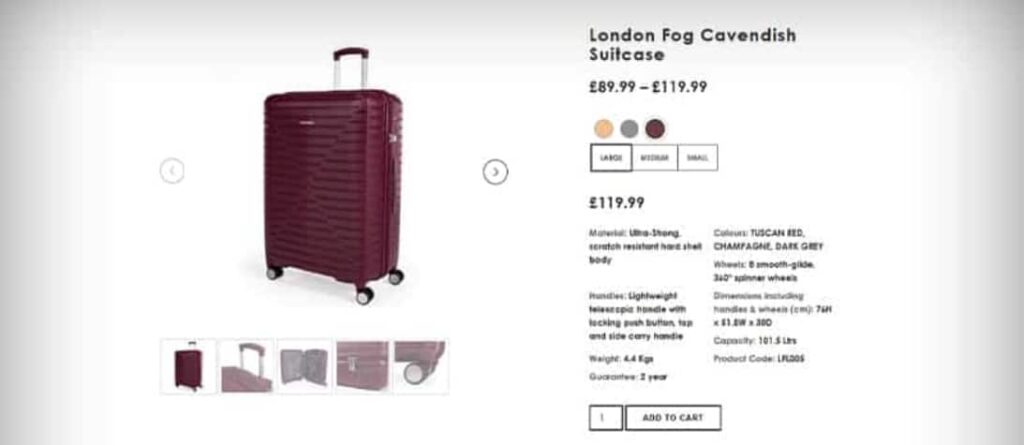
Highlight Key Features: Start with the most important features of your product. What makes it unique? Why would someone need it? Be particular about what sets your product apart.
Focus on Benefits: While features are about the product, benefits are about the customer. How will the product improve their life or solve a problem they have? For instance, if you’re selling a backpack, highlight its ergonomic design that ensures comfort during long travels.
Use the Right Tone: The tone of your descriptions should match your brand voice and appeal to your target audience. If your brand is playful and fun, let that shine through in your writing.
Be SEO Friendly: Incorporate keywords naturally to improve search engine rankings, but avoid keyword stuffing. Remember, you’re writing for humans first, search engines second.
Techniques to Make Descriptions Concise, Clear, and Engaging
To keep your product descriptions concise and engaging:
Use Bullet Points: Bullet points make the text easier to scan and digest. List the most critical features or benefits in a bullet format.
Avoid Jargon: Use simple language that your average customer will understand. Steer clear of industry-specific terms unless your product is aimed at a specialist market.
Tell a Story: Write a short story about your product if appropriate. This can create an emotional link with the customer.
Include Social Proof: Where relevant, include customer testimonials or ratings within your product description. This adds credibility and can be a powerful persuader.
Edit Ruthlessly: After writing your description, go back and cut out any unnecessary words or phrases. Keep it as brief as possible while still being informative and engaging.
Search Engine Optimization (SEO)
In the digital marketplace, where visibility is key to success, Search Engine Optimization (SEO) plays a crucial role. SEO is not just an add-on but an integral part of eCommerce web design, deeply influencing how easily potential customers can find your online store.
The Necessity of Incorporating SEO in eCommerce Web Design
Integrating SEO into your eCommerce site’s design is essential for various reasons:
Increased Visibility: Appearing higher in search engine results pages (SERPs) increases the likelihood of possible customers finding your website when they search for products you offer.
User Experience: Good SEO practices align with creating a user-friendly website. This includes fast loading times, mobile responsiveness, and clear navigation, all contributing to a positive user experience.
Cost-Effective Marketing: While paid advertising can drive traffic to your site, SEO provides a more cost-effective and sustainable approach. Organic search traffic, driven by good SEO, is often a significant source of visitors to your site.
How SEO Practices Impact Visibility and Traffic
Effective SEO strategies have a profound impact on the visibility and traffic of your eCommerce site:
Keyword Optimization: Using the proper keywords in your product titles, descriptions, and content helps your site show up in relevant searches. This means more customers can discover your products.
Quality Content: Creating informative, valuable content around your products or industry can attract more visitors to your site. This includes blog posts, buying guides, and product reviews.
Site Structure and Navigation: A website with a clear navigation structure aids search engines in effectively crawling the site, improving its visibility.
Mobile Optimization: As search engines prioritize mobile-friendly sites, ensuring your eCommerce site is optimized for mobile users can significantly boost your search rankings.
Backlink Building: Obtaining backlinks from high-quality websites improves your site’s authority and directs more traffic to your site.
Streamlined Checkout Process
Checkout is a critical moment in the customer’s journey in the eCommerce landscape – the final hurdle before a sale is secured. A smooth checkout process is essential for enhancing user experience and reducing cart abandonment, a common challenge for online retailers.
Importance of a Simple and Quick Checkout Process to Reduce Cart Abandonment
A complicated or time-consuming checkout process can be a major deterrent for customers, leading them to abandon their carts. Here’s why simplicity and speed are key:
Reduced Friction: A straightforward checkout minimizes confusion and potential frustration, reducing the chances that customers will give up before completing their purchase.
Enhanced Customer Experience: A quick and easy process respects the customer’s time and leaves a positive, lasting impression, increasing the likelihood of return visits and repeat purchases.
Improved Conversion Rates: Simplifying the checkout process can directly impact your bottom line by increasing the conversion rate of visitors into paying customers.
Features that Make the Checkout Process More User-Friendly
To make your checkout process more user-friendly, consider implementing these features:
Guest Checkout Option: Enable customers to make purchases without creating an account. This can speed up the process and is particularly appealing to first-time customers.
Clear Progress Indicators: Show customers where they are in the checkout process, such as ‘Shipping Details,’ ‘Payment Information,’ and ‘Confirmation.’ This transparency helps manage expectations and reduces anxiety about the length of the process.
Multiple Payment Options: Offering different payment methods, including credit cards, PayPal, and digital wallets, caters to different preferences and can streamline the payment process.
Auto-Fill Functionality: Implement auto-fill for returning customers to expedite the process. This feature can automatically input known information, saving time and effort for the customer.
Error Handling and Guidance: Clearly indicate when a mistake is made during input (such as an invalid card number) and provide immediate guidance on correcting it.
Order Summary and Confirmation: Display an order summary for final review before submission and send a confirmation message or email once the purchase is complete. This reassures customers that their transaction was successful.
Consistent Branding
Establishing a unique identity is crucial in the digital world, where countless brands vie for attention. Consistent branding across your eCommerce website and other digital platforms is key to building brand recognition and trust. Let’s explore how consistent branding can be effectively implemented.
Ensuring the Website Reflects the Brand’s Identity and Values
Clarified the importance of accurately reflecting brand identity and values.:
Visual Elements: Ensure that your logo, color scheme, typography, and other visual elements on your website align with your brand’s style guide. This visual consistency helps reinforce brand recognition.
Brand Voice and Messaging: The tone and language used throughout your website should mirror your brand’s personality. Whether professional, friendly, quirky, or serious, maintaining a consistent voice helps forge a connection with your audience.
Values and Storytelling: Your brand’s values should be evident in the content of your website. Share your brand story, mission, and the principles that guide your business. This can resonate deeply with customers who share similar values.
Imagery and Content: Use images and content that align with your brand’s ethos. For instance, if your brand is committed to sustainability, use imagery and content highlighting this commitment.
Using Consistent Branding Across All Digital Platforms
Consistency across all digital platforms extends your brand’s reach and reinforces its identity:
Social Media Presence: Ensure your brand’s aesthetic and voice are consistent across all social media platforms. This includes using the same profile pictures, cover photos, and similar post styles.
Email Marketing: Emails sent to customers should reflect the same branding as your website, whether for marketing or transactional purposes. This includes using similar templates, colors, and language.
Digital Advertising: Ads placed on various platforms should be instantly recognizable as belonging to your brand. Consistency in design and messaging helps in maintaining a cohesive brand experience.
Online Customer Service: Customer service interactions should reflect your brand’s voice. Whether through chatbots, emails, or social media responses, how you communicate should align with your brand’s personality.
Clear Call to Action (CTA)
In the digital marketplace, a clear Call to Action (CTA) is more than just a button or a line of text; it’s a crucial guidepost that leads customers through the buying process. A well-crafted CTA can significantly boost user engagement and conversion rates, playing a pivotal role in the success of your eCommerce strategy.
Designing Effective CTAs to Guide Users Through the Buying Process
Effective CTAs are the signposts that guide users on what to do next. Here’s how to design them effectively:
Visibility and Design: Your CTA should stand out visually. Use colors that contrast with the rest of your page to make it noticeable. The size and shape of the button should also draw attention without being overwhelming.
Strategic Placement: Place CTAs where users are most likely to take action, such as near product descriptions, at the end of blog posts, or within email content. The placement should feel natural to the flow of the user’s journey.
Clear Language: Use action-oriented, concise language. Phrases like ‘Buy Now,’ ‘Sign Up,’ ‘Learn More,’ or ‘Get Started’ clearly communicate what action you want the user to take.
Urgency and Incentive: Create a sense of urgency or offer an incentive. Phrases like ‘Limited Offer’ or ‘Sign up today and get a 10% discount’ can encourage users to take action immediately.
Testing and Optimization: Continuously test different kinds of your CTAs to see which ones perform the best. This could be changing the wording, color, or placement to optimize their effectiveness.
The Impact of CTAs on Conversion Rates
CTAs are a key element in converting website visitors into paying customers:
Directing Customers: A clear CTA directs customers on what to do next, removing any ambiguity that might prevent them from taking action.
Enhancing User Experience: Well-placed and well-designed CTAs contribute to a seamless user experience, making it easier for customers to navigate and complete their desired actions.
Boosting Engagement: An effective CTA can entice users to engage more with your content, whether signing up for newsletters, downloading a guide, or purchasing.
Measuring Effectiveness: CTAs provide measurable data. Analyzing how users interact with your CTAs lets you get valuable insights into user behavior and preferences, helping you refine your marketing strategies.
Security Features
In the digital era, where data breaches are increasingly common, implementing robust security measures in eCommerce is not just a feature – it’s a necessity. Strong security practices protect customer data and build trust and credibility for your brand.
Implementing Robust Security Measures to Protect Customer Data
Protecting customer data should be a top priority for any eCommerce business. Here are key security measures to implement:
Data Encryption: Use encryption to protect sensitive customer data, such as credit card information and personal details. This ensures that even if data is intercepted, it remains unreadable and secure.
Secure Sockets Layer (SSL) Certificates: SSL certificates are essential for securing online transactions. They encrypt the data transferred between the user’s browser and your website, ensuring that sensitive information is protected.
Regular Security Audits: Conduct regular security audits to identify and address vulnerabilities. This involves checking for software updates and potential system weaknesses and ensuring that all security measures are current.
Compliance with Standards: Ensure your website complies with relevant standards and regulations, such as the Payment Card Industry Data Security Standard (PCI DSS). Compliance not only improves security but also enhances customer confidence.
User Education: Educate customers about safe online practices, such as creating strong passwords. Providing tips and information can help them protect their accounts on your site.
SSL Certificates, Multi-Factor Authentication, and Regular Security Updates
Delving deeper into some key security features:
SSL Certificates: An SSL certificate is a must for any eCommerce site. It encrypts data sent over the internet, ensuring that customer information remains private and secure.
Multi-Factor Authentication (MFA): MFA adds an extra layer of security by requiring users to provide two or more verification factors to access an account, making it harder for unauthorized users to breach customer accounts.
Regular Security Updates: Keeping your software and platforms updated is crucial. Regular updates often include security patches that protect against new vulnerabilities.
Multiple Payment Options
Offering multiple payment options is not just a matter of convenience; it’s about catering to the diverse preferences of your customers, enhancing their shopping experience, and potentially increasing your conversion rates.
Wide Range of Options: Provide various payment methods, including credit cards, debit cards, digital wallets like PayPal, and even newer options like cryptocurrency if they align with your customer base.
Payment Gateway Security: Ensure that your payment gateways are secure and reliable. Look for gateways that offer additional security measures like tokenization, which replaces sensitive data with unique identification symbols.
Easy Checkout Process: The payment process should be seamless and user-friendly. A complicated or lengthy payment process can lead to cart abandonment.
Localization: Consider offering local payment options for different regions. Localized payment solutions can significantly improve the shopping experience for international customers.
Navigating the intricate landscape of eCommerce can be challenging. Still, with the right strategies and tools, it becomes a journey of growth and success. From ensuring a user-friendly design that resonates across various devices to crafting compelling product descriptions, each element plays a vital role in sculpting a memorable online shopping experience. The significance of SEO in enhancing your visibility, the importance of a streamlined checkout process, and the implementation of robust security measures cannot be understated. They collectively forge a path that not only leads to customer satisfaction but also to business prosperity.
Chetaru is your ideal partner for eCommerce web design. With our expertise and experience, we can help you create an online store that’s visually appealing, functionally robust, secure, and optimized for success. Whether starting a new venture or looking to enhance your existing online presence, Chetaru guides you through every step. Let’s embark on this journey together and unlock the true potential of your eCommerce business. Contact Chetaru today to begin your journey towards eCommerce excellence.
See What Chetaru Could Do for Your eCommerce Business
Ping an email to info@chetaru.com if you’d like to find out more about how Chetaru’s web design service could optimise your eCommerce store and help you increase sales.
Web design is constantly evolving, shaped by new technologies and changing user preferences. As we step into 2025, staying updated with the latest trends is crucial for creating engaging and user-friendly websites. This year, the focus is on simplicity, speed, and personalization. Designers are finding creative ways to blend aesthetics with functionality, ensuring every website delivers a seamless experience. Let’s explore the key web design trends that will define 2025 and help your website stand out.
Let’s explore the web design trends for 2025 below, highlighting innovative and user-focused designs.
Immersive 3D elements involve incorporating three-dimensional visuals and interactive graphics into web design. These features create a lifelike experience, allowing users to engage with content in ways that feel more dynamic and realistic.
Why It Matters?
Enhanced User Engagement: 3D visuals capture attention faster than flat designs. They invite users to interact with the website, keeping them engaged longer.
Memorable Experiences: The uniqueness of 3D elements makes websites stand out, leaving a lasting impression on users. This can be a game-changer for branding.
Improved Storytelling: Websites can use 3D designs to visually narrate their stories, products, or services, offering more immersive and detailed explanations.
Technological Advancements: With advancements in browser capabilities and faster internet speeds, 3D elements now load quickly and run smoothly, making them more accessible.
Examples of 3D Elements in Use
Interactive 3D Models: Websites like Apple showcase their products in interactive 3D. For instance, users can rotate an iPhone to view it from different angles, offering a more comprehensive product experience.
Isometric Designs: Many tech websites use isometric illustrations for creating engaging visuals. These designs combine a 3D effect with clean and structured layouts.
Floating 3D Elements:Websites like Stripe use subtle floating 3D graphics to add depth to their design without overwhelming the content.
How to Use 3D Elements Effectively
Prioritize Performance: Ensure 3D visuals are optimized to load quickly and work on various devices.
Keep It Relevant: Use 3D graphics that align with your brand’s identity and purpose.
Focus on Interaction: Allow users to interact with the 3D elements for an engaging experience.
Challenges and Considerations
While 3D elements enhance design, they can increase page load times if not optimized properly. Test thoroughly to maintain speed and performance.
Dark mode goes beyond the basic black backgrounds. It incorporates contrasting neon highlights and adaptive color schemes that adjust based on the time of day or user preferences. These enhancements make dark mode designs more vibrant and user-friendly.
Why It Matters?
Reduces Eye Strain: Dark mode helps users browse comfortably, especially in low-light environments. The softer tones are easier on the eyes during long screen sessions.
Boosts Aesthetic Appeal: Combining dark backgrounds with bright neon accents creates a sleek, modern look. It makes content visually striking while maintaining readability.
Increases User Preference: Many users now prefer dark mode for its calming effect and stylish design. Offering this option enhances user satisfaction.
Improves Battery Life: On OLED and AMOLED screens, dark mode saves battery by using less power to display darker colors.
Examples of Websites Using Dark Mode
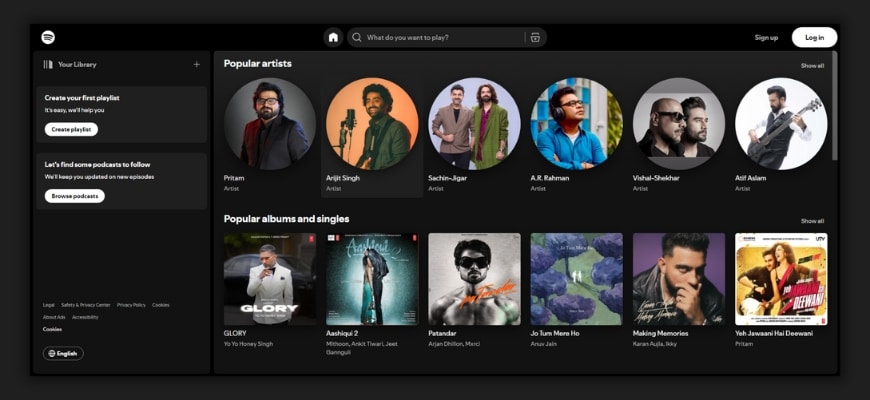
Spotify: Features dark mode with clean highlights for navigation, making it visually appealing and functional.
Slack: Offers adaptive themes, allowing users to switch between dark and light modes seamlessly.
How to Use Dark Mode Effectively
Focus on Contrast: Ensure text and icons are clear against the dark background.
Add Neon Highlights: Use subtle pops of color for buttons or interactive elements to draw attention.
Offer Customization: Let users choose between dark and light modes to match their preferences.
Challenges and Considerations
Test designs on various devices to ensure readability.
Avoid overusing neon colors, as they can become overwhelming if not balanced.
Minimalist maximalism blends clean and simple layouts with bold, eye-catching design elements. It uses vibrant colors, dramatic typography, and oversized visuals to create a striking yet balanced look.
Why It’s Effective
Balanced Design: It keeps the layout uncluttered while using bold elements to grab attention, creating a unique mix of simplicity and creativity.
Memorable Impact: The dramatic use of oversized visuals and vibrant colors leaves a lasting impression on users.
Improved Readability: Clean layouts ensure easy navigation, while bold typography highlights the most important information.
Brand Personality: This design style allows brands to express creativity without losing a polished, professional appearance.
Examples of Minimalist Maximalism
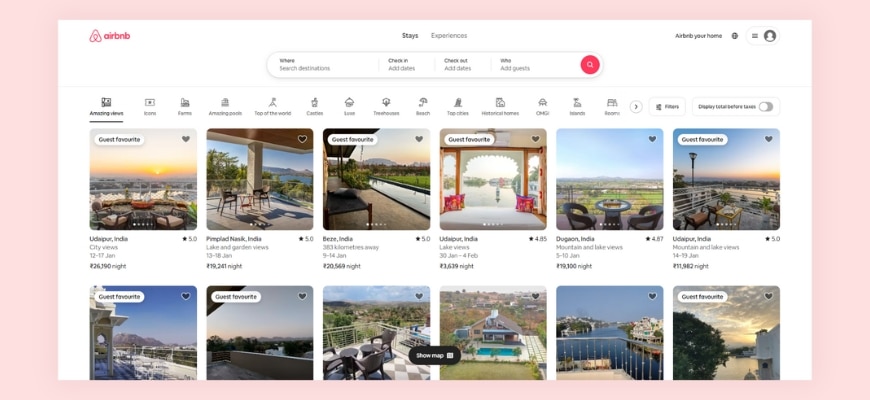
Airbnb: Combines simple layouts with bold, oversized typography for a modern feel.
Canva: Uses vibrant colors and dramatic design elements while keeping the interface clean and user-friendly.
How to Use It Effectively
Keep It Simple: Maintain white space to avoid clutter.
Focus on Key Elements: Use oversized visuals or typography sparingly to highlight important messages.
Play with Colors: Add vibrant hues to create contrast and draw attention to specific areas.
Challenges and Considerations
Avoid overloading the design with too many bold elements.
Ensure the design aligns with your brand’s tone and purpose.
Scrollytelling uses storytelling techniques in web design, where the narrative unfolds as users scroll. It combines visuals, text, and animations to create an interactive and engaging experience.
Why It’s Effective
Engages Users:Scrolling through a story keeps users interested and encourages them to explore more.
Improves Understanding:By combining visuals and animations, complex ideas or products are explained in an easy-to-follow format.
Makes Content Memorable:The storytelling approach connects with users emotionally, making the content more impactful.
Best Use Cases
Product Showcases: Highlight features and benefits step by step as users scroll.
Portfolio Sites: Display creative work dynamically, keeping visitors intrigued.
Brand Storytelling: Share the journey and mission of your brand in an engaging, visual way.
Examples of Scrollytelling
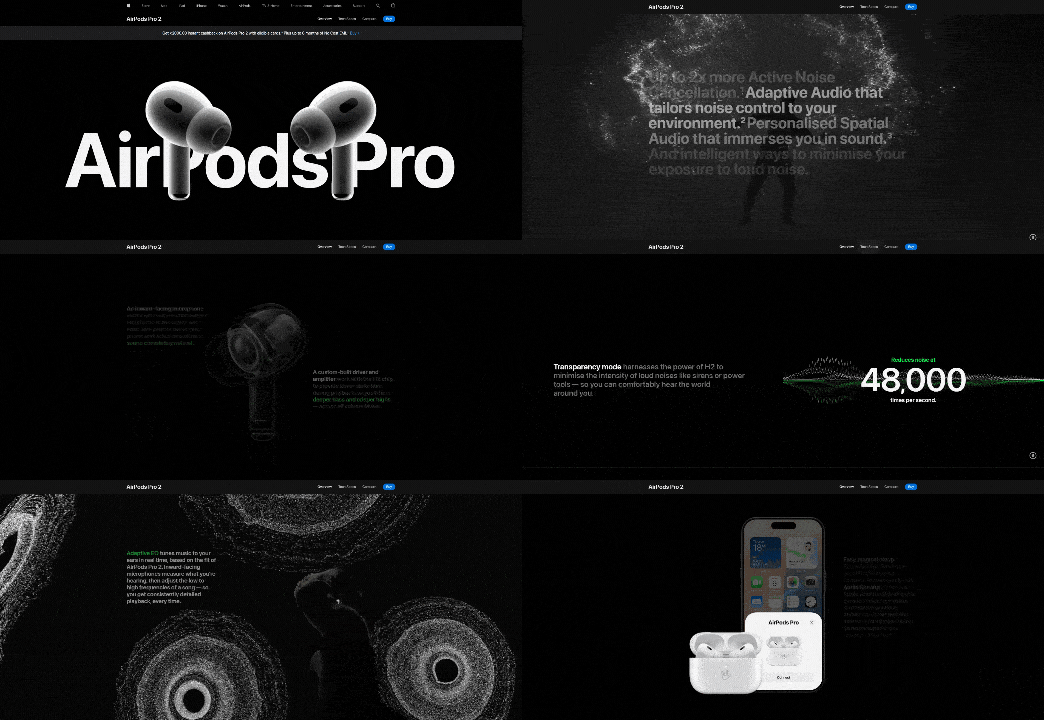
Apple’s Product Pages: Uses animations and visuals to explain product features interactively.
The New York Times’ Special Stories: Combines text, images, and scrolling animations for immersive storytelling.
How to Use Scrollytelling Effectively
Focus on Flow: Ensure the story progresses naturally without overwhelming the user.
Optimize Performance: Use lightweight animations and visuals to maintain fast loading speeds.
Test for Usability: Make sure scrolling works smoothly on all devices and browsers.
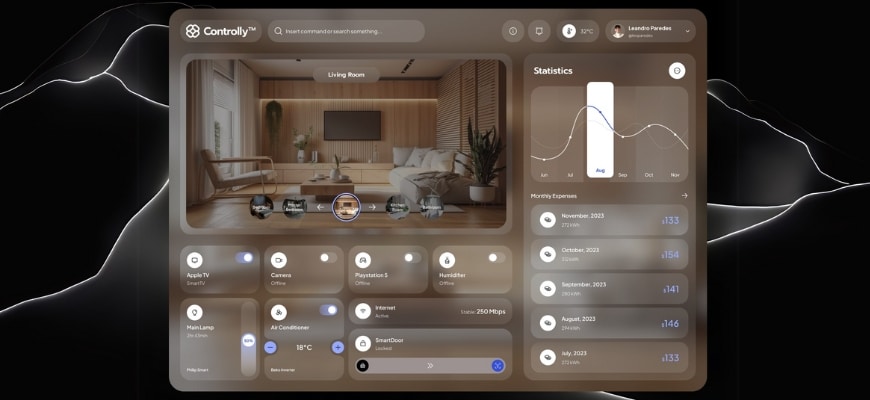
Glassmorphism uses frosted glass effects combined with bold colors and gradients. It creates a transparent, layered look that adds depth and elegance to web designs.
Why It’s Trending
Modern Aesthetic: The sleek and futuristic style makes websites look polished and visually appealing.
Adds Depth: Layering elements with a frosted glass effect creates a sense of dimension, making designs feel dynamic.
Improves Focus: By blurring the background, it highlights the content in the foreground, guiding the user’s attention.
Examples of Glassmorphism in Use
Apple Music: Features frosted effects to enhance its modern interface.
Dribbble Designs: Many UI concepts showcase glassmorphism for card designs and menus.
How to Use Glassmorphism Effectively
Balance the Design: Pair glass effects with simple layouts to avoid visual clutter.
Use Subtle Gradients: Complement the frosted glass with soft gradients for a cohesive look.
Test for Readability: Ensure text and icons remain clear against the frosted background.
Challenges of Glassmorphism
Performance Issues: Frosted glass effects can slow down websites if not optimized, especially on older devices.
Readability Risks: Poor contrast between text and background can make content hard to read.
Overuse of Effects: Excessive glass layers can clutter the design and reduce usability.
Bold typography uses large, expressive fonts that dominate the design. These oversized text elements grab attention and communicate key messages effectively.
Why It’s Trending
Captures Attention:Big, bold fonts instantly draw the user’s eye to important content.
Enhances Readability:Clear and impactful typography ensures users can quickly understand the message.
Builds Strong Branding:Expressive fonts reflect the brand’s personality and make it memorable.
Best Uses
Headlines: Use bold typography to emphasize key messages or announcements.
Hero Sections: Make a strong first impression with striking fonts that dominate the page.
Branding Elements: Incorporate unique typography to align with your brand identity.
Examples of Bold Typography in Use
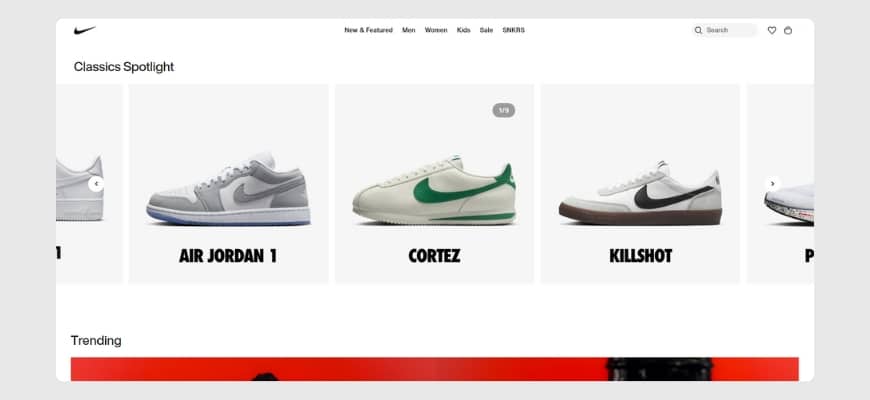
Nike: Uses bold fonts in its hero sections to emphasize power and energy.
Spotify Wrapped: Features oversized typography to create excitement and highlight key stats.
How to Use Bold Typography Effectively
Keep It Simple: Use minimal text to let the typography shine without overcrowding.
Pair with Clean Layouts: Bold fonts work best with simple, uncluttered designs.
Maintain Contrast: Choose colors that ensure the text stands out against the background.
Challenges of Bold Typography
Overwhelming Design: Overusing bold fonts can make the design feel heavy and distract from the message.
Responsiveness: Large typography can look awkward on smaller screens if not scaled properly.
Font Selection: Using overly decorative fonts can hurt readability and clash with the design.
Micro-Interactions
Micro-interactions are small, subtle animations or effects that happen when users interact with a website. Examples include button hover effects, progress indicators, and feedback animations when an action is completed.
Why It’s Important
Enhances User Engagement: These small details make interactions feel more dynamic and enjoyable, keeping users interested.
Provides Feedback: Micro-interactions confirm user actions, like a subtle animation showing that a form submission was successful.
Improves Navigation: Hover effects and transitions guide users intuitively, making it easier to explore the site.
Examples of Micro-Interactions in Use
LinkedIn: Displays a loading indicator when uploading a file, keeping users informed.
E-commerce Sites: Add to cart buttons often feature animations to confirm the action visually.
How to Use Micro-Interactions Effectively
Keep It Subtle: Avoid overwhelming users with overly flashy animations.
Focus on Functionality: Ensure animations have a purpose, like providing feedback or enhancing navigation.
Optimize for Performance: Test animations to make sure they run smoothly without slowing the site.
Challenges of Micro-Interactions
Overuse: Too many animations can clutter the design and distract users.
Performance Issues: Poorly optimized effects can affect website speed and user experience.
Consistency: Inconsistent interactions across pages may confuse users and break the flow.
Adaptive Color Schemes
Adaptive color schemes change based on factors like the time of day, user preferences, or device settings. For example, a website might shift to dark mode in the evening or align with a user’s chosen theme.
Why It’s Popular
Personalized Experience: Adaptive color schemes cater to user preferences, making browsing feel more tailored.
Improved Comfort: Adjusting colors based on the time of day reduces eye strain and creates a pleasant viewing experience.
Device Compatibility: These schemes sync with device settings like dark or light mode, ensuring consistency across platforms.
Examples of Adaptive Color Schemes in Use
YouTube: Automatically switches between light and dark modes based on device settings.
Twitter: Lets users choose themes or follow system preferences for a consistent experience.
How to Use Adaptive Color Schemes Effectively
Offer Customization: Allow users to switch modes manually if they prefer.
Test Readability: Ensure text and elements are visible and clear in all color variations.
Optimize Transitions: Smoothly transition between schemes to avoid jarring effects.
Challenges of Adaptive Color Schemes
Design Complexity: Maintaining consistent branding across multiple schemes requires extra effort.
Performance Impact: Switching schemes dynamically can slow down poorly optimized websites.
Accessibility: Some color combinations may not be accessible to users with visual impairments.
AR-Enhanced Design
AR-enhanced design integrates augmented reality (AR) features into websites. These elements allow users to interact with digital objects in real-world settings through their devices. Examples include virtual try-ons for shopping or interactive AR games.
Why It’s Trending
Improves User Engagement: AR makes the browsing experience more interactive and exciting.
Enhances Decision-Making: Features like virtual try-ons help users visualize products, leading to more confident purchases.
Adds a Wow Factor: AR elements stand out and create a memorable user experience.
Examples of AR-Enhanced Design in Use
IKEA Place App: Lets users visualize furniture in their space through AR.
Warby Parker: Offers virtual try-ons for glasses directly on their website.
How to Use AR-Enhanced Design Effectively
Focus on Value: Use AR to solve a problem or enhance the user’s experience, like helping them try products virtually.
Ensure Accessibility: Make AR features easy to use on different devices and browsers.
Optimize Performance: Keep AR elements lightweight to avoid slowing down the website.
Challenges of AR-Enhanced Design
Technical Requirements: Users need compatible devices and browsers to access AR features.
Development Complexity: Integrating AR requires specialized skills and tools, increasing development time and cost.
User Adoption: Some users may be unfamiliar with AR or hesitant to use it.
Overlapping Layers
Overlapping layers use elements like images, text, and graphics that stack and intersect to create depth and movement in a design. This approach gives websites a more dynamic and engaging look.
Why It Works
Adds Depth: Overlapping layers create a sense of three-dimensional space, making the design feel richer and more immersive.
Boosts Visual Interest: The interplay of layers draws the user’s eye and keeps them engaged.
Encourages Creativity: Designers can experiment with different combinations to create unique layouts that stand out.
Examples of Overlapping Layers in Use
Creative Agencies: Often use layered text and images in hero sections to showcase bold, artistic designs.
Portfolio Sites: Combine overlapping elements to present work dynamically and visually.
How to Use Overlapping Layers Effectively
Maintain Balance: Avoid overcrowding the layout; use white space to give elements room to breathe.
Ensure Clarity: Test the readability of text and visibility of key graphics in layered designs.
Keep It Responsive: Make sure layers adapt well to different screen sizes without looking cluttered.
Challenges of Overlapping Layers
Overcrowded Design: Too many layers can confuse users and reduce the impact of the design.
Performance Issues: Complex layering can slow down page loading if not optimized.
Device Compatibility: Designs may not look the same across all devices and browsers.
Motion UI involves using smooth animations and transitions to guide users through a website. These movements make interactions more engaging and intuitive, like animated menus, hover effects, or subtle loading screens.
Why It’s Trending
Improves Navigation: Animations provide visual cues, helping users understand how to move through the interface.
Enhances Engagement: Motion adds life to static designs, making the experience more dynamic and enjoyable.
Provides Feedback: Transitions and effects confirm user actions, like a subtle animation when clicking a button.
Best Use Cases
Loading Screens: Use animations to keep users entertained while pages load.
Menu Animations: Highlight transitions between menus or sections for a polished look.
Hover Effects: Add motion to buttons or links to encourage interaction.
Examples of Motion UI in Use
Dropbox: Uses smooth transitions and animations to explain features and guide users.
Asana: Adds subtle hover effects and animations to enhance usability.
How to Use Motion UI Effectively
Keep It Simple: Avoid overly complex animations that might distract users.
Focus on Speed: Ensure animations are quick and don’t delay user actions.
Maintain Consistency: Use motion effects consistently across the site for a cohesive experience.
Challenges of Motion UI
Performance Impact: Heavy animations can slow down websites if not optimized properly.
Device Compatibility: Some animations may not work smoothly on older devices or browsers.
Accessibility: Excessive motion might overwhelm users with sensory sensitivities.
Split-Screen Layouts
Split-screen layouts divide the screen into two or more sections, allowing multiple pieces of content to be displayed side by side. This design helps balance visuals and text or compare different ideas effectively.
Why It’s Useful
Showcases Comparisons: Perfect for highlighting differences or similarities, like product features or before-and-after visuals.
Enhances Storytelling: Split layouts can guide users through a narrative by pairing images and text in an engaging way.
Improves Clarity: By separating content into distinct sections, the design feels clean and organized.
Examples of Split-Screen Layouts in Use
Nike: Uses split screens to display product features alongside visuals, creating a dynamic look.
Portfolio Sites: Many designers showcase projects on one side and descriptions on the other for a balanced presentation.
How to Use Split-Screen Layouts Effectively
Keep It Balanced: Ensure each section gets equal attention and doesn’t overpower the other.
Use Contrast: Apply contrasting colors or visuals to distinguish sections clearly.
Optimize for Mobile: Adapt the layout for smaller screens to ensure readability and usability.
Challenges of Split-Screen Layouts
Mobile Responsiveness: Split designs can become cluttered on small screens if not optimized well.
Visual Overload: Displaying too much content in one view may overwhelm users.
Consistency: Maintaining balance and alignment across sections can be challenging.
Circular Design Elements
Circular design elements focus on rounded shapes and patterns in user interfaces. These include circular buttons, icons, and layouts that create a smooth and cohesive look.
Why It’s Trending
Soft Aesthetic: Rounded shapes feel approachable and friendly, making websites more inviting.
Modern Appeal: Circles and curves give designs a clean, modern feel that stands out.
Focus and Balance: Circular elements naturally draw the eye and create harmony in layouts.
Examples of Circular Design Elements in Use
Google Workspace: Uses circular icons and buttons to maintain a simple and user-friendly design.
Fitness Apps: Often feature circular progress bars to track goals visually.
How to Use Circular Design Elements Effectively
Keep It Simple: Avoid overcrowding the layout with too many rounded shapes.
Highlight Key Features: Use circular designs to draw attention to important buttons or icons.
Blend with Other Shapes: Pair circles with clean lines and rectangles for balance.
Challenges of Circular Design Elements
Limited Space: Circles can restrict the amount of content or text displayed inside them.
Overuse: Too many rounded elements can make the design feel repetitive or overly soft.
Responsive Design: Ensuring circular elements scale well on smaller screens can be tricky.
Gradient Overlays
Gradient overlays use soft color transitions as backgrounds or layered effects on images and text. These gradients range from subtle tonal shifts to vibrant multi-color blends, adding a polished look to web designs.
Why It’s Popular
Adds Depth: Gradients create a sense of dimension, making flat designs more dynamic.
Enhances Visual Appeal: Smooth color transitions bring vibrancy without overpowering other design elements.
Modern Touch: Gradients offer a fresh, contemporary aesthetic that appeals to users.
Examples of Gradient Overlays in Use
Spotify: Uses bold gradients in its backgrounds and promotional banners for a dynamic look.
Instagram: Features its iconic gradient as a central part of its branding and interface.
How to Use Gradient Overlays Effectively
Stay Subtle: Use gradients that complement, rather than overpower, the content.
Match the Brand: Choose gradient colors that align with your brand’s identity.
Test for Contrast: Ensure text and visuals remain clear and readable over the gradient.
Challenges of Gradient Overlays
Overuse: Too many gradients can make the design feel busy or distracting.
Consistency: Creating gradients that look good across devices and screens requires careful testing.
Performance: Large gradient images can affect loading times if not optimized.
Inclusive Design
Inclusive design ensures websites are accessible to everyone, including users with different abilities. It features customizable interfaces, accessible navigation, and support for tools like screen readers.
Why It’s Crucial
Expands Reach: Inclusive websites cater to a wider audience, making them usable for all, including people with disabilities.
Enhances Usability: Features like adjustable text sizes, clear navigation, and color contrast improve the experience for every user.
Supports Legal Compliance: Many regions require websites to meet accessibility standards, such as WCAG guidelines.
Examples of Inclusive Design in Use
BBC: Offers keyboard-friendly navigation and supports screen readers to accommodate all users.
Apple: Includes features like VoiceOver and adjustable settings for accessibility across devices.
How to Use Inclusive Design Effectively
Ensure Text Readability: Use clear fonts, adjustable sizes, and high contrast for visibility.
Optimize Navigation: Include keyboard-friendly controls and clear labels for links and buttons.
Test Accessibility: Use tools like WAVE or Lighthouse to identify and fix accessibility issues.
Challenges of Inclusive Design
Increased Complexity: Designing for diverse needs requires extra time and resources.
Testing Across Devices: Ensuring accessibility on various devices and browsers can be challenging.
Ongoing Updates: Accessibility needs evolve, requiring continuous monitoring and improvements.
Dynamic Cursor Effects
Dynamic cursor effects make the cursor interactive, changing its shape, color, or behavior based on user actions. For instance, the cursor might expand when hovering over links or morph into a different icon when interacting with content.
Why It’s Trending
Engages Users: Interactive cursors add a playful and unique touch, keeping users interested.
Enhances Personalization: Custom cursors create a distinct brand experience, making the website more memorable.
Examples of Dynamic Cursor Effects in Use
Creative Portfolios: Many designers use dynamic cursors to highlight links or emphasize interaction.
Gaming Websites: Incorporate unique cursors that align with the theme of the site.
How to Use Dynamic Cursor Effects Effectively
Keep It Subtle: Avoid overly complex effects that might distract users.
Focus on Functionality: Use changes to guide users, like indicating clickable areas.
Test Responsiveness: Ensure cursors perform well across different devices and browsers.
Challenges of Dynamic Cursor Effects
Overuse: Too many animations can overwhelm users and slow down performance.
Accessibility Issues: Some cursor effects may not work well for users relying on assistive technologies.
Compatibility: Unique cursors might not render correctly on all devices or operating systems.
Textured Backgrounds
Textured backgrounds use subtle patterns or designs to give a website depth and character. These can range from soft gradients to fine grain effects, making the design more engaging and visually appealing.
Why It’s Trending
Adds Depth: Textured backgrounds break away from flat, plain designs, creating a more dynamic feel.
Enhances Sophistication: The tactile quality of textures adds a polished and professional look.
Improves Visual Interest: Patterns and textures draw attention without overpowering the main content.
Examples of Textured Backgrounds in Use
Luxury Brand Sites: Often use fine grain or subtle fabric textures to create a premium feel.
Creative Portfolios: Incorporate watercolor effects or abstract patterns for artistic appeal.
How to Use Textured Backgrounds Effectively
Stay Subtle: Choose textures that complement the content instead of distracting from it.
Match the Brand: Select patterns or effects that align with your brand’s style and tone.
Optimize for Performance: Use lightweight texture files to maintain fast loading speeds.
Challenges of Textured Backgrounds
Overwhelming Designs: Bold or busy textures can overshadow text and visuals, reducing readability.
Consistency: Ensuring textures look good across various devices and screen sizes can be challenging.
Accessibility Concerns: Some textures may make text harder to read for users with visual impairments.
Web design trends for 2025 showcase the perfect blend of creativity, functionality, and inclusivity. From immersive visuals to user-first designs like adaptive color schemes and inclusive layouts, staying updated with these trends can elevate your website’s experience and make it stand out. Whether you’re looking to revamp your site or create a new one, embracing these innovations ensures you stay ahead in the competitive digital landscape.
Ready to implement these trends on your website? At Chetaru, we specialize in crafting stunning, trend-focused websites tailored to your brand’s needs. Let’s work together to build a site that captivates your audience and drives results. Contact us today to get started!
10 years of helping businesses of all shapes and sizes across the world create sustainable success and drive leads through great digital journeys that delight their customers.
So, What Does That Look Like in Numbers?
800+ websites
100+ eCommerce websites
50+ innovative and robust native Apps built from scratch
30 members of staff (we started out with just two) in our offices in Darlington, UK and Indore, India
Projects and long-term relationships with clients in countries across the globe (including Australia, Germany, Holland, France, USA, India, Canada and the UK)
And… lots and lots of happy clients!
Awards
2019 Brand Leadership Award
2019-20 Women of Worth Award for our Co-Founder Chetena Verma
Where It All Started
Chetaru was founded by Chetena and Tarun in Indore, India.
The two were determined to make their vision of a digital marketing services agency providing businesses of all kinds across the world with the best digital journeys a reality.
And that’s just what they’ve done!
10 years later, and Chetaru now not only has a team of 25+ coding, SEO, digital strategy, web development, design, UX and app building experts in Indore, but also a team of Digital Connect Managers, strategy, content and copywriting specialists in the office we opened in Darlington, UK in 2016.
What’s Happened Since?
Well, we’ve taken over the world!
OK, not quite.
But we’ve certainly been making waves, leaving virtually no industry sector untouched.
And we’ve used the invaluable experience and insights gained to develop the powerful Digital Connect process that now makes us such a force to be reckoned with – and, most importantly, enables our clients to Grow, Evolve, Connect.
Why reaching this milestone means so much
10 years is a long time for a digital agency to have been around.
Especially considering the ever-growing challenges that we – and other businesses – are facing in a rapidly changing world (and that’s without even mentioning the impact of COVID-19!).
While we’re happy to reflect on our longevity, adaptability, creativity and all those great things, do you know what we’re actually most proud of?
Seeing the success of our clients, and how we helped them get where they are now – that’s what.
Do you want to see how we’ve done it?
And learn about our dedication to constantly improving the digital journeys we build for businesses across the world?
Find out more about Digital Connect and how it helps businesses of all shapes and sizes to Grow, Evolve and Connect.
And if you want a friendly, no obligation chat with one of our team to discuss how we can help you build a journey to digital success, You can ping an email to info@chetaru.com, if you’d prefer.
It’s tempting to always blame a poor Wi-Fi connection when websites take a frustrating amount of time to load properly – but did you know that it’s sometimes the fault of the website itself?That extra few seconds (or longer, as the case often is) of waiting for a page to load can sometimes be the difference between gaining a potential customer and losing one.Read on to learn more about why website speeds are so important to online sales and customer loyalty – and how to fix a slow website.
Why Website Speed Matters
Here are some simple but eye-opening statistics that clearly show why it’s so critically important that websites load quickly: A quarter of all website users will abandon a website that takes longer than four seconds to load
Almost 65% of online shoppers who are frustrated by slow website load times will shop on another website the next time Nearly half of people won’t use poorly performing websites in future
It may sound brutal, but even a delay of one second will cause over a quarter of potential leads to feel dissatisfaction
You could lose two-thirds of your potential new customers (and their long-term custom) to a competitor because they were frustrated by how long your website took to load.
Half of the people that didn’t enjoy using your website will never return again.
Today’s consumers and website users are incredibly impatient and have very high expectations.
What is Bounce Rate?
Bounce rate is the term used for the percentage of visitors that leave a webpage without performing an action, such as clicking on a call to action, filling out a form or making a purchase.
If your website is set up with Google Analytics, the bounce rate will be automatically recorded and very visible on your dashboard, because it’s one of the key website metrics.
The average bounce rate for a content-based website like this one is between 40%-60%, but you should be aiming for 30% or lower.
The average bounce rate for an eCommerce website is between 20%-40%. If you can get yours to below 20%, then you’re doing very well and no doubt enjoying some great lead conversion figures – well done!
But, if your bounce rate is high – that is, 41% or higher for an eCommerce site or 65% or above for a content-based site – then you have a serious problem with your website.
One of the biggest problems you may have is that your website is loading too slowly, causing leads and potential customers to flounce off elsewhere in frustration.
Yes, that’s right, you could literally be losing out on sales and customer loyalty because your website speeds are slow.
Slow Website Speeds Reduce Your Online Visibility
You will also lose online visibility and discoverability if your website speeds are slow. And that will have a massive impact on your ability to attract leads and make online sales.
As we’ve established, the longer a webpage takes to load, the higher its bounce rate will be.
The higher your bounce rate gets, the more suspicious Google and other search engines will become that users don’t actually find the content on your page useful. And, as Google in particular sets so much stall by great User Experience (UX), that means that your search engine rankings will suffer.
eCommerce sites meanwhile will definitely lose customers if their checkout pages are slow.
What Can You Do to Improve Website Speeds?
Online retailers and brands are finding themselves having to resort to increasingly complex and content-rich websites in order to satisfy ever-more demanding consumer expectations.
It’s tempting to invest in lots of shiny and exciting new content for your website. And yet it’s also very important to remember that your website can get slowed down to glacial speeds if you overload it – which, ironically, will hugely frustrate users and cause them to bounce off elsewhere.
There are a number of things that can affect page load speeds, but the right website development partner (like Chetaru!) will know how to mitigate against these factors.
Let’s take a look at a few below…
How big are your assets?
Oversized images and video – or having too many of them – can really be a drag on the performance of your webpage.
There are ways to fix these potential obstacles to good speeds, such as sizing your images properly or using images in a compressed JPEG format, so that they render properly.
Also be sure to compress all videos and, if possible, embed them using a 3rd party hosting platform, like Vimeo.
And keep that Bauhaus mantra ‘Less is more’ in mind when thinking about web design and content delivery.
The host with the most
Using a shared hosting platform has what seem like cost benefits on the surface of things.
But you could actually be falling into the trap of a false economy that results in slow web page speeds and annoyed potential customers.
If your website prides itself on fantastic content-driven user experiences, then it’s a very good idea indeed to invest in a high-performing VPS, managed or dedicated web hosting platform that you can truly rely on for fast and smooth delivery. Take the risk of opting for a cheaper option and it could end up costing you in the long-run.
Caching it in
We’ll try not to get too technical here, but needless to say that this tweak is beyond the skillsets of even the most rounded of marketers.
What do you know about cache?
In short, a cached web page will load far faster than a non-cached one, and reduce the load on the server by up to 80%.
Let’s break it down:
A cache is a storage space for temporary files that makes a device, webpage or app run quicker and more efficiently Cached data is used to quickly load an app or website for every subsequent visit, thereby improving future user experiences
Still too technical? Don’t worry – it’s something that an experienced website development partner will handle for you.
And that’s even before we get started on minimising HTTP requests, Gzip compressions, CDN…
In Conclusion
There are so many factors that could impact your website’s speed, and it’s incredibly important that you take them all into account if you want to continue to attract and convert leads.
We’ve briefly covered some of the key ones here, but there are loads more to consider.
And that’s why it’s so important to invest in the expertise, guidance and technical capabilities of a web development partner with extensive experience of helping businesses deliver great user experiences that generate sales.
Your website is the key to unlocking your brand’s success.
That’s where Chetaru comes in. We create consistently fast, attractive and responsive SEO-optimised websites that help you stand out from the crowd.
Chetaru uses the combined power of great responsive design, UX, SEO, and sustainable ongoing content strategies to drive leads to your website and keep them coming back for more.
Get in touch with us at info@chetaru.com to discuss the next steps in your digital journey.
It was already growing incredibly quickly, but the popularity of eCommerce has gone through the roof during the Coronavirus pandemic.
It’s therefore never been as important as it is now to optimise your eCommerce website, with the goal of increasing searchability, standing out from the crowd, outperforming the competition and converting leads.
In this blog, we explore how you can get ahead by making the best use of eCommerce SEO.
But first, some context…
Why Has eCommerce Become So Popular?
Global and localised lockdowns have forced people to change the way they shop.
Habits formed during lockdown have, inevitably, set in – and people that were once reluctant to shop online are now fully embracing this way of acquiring goods.
Why Do People Like to Shop Online?
While ‘price’ may once have been the key reason that people shopped online rather than in-store, there are actually a number of equally important drivers these days, including:
Convenience – It’s a heck of a lot easier to find and buy what you want online than it is to traipse into a busy town or city centre, only to find that the product you want isn’t in stock
Shop anytime, anywhere – Should I rush out in the rain to shop in a store that’s closing for the day soon and is well out of my way? Or should I just get what I need with a click or two on my phone while sitting on the sofa watching TV with a nice cup of tea? Hmm, let me think…
Price – It’s still possible to get great deals online, but there’s actually a new trend called ROBO (research online, buy offline) whereby people identify the product they want online and then go and buy it for less money in a physical store. It’s like digital life’s gone full circle!
Choice and stock level predictability – As nice as it can be to visit a physical store, there’s always the worry that they won’t stock the exact product you’re looking for or that they’ve run out. Shopping online minimises both of those issues – the choice is virtually limitless (even if you have to opt for a different retailer or brand) and eRetailers tell you immediately whether a product is in stock or not
Great experiences! – You only have to look at the razzmatazz of the Chinese livestreaming shopping trend and the Hollywood sheen of some highly optimised eCommerce websites to understand that people now expect great experiences, excitement and even entertainment when shopping online. Physical shopping is far from dead, but it has a lot to learn from eCommerce players.
How Are Businesses Responding to the New Trend?
Big brands and small businesses alike have looked to take advantage of the exponentially growing eCommerce trend. They’ve upped their performance on Amazon, Etsy and other gigantic 3rd party eCommerce platforms.
They’ve also invested in building their own eCommerce platforms and content, using highly valuable 1st party data to try to sell directly to customers.
All of this means that eCommerce is changing the retail and general business landscape, and that there are fantastic opportunities to sell products and other items online.
But it also means that there is more and more competition in what was already a crowded marketplace.
So, how can you make your eCommerce website stand out from the crowd?
What is eCommerce SEO?
How do people find the products they’re looking for when shopping online?
A recent study has found that less than 5% of searchers are inclined to click through to the second page of search results. So, it’s critical that you appear on the first page for search terms relevant to the product or service you’re trying to sell.
Your position on that first page is vitally important as well, with research showing that the top result commands 32+% of traffic and the second 17.6+%.
Getting high up on the first page doesn’t just happen. Far, far from it. You need a dedicated and powerful search strategy to get you there.
1. The Importance of Keyword Research
You know the chorus to that classic (or laughably bad, depending on your point of view – we’ll let you make your own minds up) Starship song “We built this city / We built this city on rocccckk annnddd rollllll…”?
Keyword research is the bedrock of any website and any content produced for it – or at least that’s the way it should be.
Your keyword strategy comes first. Then your content plans, content, on-page optimisation, link building and content evaluation.
Tell us more about Keyword Research
Keyword research is the first step in identifying high-value search terms that your potential customers will be using to find what they’re looking for online.
But there’s a difference between eCommerce SEO (or commercial SEO) research and typical, information-focused SEO.
You may have typed ‘What is eCommerce SEO’ or a similar search term into Google and found this blog. That’s an example of information-focused SEO. We build eCommerce websites and are experts in eCommerce and other SEO, but www.chetaru.com isn’t an eCommerce website. This is a content-heavy website about our services and general awesomeness.
eCommerce SEO is different, though, because it’s a search that reflects ‘buying intent’ like ‘men’s jeans’.
Try typing ‘men’s jeans’ into Google now and see what happens.
That’s right, you’re immediately presented with ads from brands that want to take you directly to a product on their eCommerce website and an image gallery of jeans that are intended to do likewise.
The higher up or more visible a brand appears for the search ‘men’s jeans’, the far more likely it is that browsing shoppers and potential leads will click through to their eCommerce websites.
Now try a more specific search like ‘men’s bootcut jeans’ and see how different the results are. This is because the brands that appear high in these searches have specifically invested in eCommerce SEO for the term ‘men’s bootcut jeans’ in order to outperform their competitors for this specific product type.
The simple truth of the matter is that if you don’t invest in keyword research, you may as well give up now on the idea of appearing on the first page of a Google search. And that means missing out on a huge amount of potential customers.
2. Search Isn’t Just About Google
It would be easy to think that most online shoppers and browsers start their product searches on Google.
Not true these days.
Amazon is the world’s biggest marketplace, so it’s hardly surprising that more than half of the world’s online shoppers start and finish their product searches there.
And that’s why an increasing number of companies that want to sell products online are investing as much in Amazon search (and search on other online marketplaces) as they are in Google search.
If you can develop a strong search strategy on Amazon and the like, you will give your brand and products a real commercial edge over the competition.
The more visible you make your product on Amazon, the more likely it is to sell.
eCommerce SEO on these platforms also drives immediate conversions by increasing a product’s visibility on the online shelf when shoppers are actively searching under a category related to your product.
Again, this is all easier said than done. A massive amount of work goes into making products appear high up on Amazon searches, and we won’t go into too much detail now, because it all gets very technical.
OK, so we’ve covered the importance of Google and Amazon (and equivalent) search when it comes to successfully selling products online. So, what about your own eCommerce website?
How do you attract online shoppers to your eCommerce website and convert them into active customers?
Google wants your eCommerce website to offer great UX (User Experience). You will therefore appear higher in searches and make your eCommerce website – and the products you sell – more visible on Google (and therefore attractive to potential customers) if your website offers great UX.
The single most important aspect of UX is how easy your eCommerce website is to navigate. Can the user – the shopper, that is – find what they’re looking for quickly?
That may seem a simple enough challenge to overcome if you’re only selling a few products. But what if you grow your offering? How do you scale that?
eCommerce website structure can get complicated and out-of-hand very quickly as you add and remove products and categories. You need to get this right from the very beginning to avoid your online store becoming a frustrating maze that drives would-be customers away forever.
Here are some key takeaways:
Keep your eCommerce website design and structure simple, but easy to scale – you don’t want to have to reconfigure your eCommerce website structure every time you add a new product category
More people shop online using smartphones and mobile devices than desktop now, so keep this front-of-mind when designing and developing your eCommerce website
Make sure every page of your website is just a few simple clicks away from your homepage as possible
Develop exciting content that entices customers and drives brand loyalty
Keep navigation as straightforward as possible!
An Essential Part of Online Sales Success
Today’s online shoppers want to be able to find what they’re looking for and buy it as quickly as possible.
eCommerce SEO is essential because it helps online retailers to satisfy that need.
We’ve outlined the basics here, but you will appreciate that getting it right takes a great deal of time, effort and technical skill. And it’s unlikely that you have the requisite resources or capabilities in-house.
Chetaru offers a cost-effective solution to that problem.
So, connect with us at hi@chetaru.com if you’d like to increase the online visibility of your products and drive sales.
OK, so you’ve got this swanky new website with all the bells and whistles.
But the sheen is beginning to wear off because it doesn’t seem to be generating leads or the volume of traffic you were expecting.
Why?
We’ve highlighted some key reasons and suggested solutions to your challenges below.
Is Your Website Optimised for SEO?
You could have a website that looks like a million dollars, but that will mean diddlysquat if search engines and (subsequently) potential leads can’t find it.
Equally, you could write something Shakesperean on your homepage and in the inner pages. Yet, if it doesn’t relate to the services or products you offer or that people aren’t looking for, then that copy won’t make your website discoverable.
With so much competition online, it’s vital that your website is SEO-friendly and properly optimised with keywords that help your prospective customers find you.
Yeah, yeah, we hear you groan. Keywords, eh? That old chestnut. Ah, but you’re thinking of the bad old days when SEO agencies with questionable principles would charge companies huge amounts of money to stuff keywords and key phrases into garbled pages of generally meaningless copy.
But those days are gone. Google is far more sophisticated and stringent with its standards these days. In fact, Google and other search engines will even punish websites and brands that indulge in those spurious practices these days.
The reason why SEO copywriters are so highly sought after today is that they are skilled at crafting balanced, keyword-rich website content that is both readable and highly relevant to the searches that your potential customers are performing when trying to find something on Google or another search engine.
There’s far more to optimising a website for SEO than just copy. Such as backlinking (whereby you ask partners to link to your site), setting up business listings on Google My Business or submitting an XML sitemap, to name just a few.
But taking a strategic approach to keywords and having an experienced copywriter weave those keywords into valuable content is a great place to start.
Because it wants to stay on top of the world by making it easier and easier for users to find exactly what they’re looking for when they use Google as their search engine of choice. And, if users get frustrated by the results that Google is returning, then they will look for a product or service elsewhere*.
You may be familiar with the term ‘user experience’ (or its acronym, UX)?
In simple terms, websites offering good UX are those that:
1. Combine relevancy (keywords reflecting what the user is looking for) 2. Readability (great copy that’s simple to read and understand) 3. Are easy to navigate and use 4. Are slick and load easily
Which brings us nicely onto mobile…
* Don’t be fooled into thinking that Google has everything its own way when it comes to search: online shoppers are far more likely to search for products on Amazon (and some other eCommerce platforms) than they are Google right now
Is Your Website Mobile-Friendly?
Smartphones are everywhere. They dominate our lives.
We hardly need to tell you what people rely on them for, from monitoring fitness to online banking and from remotely controlling their heating to keeping up with their favourite celebrities.
Because – and we can’t stress this enough – you need to make sure that your company takes a ‘mobile-first’ approach to their website development and content strategy!
If you build a website and create content designed for desktop, then you are going to create a lot of barriers to purchase or navigation for mobile users.
For instance, pages and images will take forever to load on smartphones if they haven’t been optimised for mobile. And, as mobile internet usage is skyrocketing, you will be creating poor user experiences for people that might have potentially become your customers if you create your website and content with desktop users primarily in mind.
Would-be customers in 2020 and beyond just won’t have the patience to stick around for poor mobile user experiences – they’ll just go and find another website (probably your competitor’s) instead.
Mobile-first. It’s the only way to go if you want to create and convert leads.
Does Your Website Have Clear Calls to Action?
What is it that you want a user to do when they visit your website or specific web page?
If you don’t know, they won’t know either. Thereby greatly diminishing your chances of converting that lead into a customer.
A call to action (CTA) isn’t just a big button on a page saying ‘Buy here now’ or ‘Contact us’. Your CTA needs to form part of a whole – a web page and user experience that shows the lead why they should contact your team or buy a product.
Your copy, images and other media (a video or infographic, for example) should all flow into a smart CTA that actually persuades or inspires the user to click on that button.
Do You Have a Clear Content Strategy?
Are you just chucking quickly thought-out and random content up on your website, or do you have a clear, coherent digital content marketing strategy that will persuade your target audiences to engage with your business?
In simple terms, today’s businesses need to treat their websites like a magazine.
Work out who your audiences are and what they like (and don’t like). How do they behave online? Explore and agree on these customer behaviours, and then create a content calendar based around them.
And don’t be tempted to let just anyone create your content. It will result in poor website or SEO performance and reflect poorly on your overall brand. Today’s consumers and B2B prospects are increasingly demanding great content that engages and even entertains them – create great content on a consistent basis and you may turn that prospective lead into a loyal customer with high lifetime value.
Let’s E.A.T.
Great content is highly beneficial to your overall brand building strategy and activities.
Expertise: Do you really know your stuff? Do you know how to write or communicate about it in an engaging manner? Or are you copying and pasting and throwing things down on the page hoping Google will recognise keywords?
Authoritativeness: Why should we pay attention to what you’re writing, saying or showing us? Should we listen to you? Do you have a good reputation in your field, or are you really over-reaching yourself?
Trustworthiness: Does this website offer a good user experience (UX)? Does it offer a good mobile experience? Or is it slow, clunky, and frustrating to use? And is this content that the brand or website owner has put time and effort into – or has it just been thrown together?
If you don’t get E.A.T. right, your website is going to be far less likely to attract and convert leads.
Chetaru Create Websites That Attract and Convert Leads
Your website is the key to unlocking your brand’s success.
But, with so much fierce competition out there, you need your website to be performing at its best if it is to attract and convert leads.
That’s where Chetaru comes in. We create attractive and responsive SEO-optimised websites that help you stand out from the crowd.
Chetaru uses the combined power of great responsive design, UX, SEO, and sustainable ongoing content strategies to drive leads to your website and keep them coming back for more.
Get in touch with us at info@chetaru.com to discuss the next steps in your digital journey.
Chetaru is a leading digital marketing agency that works in harmony with you to grow your business and develop your brand into a powerhouse.
No matter the size of your business, Chetaru’s digital marketing services agency will steer you to success through its expertise and comprehensive, extremely competitively-priced offering.
At Chetaru, we build epically strong relationships with our clients and deliver best-in-class digital marketing services that drive traffic, increase brand visibility and boost conversions.
What Digital Marketing Services Can Do for Your Business (in a nutshell)
The disruption caused by the COVID-19 pandemic and major consumer behaviour trends mean that there has never been a more important time to stand out from the crowd. You not only need to grab the attention of potential audiences but convert them into active customers. Because, if you don’t, a competitor will.
Chetaru’s digital marketing services are here to help you:
Build your brand and create a compelling brand story that works seamlessly across multiple channels to attract and retain the interest of potential customers
Reach an enormous and segmented customer base in a way that is targeted, measurable and sustainable
Engage customers in a way that is far more cost-effective and potentially impactful than most traditional marketing methods
Really get to know your audiences, their behaviours and what they like – and you can leverage these rich insights to interact with them through tailored and personalised messaging that drives sales and brand loyalty
All of which will boost your brand’s visibility and grow your business. What’s not to like?
Marketing Before the Digital Age
Pre-internet and the dawn of content marketing, brands faced a near impossible, Sisyphean task when it came to gaining market share through marketing in their respective sectors and verticals.
Why?
Because, regardless of how awesome your product or service offering might have been, you had such limited opportunities to tell the right people about it in a scientifically measurable and effective way.
There were – relative to today’s plethora of digital platforms – so few channels to reach audiences through.
And these channels – whether TV/radio advertising, print advertising, PR, billboard posters, printed brochures, glossy catalogues or leafleting – cost a lot of money.
Further still, the effectiveness of these channels was highly questionable, owing to audience data and targeting being pretty crude and inaccurate in comparison with modern data analytics. Not to mention that commissioning your own research was eye-wateringly expensive. And everything marketing-related just took so long.
So, what did that mean?
It meant that the big boys dominated the airwaves, newspaper or magazine column inches, the media agenda, public consciousness and, therefore, market share – because they could afford to pay big advertising, PR, creative and research services agencies mountains of cash to take them to lofty heights and keep them there.
There really were so few ways of disrupting the status quo and for newcomers or smaller businesses to get a look-in.
Digital Marketing Services Have Levelled the Playing Field
Ah, but then something happened.
Something big.
And that something big was the World Wide Web, as the old folks call it. The internet. And, more pertinently, what the internet and the potential of digital marketing services could do for businesses of all sizes and types.
All of a sudden, a start-up business or a small manufacturer or authentic food producer in a tiny rural village could build a website as a shop window to the world and sell its goods to people living on the other side of the planet.
Or a disruptive tech software company could use a creative email marketing campaign to persuade a massive financial firm to ditch its traditional, outdated service provider in their favour.
A savvy pet insurance company open to new marketing methods could use this new-fangled Google search engine thingy to reach potential customers by putting itself top of relevant results pages – ahead of some of the biggest and most-well-established brands in the world.
Hell, if you’re looking for an example of how quickly and exponentially digital marketing services can grow a business, you only need to look at Amazon. 25 years ago, it was just one bloke at a rented desk selling books. It would never catch on, so some people thought. And look at how much of a behemoth it is now – thanks, in the main, to the extraordinary power digital marketing has to target and reach new customers across the globe.
A website offering a great user experience (UX) will enable your business to find new markets across the globe – or, more locally, if you prefer.
More Bang for Your Buck
A strategic well-planned and expertly executed digital marketing campaign will positively engage the right customers at a much lower cost than traditional marketing methods.
Measure and optimise
Measuring your digital marketing with website analytics and other online tools makes it easier to establish how effective your campaigns are. This information can be used to gather a great picture of how your target audiences are behaving, and what you can do to improve engagements with them that result in more sales.
Tailor your marketing messages
People researching and buying online respond extremely well to tailored or personalised user experiences that reflect their behaviours and preferences.
Amplify your brand
Great social media strategy and execution will not only increase your brand’s visibility and engagement levels but also build customer loyalty and enhance your reputation.
Convert, convert, convert
Websites aren’t there to just look pretty. A great website prioritising user experience above all else will hugely increase casual browsers into active buyers.
What Digital Marketing Services Does Chetaru Offer?
Chetaru offers a combination of strategic and tactical digital marketing services that will build your brand and help your business achieve extraordinary growth:
1. Website design and development 2. Innovative app development 3. Content marketing 4. SEO 5. PPC 6. Social media management 7. Email marketing 8. Conversion rate optimisation
Website Design and Development A poor website experience will put potential customers off buying products or services from you. 90 percent of people say that they would rather go to a competitor than shop or do business with a brand that gives them a poor website experience. Yes, that means that your website could be losing you customer, leads and sales. Bespoke web design and development services will not only stop the leak but also help your brand stand out from and beat the competition.
Website Design and Development
A poor website experience will put potential customers off buying products or services from you. 90 percent of people say that they would rather go to a competitor than shop or do business with a brand that gives them a poor website experience. Yes, that means that your website could be losing you customer, leads and sales. Bespoke web design and development services will not only stop the leak but also help your brand stand out from and beat the competition.
Building Mobile Apps
Today, more than ever – especially with the huge spike in the popularity of online shopping during the coronavirus – we use our phones to browse and buy. Online buyers like nothing more than convenience and great user experiences – and a great mobile app can offer those in bucketfuls. Suitable for startups and large-scale businesses alike, mobile apps will give your brand a boost to outperform competition and reinforce your identity.
Content Marketing
Companies with coherent content marketing strategies enjoy six times more conversions than those that don’t. 90% of companies use inbound marketing to create leads – and data-driven content marketing will allow you to engage with shoppers and clients along every stage of their respective buying journeys.
Search Engine Optimisation (SEO)
There’s a very good reason why around three-quarters businesses invest in search engine optimisation (SEO) – it plays a big part in increasing invisibility and creating a competitive advantage. But only if done well. Your SEO service provider will need to have a proven track record of delivering outstanding results through cost-effective methods.
Pay-Per-Click Advertising (PPC)
An influential report on the state of digital marketing says that 54% of people exposed to digital advertising like pay-per-click (PPC) while shopping or researching services say that it helps them come to purchasing decisions. People that click online advertisements are 50 percent more likely to make a purchase. A custom pay-per-click (PPC) advertising strategies will help your business reach and convert high-value consumers and business buyers.
Social Media Management
An increasing number of people now rely on social media for product and service recommendations, with almost 75 percent of people using channels like Facebook, Twitter, Instagram, LinkedIn and even TikTok when making purchase decisions. But the game is becoming ever-more competitive, making it very tough to gain traction, grow your brand and drive sales without a great strategy built on key customer insights and experience.
Email Marketing
Email Marketing may have been around for some time, but it’s still the most effective digital marketing channel around, delivering an impressive return on investment (ROI) of$32.50 for every$1 spent. Good email marketing strategies and executions will generate and nurture leads and drive repeat purchases.
Conversion Rate Optimisation (CRO)
Your website’s usability, design and content all have huge parts to play in enabling shoppers or potential clients to make purchasing decisions. Your digital marketing agency provider should give your website a competitive edge with integrated conversion rate optimisation (CRO) services that enable you to make great decisions about your website that help you match user customer behaviours.
How Much Do Chetaru’s Digital Marketing Services Cost?
Chetaru delivers highly competitive monthly retained or more ad hoc digital marketing services for clients of all shapes and sizes. Prices range from $1500 per month to $5000 per month. Please contact us to find out more details about our pricing for a tailored full service offering or for individual services like website design, brand book creation, creative digital assets, ecommerce website, copywriting and competitor keyword research.
Let’s give your business the attention it deserves and help it grow exponentially through Chetaru’s digital marketing services. Email us at info@chetaru.com for a free consultation.
On the 13th March, Google announced via Twitter that it had rolled out its March 2019 Core Update. Danny Sullivan, Public Liaison for Google followed on from the Tweet, stating that the process began on the 12th March. Some industry blogs have dubbed the update as the Google Florida 2 Update, although it has no connection to the 2003 Florida update.
WHAT IS THE CORE MARCH 2019 ALGORITHM UPDATE?
Google makes changes to its algorithms on the daily, generally, in the form of small updates that are designed to improve its results. In the past updates such as Penguin, Panda, Pigeon and the ‘Medic’ Update have addressed specific issues in Google’s algorithms. The Core March 2019 Algorithm Update differs, however, as such an update consists of a change to the main search algorithm itself. With 200+ ranking factors used to measure sites, it’s unknown specifically as to what the update tweaked. Google has reiterated that such updates do not target specific niches.
HOW HAS THE UPDATE AFFECTED RANKINGS?
The March 2019 Core Update has seen some gains and losses across the web. There is still much speculation around the update’s impact, though some of the websites previously impacted by the ‘Medic’ Update last August have reported being affected again.
So what does this mean for your ranking, do you ask?
Although a minority of websites have reported changes, the update is likely to not have affected rankings too much at all. If you do find that your website has experienced changes in its ranking, Google has advised:
“We suggest focusing on ensuring you’re offering the best content you can. That’s what our algorithms seek to reward….If you understand how raters learn to assess good content, that might help you improve your own content — and, in turn, perhaps do better in search.”
CHETARU’S ADVICE.
“Following Googles guidelines, focus on building great content with fab content writers, and, avoid blackhat methods. This is a great way to stay above the wave of Google algorithm changes.”
WooCommerce is one of a few popular options available to you if you’re looking to sell products online and want to set up and run your own eCommerce store.
Yet, in spite of its popularity, WooCommerce may not be completely right for everyone.
If you’re considering using WooCommerce as the platform for your eCommerce business, you’ll need to weigh up all of the pros and cons.
Here, we’ll talk through some of the good things – and the not so good things – about WooCommerce to help you decide whether or not it’s the right eCommerce platform for you!
What Is WooCommerce?
WooCommerce is a free and open-source eCommerce platform offering users a highly customisable software package that business owners or eCommerce managers like you can sell their products through.
WooCommerce has become hugely popular over the last few years, with thousands of business owners around the world adopting the platform to fulfil their own eCommerce needs.
After all, WooCommerce gives businesses the ability to sell products of almost any kind, whether it’s digital Solutions or physical items delivered through a direct-from-business or drop-shipping model.
Pros of WooCommerce
First, let’s look at all the aspects of the WooCommerce platform that could make it the right platform for your eCommerce store.
Free & Open Source
These days, there are so many costs associated with the start-up and running of a successful business.
For that reason, one huge positive of WooCommerce is that it is both free and open source.
While there are paid aspects to the platform, being open source means that there are plenty of themes and useful modifications produced by fellow WooCommerce users that others (like you!) can use for free.
These themes have all been optimised for use by other eCommerce store owners, so you know that they are tried, tested and of a high quality.
Being open source also means that modifications and themes are updated on a regular basis. So, when the time comes to give your store a visual refresh, you’ll have no shortage of great options available to you.
Easy to Use
Of course, whether you have an existing eCommerce site or are looking into setting one up for the first time, you’ll want to get it up and running as soon as you can.
You may be concerned, though, by your own limited eCommerce website design experience and by WooCommerce’s functionality.
Luckily, WooCommerce is incredibly easy to use, especially for those with previous experience of working with WordPress, which WooCommerce plugs into.
Further customisation is simple, too – product images and design features can all be changed fairly easily.
And if you do run into any obstacles, there is no shortage of WooCommerce help available through WooCommerce Support. A quick chat with a member of the WooCommerce team is sure to resolve your issues before too long.
Simple Reporting
One of the issues that sellers regularly run into when operating an online store is keeping track of income, profits, inventory, sales, and other such factors.
Luckily, WooCommerce does all of that for you!
With WooCommerce, users are able to access clear and simple reports which give you plenty of insight into how your store is doing.
These reports can be accessed at any time through the WooCommerce website or app, and will offer you a much clearer look at how your online store’s performance e.g.:
Which products are selling well
How many visits your store is getting
How many of those visits are converting into actual sales
Frequent updates on how much stock you have left in your store inventory
So, WooCommerce is ideal if you’re looking for an eCommerce platform that takes the guesswork out of store statistics.
A Handy Mobile App
A huge positive for busy company owners is that WooCommerce can be accessed via a mobile app.
While the app doesn’t allow users to make thematic changes to their store, it does let them access reports, stock numbers, sales details and so forth ‘on the go’.
Perfect, then, for giving you a valuable snapshot of your eCommerce store’s performance when you are out and about, away from the office.
Cons of WooCommerce
To help you make a more informed decision about whether or not it’s the platform for you, we now dive into the more negative aspects that might make you consider WooCommerce unsuitable for you and your business.
Premium Extensions and Hidden Costs
While there are plenty of free WooCommerce themes available, the highest quality and most optimised themes are a little pricier.
In fact, when buying an official theme through WordPress – a purchase that will allow you the highest level of WooCommerce support, speed and SEO – you could be looking at a cost of up to $120 each.
This price tag could put you off if you’re looking to keep things as low-cost as possible, even if there are benefits to these premium options.
Further costs could also come in the form of plugins required for payment gateway options.
WordPress Knowledge is a Must
As WooCommerce is a WordPress plugin, you will definitely need fairly extensive knowledge of the WordPress platform to take full advantage of everything that WooCommerce has to offer.
WooCommerce and WordPress go hand-in-hand, so if you’re unsure how to use WordPress or currently run your eCommerce store using a different platform, WooCommerce may not be for you.
Shopify is a natural contender to WooCommerce. So, which is better?
Let’s compare!
Cost Shopify is a paid service, but it does come with more features that are accessible to users post-purchase. While WooCommerce is free on the surface of things, there are certain aspects of the platform that the eCommerce store owner will need to pay for
Products Shopify and WooCommerce both allow users to list an unlimited number of products – so this one’s a draw!
Hosting Shopify includes hosting. WooCommerce does not
Start-up costs It costs around $300 in total to build an eCommerce store on Shopify, compared to $200 on WooCommerce
Themes WooCommerce offers a much wider variety of themes than Shopify. Web design and development are probably easier on WooCommerce, too (though these things are slightly subjective).
Customisation WooCommerce definitely comes out on top here, giving you loads more options than Shopify
So, overall, it looks like WooCommerce comes out on top when pitched against its competitor, Shopify.
An eCommerce Partner With The Expertise Your Online Store Needs
At Chetaru, we have all the skills and knowledge needed to help you get your eCommerce site up-and-running and optimised.
If you’d like to learn more about our eCommerce services, please drop a line at info@chetaru.com
A hard refresh is a method of forcing the browser to load the most recent version of a page by deleting the cache for that page. Caching means that when updates are made to the website, they don’t always take effect right away. A hard refresh will usually solve the problem, though it may be necessary to entirely erase the cache on rare occasions.
Important: Refreshing your browser by clicking the “Refresh” arrow in the URL bar does not constitute a hard refresh. Here’s how to erase your cache in any browser by performing a hard refresh:
Google Chrome
Hold down Ctrl and then press F5 on your keyboard if you’re using Windows.
Hold down Cmd and Shift and then press R on your keyboard if you’re a Mac user.
Firefox
Hold down Ctrl and then press F5 on your keyboard if you’re using Windows.
Hold down ? cmd and ? shift if you’re a Mac user. Press R on your keyboard while holding down Shift.
Safari (Mac)
Go to Safari > Empty Cache or press Opt + Cmd + E.
To refresh, use Cmd + R or click the refresh button in the address bar.
Internet Explorer/Microsoft Edge (Windows)
Press F5 on your keyboard while holding down Ctrl.
Before you attempt anything, be sure the problem isn’t with your browser’s cache. You can try loading the website in a private browsing window. You can also use a proxy server to see if the website looks different than it does in your browser.
The simplest solution to fix a website’s difficulties is to clear the cache in your browser. It’s important to understand that a hard refresh is similar to a standard refresh, with the exception that you’re just resetting the stored data for a single page.
So, whenever you notice your website’s performance is slower than usual, remember to do a Hard Refresh.