Search engine optimization (SEO) is a crucial component of digital marketing. It improves a website’s visibility and ranking on search engine results pages (SERPs) through on-page and off-page optimization techniques. However, effective SEO strategies require extensive knowledge and expertise, making it a challenging task for businesses to handle independently. That’s where an SEO consultant comes in. In this article, we will explore in more detail what an SEO consultant is, and why hire seo consultant for your business.
What is an SEO Consultant?
An SEO consultant specializes in developing and implementing effective SEO strategies to improve a website’s search engine ranking and visibility. SEO Consultants do SEO for small businesses to analyze their online presence and develop a customized SEO strategy to help them achieve their goals.
What Does an SEO Consultant Do?
An SEO consultant’s role is diverse and extensive. They help businesses optimize their website for search engines through various techniques, such as:
They analyze competitors’ websites to identify their strengths and weaknesses and develop strategies to outrank them. This analysis helps businesses understand their market position and develop strategies to improve it.
On-page Optimization
An SEO consultant optimizes a website’s content, meta tags, and internal linking structure for better search engine visibility. This includes optimizing website content for target keywords, optimizing website structure and organization, and developing quality content that engages users.
An SEO consultant provides regular reports on website traffic, keyword rankings, and other important metrics to help businesses track progress and make data-driven decisions. These reports ensure businesses get the expected results from their SEO campaigns.
Why Hire an SEO Consultant?
Now that we know what an SEO consultant does, let’s explore why businesses should consider hiring one.
Expertise
An SEO professional has specialized knowledge and skills that can help improve a website’s search engine rankings and drive organic traffic. They stay up-to-date on the latest search engine algorithms, best practices, and trends, allowing them to develop effective strategies that work.
Time-Saving
By outsourcing SEO to a consultant, businesses can save time and focus on other important aspects of their business. This is particularly important for small businesses that need more resources to manage an in-house SEO team.
An SEO consultant develops customized strategies tailored to a business’s goals and needs. They analyze a business’s current online presence and develop a customized plan that addresses their unique needs and goals.
Technical Expertise
A professional SEO company can optimize technical aspects of a website, such as a site speed and mobile responsiveness, which can improve search engine rankings. This requires extensive technical knowledge, which most businesses need to gain.
Staying Ahead of the Curve
An SEO consultant keeps up with the latest trends and algorithm updates, ensuring a website stays competitive in rankings. This is important because search engine algorithms are constantly evolving, and what works today may only work for a while.
Improves ROI
Businesses can increase their return on investment by improving a website’s search engine rankings and driving organic traffic. An SEO consultant can help businesses achieve this by developing and implementing effective strategies that generate significant ROI
When Should You Hire an SEO Consultant?
Suppose your business wants to improve its website’s search engine rankings and drive organic traffic. In that case, hiring an SEO consultant can be a wise investment. An SEO consultant can help you create a customized strategy to boost your website’s visibility and attract more potential customers. Furthermore, hiring an SEO consultant can be even more beneficial if you lack the expertise and knowledge to implement effective SEO strategies.
What to Look for When Hiring an SEO Consultant
Here are some key factors to consider when hiring an SEO consultant:
Experience
Look for an SEO consultant with several years of experience and a proven track record of success. Ask for case studies or testimonials to ensure they have helped other businesses achieve their goals.
Knowledge
An effective SEO consultant should understand search engine algorithms and best practices for on-page and off-page optimization. They should be able to analyze your website and provide you with specific recommendations to improve its ranking.
Communication
Choose an SEO consultant who communicates clearly and regularly. They should provide you with updates and progress reports so that you can track your website’s progress.
Transparency
Look for an SEO consultant who is transparent about their methods and strategies. They should be willing to explain their process to you and show you evidence of their success.
Industry Knowledge
Choose an SEO consultant who stays up-to-date on the industry’s latest trends and algorithm updates. SEO is constantly evolving, and your consultant should be able to adapt to these changes.
Reviews and References
Look for reviews and references from past clients to ensure that the SEO consultant has a positive reputation and a history of delivering results. You can also ask for referrals from your network to find an SEO consultant they have had a good experience with.
An SEO consultant can help businesses of all sizes improve their website’s search engine rankings and drive organic traffic. When hiring an SEO consultant, it’s important to consider factors such as experience, knowledge, communication, transparency, industry knowledge, reviews and references, and cost. Finding the right SEO consultant can create a customized strategy that helps your business attract more potential customers and achieve your goals.
In a highly competitive online landscape, SEO for small businesses improves your visibility in search results and drives targeted website traffic. Optimizing your website for relevant keywords and adding quality content can establish your business as an authority. This will attract potential customers actively searching for products or services like yours. With a strategic SEO plan, your small business can compete with larger companies and reach your target audience effectively.
What is SEO for Small Businesses, and How Does It Work?
SEO works by optimizing various aspects of a website to make it more attractive to search engines like Google. This includes:
Keyword research: Identifying the most relevant and high-traffic keywords potential customers use to search for products or services.
On-page optimization: Optimize website content, including meta tags, headings, and images, to align with the target keywords.
Technical optimization: Ensuring the website is optimized for search engine crawlers, including proper website structure, sitemap, and fast loading speed.
Off-page optimization: Building high-quality backlinks from reputable websites to increase website authority and domain ranking.
By implementing these strategies, small businesses can improve their website’s ranking on SERPs and attract more organic traffic. This can lead to increased brand visibility, leads, and sales.
Importance of SEO for Small Business
SEO can be a powerful tool for small businesses to enhance their online presence and attract new customers. While it may take time and effort to see results, the long-term benefits are often worth the investment. Some of the importance of SEO for small businesses are as follows:
Increased visibility and brand awareness: Optimizing your website for search engines can boost your online visibility and reach a larger audience. This can raise brand awareness and attract new customers.
Improved user experience: By focusing on technical optimization and on-page content, you can improve the user experience of your website and keep visitors engaged. This can increase engagement and conversions.
Cost-effective: SEO can be a cost-effective way to drive traffic to your website compared to other forms of online advertising. This can be especially beneficial for small businesses with limited budgets.
Long-term benefits: Unlike other forms of online advertising, the benefits of SEO can be long-lasting, and your website can continue to attract organic traffic over time.
Competitive advantage: By optimizing your website for search engines, you can gain a competitive benefit over other businesses in your industry that may need to invest in SEO.
Issues Faced by the Small Business While Doing SEO
Small businesses may need help with SEO, including limited resources to invest in SEO efforts, and difficulty competing with larger firms with a more established online presence and bigger budgets. Some of the issues are as follows:
Lack of Resources and Expert Knowledge
One of the main issues small businesses face with SEO is needing more resources and expert knowledge. Small businesses may need more money or staff to invest in SEO efforts. They may need more expertise to effectively implement SEO strategies. This can make competing with larger businesses with more resources and an established online presence challenging. For those reasons, many professional seo services are working for small businesses. You can hire them and start your SEO today.
Lack of Budget
A common issue small businesses face with SEO is a need for more budget. SEO can require a significant investment in time and money, and small businesses may need more resources to invest in SEO efforts. This can make it challenging to compete with more prominent brands with bigger budgets for SEO. However, there are still cost-effective SEO strategies that small businesses can implement, such as focusing on local search optimization and creating high-quality content.
Lack of Time
Another area in which small businesses may need more time with SEO is requiring more time. Small business owners often have a lot on their plate and may need more time to dedicate to SEO efforts. This can make it challenging to keep up with the constantly changing SEO landscape and implement effective strategies. However, even negligible, incremental steps towards SEO can make a difference over time, and outsourcing SEO tasks to experts can also help to free up time for other essential business tasks.
What is Better, SEO or Google Ads?
Whether SEO or Google Ads is better for your business depends on your goals and circumstances. Here are some things to consider:
Cost: SEO can be a more cost-effective long-term strategy, as it can generate ongoing traffic without ongoing advertising costs. Google Ads can be more expensive in the short term but may provide quicker results.
Competition: If you’re in a highly competitive industry, Google Ads may be a better option to quickly get your business in front of potential customers. SEO may take longer to generate results in a highly competitive space.
Target audience: Google Ads allows you to target specific audiences based on demographics and interests. At the same time, SEO relies on attracting organic traffic based on relevant search queries.
Branding: Google Ads can be useful for branding, as your ads can appear at the top of search results for relevant keywords. SEO can also increase brand awareness over time through increased visibility in search results.
SEO and Google Ads can effectively drive traffic and generate leads for your business. The best approach is often to use both strategies, focusing on SEO for long-term growth and Google Ads for short-term results and targeted advertising.
Before We Start
Before starting an SEO campaign for your small business, it’s important to clearly understand your target audience and goals to ensure your SEO strategy aligns with your business objectives.
Build a Good and User-Friendly Website.
Building a good and user-friendly website is essential for effective SEO. Here are some tips:
Make sure your website is mobile-friendly and responsive.
Ensure your website has a clear and intuitive navigation structure.
Use informative and relevant page titles and meta descriptions.
Use headers (H1, H2, etc.) to structure your content and make it simple for users to read.
Create high-quality, engaging content that addresses the needs and interests of your target audience.
Use internal linking to help users navigate your website and discover related content.
Make sure your website is secure and uses HTTPS.
By building a good and user-friendly website, you can improve the user experience and make it simple for search engines to crawl and index your content, which can help to improve your SEO performance.
Understand what your customer wants.
Understanding what your customer wants is crucial for effective SEO. Here are some tips:
Conduct keyword research to identify your customers’ search terms for similar products or services.
Use tools like Google Analytics to gain insights into your audience’s demographics, interests, and behavior on your website.
Monitor social media and customer feedback channels to gain insights into what your customers say about your business.
Use customer surveys and focus groups on gaining more detailed feedback on your customers’ needs and preferences.
Set up a Search Console and Google Analytics Account
By understanding what your customers want and need, you can create content that addresses their interests and pain points and optimize your website and marketing efforts to better target their search queries and preferences. Setting up a Search Console and Google Analytics account is important for effective SEO. Here’s why:
Search Console is a free tool from Google that allows you to monitor and maintain your website’s presence in search results. It can provide insights into how Google crawls and indexes your website and identify issues with your website’s structure or content that may impact your search performance.
Google Analytics is a free tool that permits you to track website traffic, user behavior, and conversion metrics. It can help you understand how users find and interact with your website and identify opportunities for improvement.
To set up a Search Console account, you’ll need to verify ownership of your website and submit a sitemap to Google. To set up a Google Analytics tool, you must create an account and add the tracking code to your website.
By setting up and using these tools, you can gain valuable insights into your website’s search performance and user behavior. Use this information to optimize your SEO strategy and improve your website’s performance.
Build a User-Friendly Site Structure.
Building a user-friendly site structure is important for effective SEO. Here are some tips:
Use a logical and intuitive navigation structure that helps users find what they’re looking for quickly and easily.
Organize your content into clear and relevant categories that align with your business goals and user needs.
Use descriptive and meaningful page titles and meta descriptions that correctly reflect the content of each page.
Use internal linking to help users navigate your website and discover related content.
Use header tags (H1, H2, etc.) to structure your content and make it simple for users to read.
Ensure your website is mobile-friendly and responsive and that your site structure works well on all devices.
Google My Business permits you to create a free listing for your business that appears in Google search results and Google Maps.
Your Google My Business profile provides users with important information about your company, such as your address, phone number, hours of operation, and customer reviews.
Your Google My Business profile can also improve your local SEO performance by making it easier for users to find your business when searching for products or services in your area.
To create a Google My Business profile, you must sign up for a Google account and provide basic information about your business, such as your name, address, and phone number. You’ll also need to verify your listing by mail, phone, or email.
Creating and optimizing your Google My Business profile can improve your visibility in search results, attract more local customers, and improve your overall SEO performance.
Competitor Analysis
Conducting a competitor analysis is an important aspect of effective SEO. Here are some tips:
Identify the main competitors in your industry or niche. Use tools like SEMrush, Ahrefs, or SpyFu to find out who your competitors are and what keywords they rank for.
Analyze your competitors’ websites to identify their strengths and weaknesses. Look at their website structure, content, backlink profile, and user experience. Identify areas where they are performing well and areas where you can improve.
Analyze your competitors’ content strategy. Look at the type of content they are creating, how often they are creating it, and what topics they are covering. Identify gaps in their content strategy that you can fill with your content.
Analyze your competitors’ backlink profiles. Look at the quality and quantity of their backlinks, and identify opportunities to build high-quality backlinks to your website.
Use the insights you gain from your competitor analysis to develop a comprehensive SEO strategy that considers your strengths and weaknesses and your competitors’ strategies.
Find the Right Keyword.
Finding the right keywords is crucial for effective SEO. Here are some tips:
Start by brainstorming a list of relevant topics and themes related to your business.
Use Google Keyword Planner for keyword research. SEMrush, or Ahrefs, to identify search terms that are relevant to your business and have a high search volume.
Focus on long-tail keywords, which are more specific and targeted, and have lower competition than broader keywords.
Consider the user intent behind each keyword, and choose keywords that align with the goals and needs of your target audience.
Analyze the keywords used by your competitors, and identify opportunities to differentiate yourself and target unique keywords.
Finding the right keywords and incorporating them strategically into your website content can improve your search visibility, attract more targeted traffic, and improve your overall SEO performance.
Fix your technical SEO
Fixing your technical SEO issues is critical to improving your website’s visibility and ranking on search engines. Here are some tips:
Ensure your website is mobile-friendly and responsive to different screen sizes. This is important as search engines prioritize mobile-friendly websites in search results.
Check your website’s loading speed and optimize it if necessary. A slow-loading website can create a negative impact in front of the end user.
Fix any broken links and ensure your website’s internal and external links work correctly.
Use structured data to help search engines recognize the content on your website. This can include adding schema markup to your website’s HTML code.
Optimize your website’s meta tags, including titles and descriptions, to ensure they accurately reflect the content on your website and include your target keywords.
Ensure that your website’s sitemap is current and submitted to search engines.
By fixing your technical SEO issues, you can improve your website’s user experience, increase visibility and ranking on search engines, and ultimately drive more traffic.
Clearly define your core service or product and ensure your website content accurately reflects your offer. This will help search engines understand your business and ensure users find the information they need quickly and easily.
Use your keywords strategically in your website content and meta tags to help search engines understand what your business offers. However, don’t overdo it, as keyword stuffing can harm your SEO performance.
Create dedicated landing pages for your core services or products, and optimize them for specific keywords. This will help users find the information they need quickly and easily and improve your website’s relevance and authority for those keywords.
Use customer reviews and testimonials to showcase the value and quality of your core services or products. This will help build belief and credibility with potential customers and improve your SEO performance by providing valuable social proof.
Make it easy for users to contact you or make a purchase by including clear calls to action throughout your website. This will help increase conversions and improve your overall SEO performance.
Focusing on your core service or product can build a strong brand identity, attract the right customers, and improve your SEO performance over time.
Focus on Quality Content.
Focusing on quality content is essential for effective SEO. Here are some tips:
Create relevant, informative, and valuable content for your target audience.
Use your keywords strategically in your content, including in the title, meta description, and throughout the body of the text.
Ensure your content is well-written, error-free, and easy to read and understand.
Use a mix of content formats, such as blog posts, infographics, videos, and podcasts, to appeal to different users.
Regularly update your website with fresh, high-quality content to keep users engaged and improve search rankings.
Quality content can improve your website’s relevance and authority, attract targeted traffic, and improve your overall SEO performance.
Build Quality Backlinks for Your Website.
Building quality backlinks is an essential aspect of effective SEO. Here are some tips:
Identify high-authority websites in your industry and reach out to them to request a backlink. This can be done through guest posting, collaborations, or simply asking for a link.
Create valuable, informative, and shareable content that other websites will want to link to. This can include blog posts, infographics, videos, and other types of content.
Use social media to spread your content and attract backlinks from other websites. This can be done by sharing your content on social media and building relationships with influencers in your industry.
Take part in online forums and communities related to your industry. Add a link to your website in your signature or profile. This can help attract backlinks from other members of the community.
Monitor your backlinks regularly and disavow any low-quality or spammy links that could harm your SEO performance.
Professional link-building services for small businesses can improve your website’s authority, attract targeted traffic, and improve overall SEO performance. However, it’s important to focus on quality over quantity and to avoid any black hat SEO tactics that could harm your website’s reputation.
Focus on Creating Business Citations for Your Business
Creating business citations is an essential part of local SEO strategy. Here are some tips to help you get started:
Claim your Google My Business profile and ensure all information is accurate and up-to-date. Ensure you include your business name, address, phone number, website, and hours of operation. This will help Google and other search engines understand your business better and improve your visibility in local search results.
Create profiles on local business directories such as Yelp, Yellow Pages, and Citysearch. Consistency in your business information across all directories can help search engines trust your business more. Having your business listed on popular directories can also increase your visibility and make it easier for potential customers to find you.
Get listed on industry-specific directories and websites that are relevant to your business. For example, if you’re a restaurant, getting listed on popular food review sites can improve your visibility among people interested in dining out. Getting listed on industry-specific directories helps improve the quality and relevance of your backlink profile, which can improve your search engine rankings.
Encourage your customers to leave reviews on your Google My Business profile and other review sites. This can help improve your online reputation and credibility. Positive reviews can also act as social proof and influence potential customers to choose your business over your competitors.
Monitor your business citations regularly to ensure all information is accurate and up-to-date. Correct any errors or inconsistencies as soon as possible. Inaccurate or inconsistent information can confuse potential customers and harm your credibility.
Optimize internal link
Optimizing your internal links is an important aspect of effective SEO. Here are some tips:
Ensure that your internal links are relevant and helpful to users. Avoid adding too many links on a single page, which can be overwhelming and confusing for users.
Use informative anchor text for your internal links. This will help users and search engines understand what the linked page is about and improve its relevance and ranking for relevant search queries.
Link to the most important pages from your homepage and other high-traffic pages. This will help improve their authority and ranking on search engines.
Use breadcrumb navigation to help users understand where they are on your website and to make it easier for them to navigate to other relevant pages.
Use HTML sitemaps to provide an overview of your website’s structure and content and to help users and search engines navigate to specific pages.
Improve your site speed.
Improving your site speed is crucial for effective SEO and user experience. Here are some tips:
Use a content delivery network (CDN) to serve your website’s content from a server closest to the user. This can significantly improve page load times, especially for users in different locations.
Optimize your website’s images by compressing them and reducing their file size without sacrificing quality. This can significantly improve page load times, especially for websites with many images.
Minimize using plugins and scripts on your website, as they can slow down page load times. Remove any unnecessary plugins and scripts, and optimize the ones you need.
Enable browser caching to store your website’s pages in a user’s browser cache, speeding up page load times for repeat visitors.
Use a content management system (CMS) optimized for speed, such as WordPress or Joomla. These CMS platforms have built-in features and plugins that can help optimize your website’s speed.
Create Videos and Images for Competitive Keywords.
Creating videos and images is a great way to boost your SEO efforts for competitive keywords. Here are some tips to help you get started:
Do your research and identify the competitive keywords in your industry. These are the keywords that your target audience is searching for and the ones that are difficult to rank for. Once you have identified these keywords, you can create videos and images that are optimized for them.
Create high-quality videos and images that are engaging and informative. Ensure your content provides value to your target audience and is relevant to your target keyword. Use clear visuals and high-quality audio to make your content more appealing to your audience.
Optimize your videos and images for SEO. This includes using relevant keywords in your file names, titles, descriptions, and alt text. Ensure your videos and images are easy to find and understand for search engines.
Share your videos and images on social media platforms and other relevant websites. This can help improve your visibility and increase the chances of your content being shared by others.
Monitor the performance of your videos and images and make adjustments as necessary. Pay attention to metrics such as views, engagement, and conversions. Use this data to optimize your future videos and images for even better results.
Ask Your Business Partners/Customers to Link Back to Your Business Website.
Asking your business partners and customers to link back to your website can be a great way to improve your SEO efforts. Here are some tips to help you get started:
Identify potential partners and customers with websites relevant to your industry. These could be suppliers, vendors, customers, or other businesses you work with.
Reach out to these partners and customers and ask if they would be willing to link to your website. Explain how this can benefit your business by increasing your online visibility and helping you reach new customers.
Provide your partners and customers with links to your website and any relevant anchor text you want them to use. Make it easy for them to link back to your site.
Monitor your backlink profile to ensure your partners and customers link to your site. Use tools like Google Search Console and Ahrefs to track your backlinks and identify potential issues.
Thank your partners and customers for linking to your site and nurturing these relationships over time. Building strong relationships with your partners and customers can help you grow your business and improve your SEO efforts.
Remember to build high-quality backlinks relevant to your industry and provide real value to your target audience. Building these links with your partners and customers can improve your SEO efforts and reach new customers online.
Leverage social media
Leveraging social media is an important aspect of modern SEO efforts. Here are some tips to help you make the most of social media for your small business:
Select the right social media platforms for your business. Not all social media platforms are created equal, and focusing on the most relevant to your target audience is important. Consider factors like demographics, interests, and behaviors when choosing your platforms.
Create engaging content that is optimized for social media. This could include blog posts, videos, images, infographics, etc. Ensure your content is visually appealing and provides value to your audience.
Use social media to create your brand and engage with your audience. Respond promptly to comments and messages, and encourage your followers to share your content with their networks.
Monitor your social media performance and adjust your strategy as needed. Use tools like Hootsuite, Buffer, and Google Analytics to track your social media metrics and make data-driven decisions.
With social media, you can improve your online presence, reach new customers, and build a loyal following for your small business. Remember to focus on creating high-quality content that resonates with your audience and provides real value to them.
Small Businesses SEO Tools.
There are various SEO tools available that can be helpful for small businesses. Here are the list of a few small businesses SEO tools:
Google Analytics: This free tool from Google allows you to track website traffic, monitor user behavior, and measure the effectiveness of your marketing campaigns. It provides insights into your audience demographics, traffic sources, and user engagement, helping you make data-driven decisions for your business.
Google Search Console: Another free tool from Google, Search Console provides insights into your website’s performance in search results, identifies potential issues, and helps you optimize your content for search. It provides information about search queries, impressions, click-through rates, and alerts for potential issues like crawl errors and security issues.
Ahrefs: A paid tool that provides comprehensive backlink analysis, keyword research, and competitive analysis. It offers a suite of SEO tools, including a site explorer, content explorer, and rank tracker, making it useful for businesses looking to improve their online visibility and search rankings.
SEMrush: A paid tool that gives insights into keyword rankings, site audits, and competitor analysis. It offers keyword research, backlink analysis, and site audit features, helping businesses optimize their website and improve search rankings.
Moz: A suite of SEO tools that includes keyword research, link building, and site audits. It offers a range of tools that help businesses improve their search rankings, including a keyword explorer, link explorer, and site crawler.
Yoast SEO: A plugin for WordPress that helps you improve your website content for search engines. It provides suggestions for optimizing your content for specific keywords and helps you create meta tags, improve site structure, and more.
Screaming Frog: A website crawling tool that can help you identify technical SEO issues and optimize your website for search. It can analyze your website’s structure, identify broken links, and help you optimize your metadata and content for search engines.
BrightLocal: A tool for local SEO that helps you manage your online reputation, monitor local rankings, and track local search performance. It provides local SEO tools such as citation tracking, review monitoring, and search rank tracking.
Serpstat: A paid tool that provides keyword research, competitor analysis, and site audit features. It offers keyword research, backlink analysis, and site audit features, helping businesses optimize their website and improve search rankings.
SpyFu: A paid tool that helps you identify your competitors’ keywords, ad campaigns, and backlinks. It provides insights into your competitors’ SEO strategies, helping you improve your SEO and gain a competitive advantage.
Ubersuggest: A free tool that provides keyword research, content ideas, and backlink analysis. It offers keyword suggestions, content analysis, and backlink data, helping businesses improve their search rankings and gain insights into their competitors’ strategies.
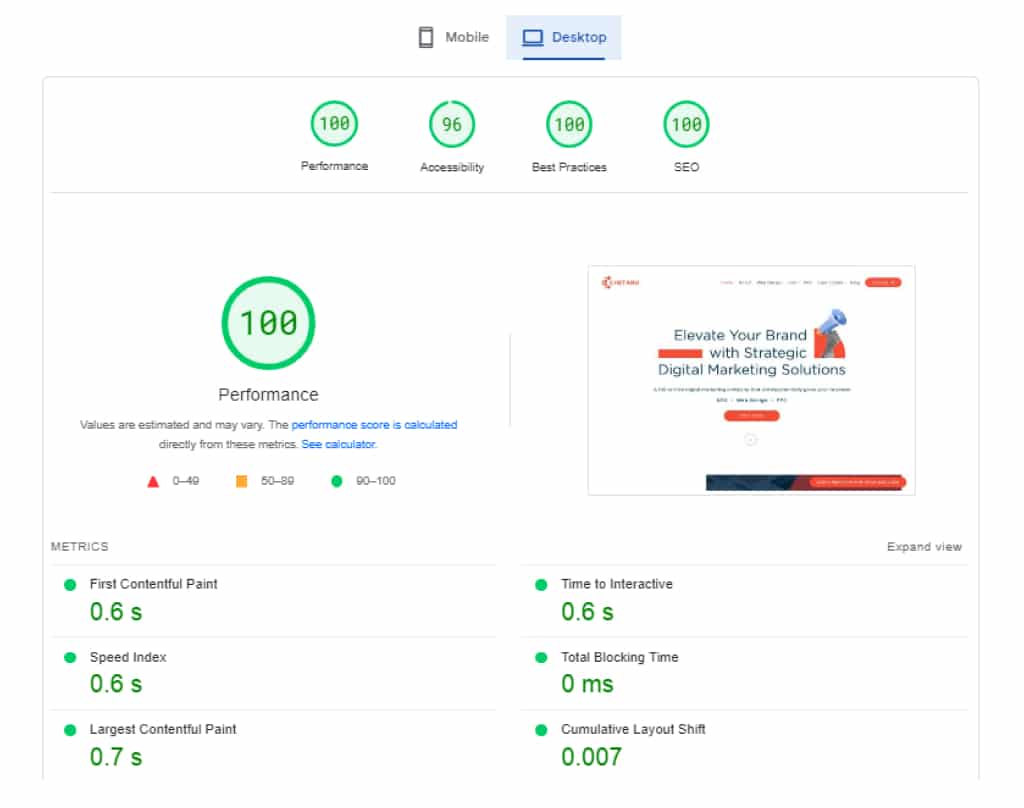
Google PageSpeed Insights: A free tool that inspects your website’s speed and provides recommendations for improvement. It provides insights into your website’s loading time and suggestions for optimizing your website’s performance.
Google Keyword Planner: A free tool that helps you find the correct keywords for your website and ad campaigns. It provides keyword search volume, competition, and cost-per-click data, helping businesses optimize their content for search engines and improve their ad campaigns.
Canva: A tool for creating high-quality images and graphics for your website and social media accounts. It provides templates and tools for creating custom graphics, making it easy for businesses to create engaging visual content for their online marketing efforts.
These are just a few examples of SEO tools that can be helpful for small businesses. Evaluating your business needs and budget is important when choosing the right tools for your SEO strategy.
Benefits of SEO for Small Businesses.
There are numerous benefits of SEO for small businesses, including:
Increased visibility and traffic: Optimizing your website for relevant keywords and providing quality content can improve your visibility in search results and drive targeted traffic to your site.
Cost-effective marketing: SEO is a cost-effective path to reach your target audience compared to traditional marketing methods such as print, radio, or TV ads.
Higher ROI: SEO can provide a higher return on investment than other forms of digital marketing, as it targets people already interested in your products or services.
Brand credibility and authority: Ranking high in search results can establish your business as a credible and authoritative source in your industry, helping to build trust with potential customers.
Competitive advantage: With a strategic SEO plan, your small business can compete with larger companies and reach your target audience effectively.
Increased local visibility: For small businesses with a physical location, optimizing for local search can help drive more foot traffic to your store or office.
Measurable results: With tools like Google Analytics and Search Console, you can track and measure the impact of your SEO efforts, allowing you to adjust your strategy and focus on what works best for your business.
Should You Outsource Seo?
SEO Outsourcing can be a good option for small businesses that need more resources or expertise to handle SEO in-house. By outsourcing, you can work with experienced professionals who can provide a customized SEO strategy tailored to your business needs. Additionally, outsourcing can save you time and effort, allowing you to focus on running your business.
However, choosing a reputable SEO agency with a track record of success and ethical SEO practices is important. You should also ensure clear communication with the agency and a good understanding of what services they will be providing and how they will measure success.
Ultimately, whether or not to outsource SEO depends on your specific business needs and resources. It’s essential to weigh the potential benefits against the costs and make the right decision for your business.
FAQ
1. How Much Should I Pay for SEO Each Month?
The cost of SEO can vary depending on your business’s specific needs, your industry’s competitiveness, and the SEO provider’s experience level. It is recommended to have a budget of at least $750 to $1,500 per month for SEO services.
2. Is SEO Free on Google?
Google provides a free tool called Google Search Console to help website owners monitor and improve their website’s performance in search results. However, SEO as a whole is not free and typically requires investment in time or resources.
3. Is SEO Good for Your Small Business?
Yes, SEO can be very beneficial for small businesses as it can help improve their visibility and attract more relevant traffic to their website, resulting in potential leads and sales.
4. How To Partner With an SEO Company for Small Businesses?
When partnering with an SEO company for your small business, it is important to clearly define your goals and expectations, ask for references or case studies, and ensure they have experience working with similar businesses. Additionally, you should establish a clear communication plan and review progress regularly.
5. Does Seo Work for Small Businesses?
Yes, SEO can work for small businesses if it is approached strategically and focuses on providing value to the target audience. It may take time to see results, but with consistent effort and optimization, SEO can help small businesses improve their online presence and drive more traffic to their website.
6. Is SEO Worth It for Your Small Business?
Yes, SEO is definitely worth it for small businesses. By investing in SEO, small businesses can improve their online presence and visibility, reach their target audience more effectively, and ultimately increase sales and revenue.
Push and pull marketing are two strategies businesses use to reach their target customers and promote their products or services. Push marketing involves actively pushing a product or service onto potential customers through advertising and other promotional efforts. This can include television and radio commercials, print advertisements, and direct mail campaigns. Push marketing aims to get the product in front of as many potential customers as possible, hoping that some will make a purchase.
On the other hand, pull marketing involves creating demand for a product or service through effective branding and customer education. This can include content marketing, social media marketing, and search engine optimization (SEO). The goal of pull marketing is to attract customers to the product or service by providing them with valuable information and building a positive brand image.
Both push and pull marketing can be effective in different situations, and many businesses use a combination of both strategies to reach their target customers.
What is Push Marketing?
Push marketing involves promoting a product or service to potential customers through advertising and other promotional efforts. The goal of push marketing is to “push” the product onto as many potential customers as possible, hoping that some will make a purchase. Push marketing can take many different forms, including:
Television and radio commercials
Print advertisements (such as in newspapers and magazines)
Direct mail campaigns (including flyers and postcards)
Email marketing
Telemarketing
In-store promotions and product demonstrations
Sponsorships and events
Push marketing can reach a large audience quickly, especially if the product or service being promoted is new or unfamiliar to potential customers. However, it can also be expensive and may only sometimes be the most targeted or personalized approach to reaching customers.
Push marketing is a strategy focused on, as the name suggests, ‘pushing’ products to a specific audience. The goal is to tell prospective customers – quite speculatively, in some cases – about your brand, product, or service. Push marketing – which is sometimes known as ‘direct marketing’ or ‘outbound marketing’ – requires a great deal of reach and is labeled as ‘interruptive’ because it’s designed to interrupt your day or thought to get your attention deliberately.
TV and radio advertising are classic examples of traditional Push marketing channels. These Push tactics have twin aims: one, to grab the listener or to watch the public’s interest; two, to make the listener or viewer take action, such as researching your product online (as is becoming the norm) or going to the shops to buy it.
Radio jingles exist because they are memorable, while brands will hire creative agencies to create TV adverts that stand out from the crowd. TV advertising slots, in particular, are very expensive, and brands will try to outbid each other to secure primetime slots.
For instance, a 30-second TV ad during Super Bowl 2020 cost companies $5.6 million – an eye-watering $186,666 per second. You’d better hope that such an investment will drive sales, brand awareness, the share of voice, and equity, but traditional marketing tactics like TV, print, and radio advertising can be very difficult to measure.
Example of Push Marketing
What’s an example of traditional Push marketing strategy?
When you go shopping in a department store, it’s likely that you’ll become aware – consciously or subconsciously – of point of sale material (or branded signage) telling you about a particular product. This is Push marketing.
Brands generally have to pay the department store to display point of sale (POS) because signage or in-store advertising of this kind has traditionally been very effective as a means of alerting browsing shoppers to specific products that they might not otherwise have been aware of or interested in.
A classic example would be fragrance lines.
The fragrance brand will often offer sales the department store sales incentives to ‘push’ its products onto customers.
This approach can work especially well for new brands trying to gain a footing in the market or for established brands trying to push a new fragrance. This is Push marketing because the shoppers visiting the store will likely encounter the brand or new product for the first time.
Example of Push Strategy
Imagine a company that sells energy drinks. They want to increase sales of their new flavor, so they launch a push marketing campaign to promote it. They create a series of television commercials that air during popular sports events, print advertisements in magazines, and online banners on popular sports websites. They also send out direct mail flyers to households in their target market and run in-store promotions at retail locations where their energy drinks are sold.
This push marketing campaign aims to get the new energy drink flavor in front of as many potential customers as possible, hoping that some will be interested in trying it and making a purchase. The company is “pushing” it onto potential customers by actively promoting the product through various channels.
Social media is considered a Push channel because it can help your company launch new products and services or promote existing ones. Social media and other digital marketing activities are highly measurable and, therefore, easy to evaluate and learn lessons from when it comes to tweaking or improving future Push campaigns.
Digital marketing has leveled the playing field. While TV and radio advertising require large (and sometimes huge!) marketing budgets, Push digital marketing activities like social media or pay-per-click (PPC) are very cost-effective. Companies of all sizes can execute them.
You could use social media to create urgency around the offer (“Don’t miss out!”) and link it to a website landing page with a little more detail and a clear Call to Action (CTA) such as ‘Speak to our friendly team now’. Social commerce – whereby customers can buy a product from a brand directly within an app like WeChat – is becoming another powerful Push digital marketing channel.
Push Marketing Strategy
Push marketing is a marketing strategy involving actively promoting a product or service to potential customers through various advertising and other promotional efforts. The goal of push marketing is to “push” the product onto as many potential customers as possible, hoping that some will make a purchase.
Here are some steps to consider when developing a push marketing strategy:
Identify your target audience: Determine whom you want to reach with your push marketing efforts. Consider factors such as demographics, interests, and buying habits to help narrow down your target audience.
Determine your marketing channels: Select the channels through which you will promote your product or service. This might include television and radio commercials, print advertisements, direct mail campaigns, email marketing, telemarketing, in-store promotions, and sponsorships and events.
Create promotional materials: Develop promotional materials such as ads, flyers, and other materials for your push marketing efforts. Make sure to include a clear call to action that encourages potential customers to take action (such as making a purchase).
Implement your campaign: Roll out your push marketing campaign using your selected channels and materials. Monitor the results of your campaign and make adjustments as needed.
Evaluate your results: Once your push marketing campaign is complete, analyze the results to determine its effectiveness. This will help you understand what worked well and what could be improved in future campaigns.
What Is Pull Marketing?
Pull marketing is a marketing strategy that creates demand for a product or service through effective branding and customer education. The goal of pull marketing is to attract customers to the product or service by providing them with valuable information and building a positive brand image.
Pull marketing can take many different forms, including:
Content marketing: creating and sharing valuable, relevant, and consistent content to attract and retain a clearly defined audience
Social media marketing: using social media platforms to connect with and engage customers
Search engine optimization (SEO): optimizing a website to rank higher in search engine results pages (SERPs) with the help of professional SEO services.
Influencer marketing: partnering with influential people or organizations to promote a product or service
Referral marketing: encouraging customers to refer friends and family to the product or service
Pull marketing can effectively build a loyal customer base and establish a strong brand presence. It can also be more targeted and personalized than push marketing, as it involves creating content and campaigns designed to attract and engage a specific audience. However, it can also be more time-consuming and may require a longer-term commitment to see results. Pull marketing aims to get customers to come to you – hence the term ‘pull.’ You’re looking to draw customers to your brand or product.
Businesses will generally use Pull marketing when the customer knows what they are looking for or what problem they need to solve, but needs pulling towards your solution instead of your competitors.
These customers don’t need pushing to make a purchase. If they see your brand and are looking for solutions like your, they’ll get back to you.
Example of Pull Marketing
Imagine a company that sells eco-friendly cleaning products. They want to attract more customers interested in environmentally-friendly products, so they launched a pull marketing campaign to educate and engage their target audience. They create a blog on their website that features articles about the environmental benefits of using their cleaning products and tips and tricks for using them effectively. They also use social media to share this content and engage with their followers, answering questions and providing additional information about their products.
This pull marketing campaign aims to attract customers to the company’s products by providing them with valuable information about the benefits of using eco-friendly cleaning products. By creating and sharing valuable content, the company is building a positive brand image and positioning itself as a go-to source of information for customers interested in sustainable living.
Another example of a prospective Pull customer would be a Finance Director looking for a SaaS (Software as a Service) accounting solution for his company’s finance department.
Corporate Sponsorship is a classic Pull marketing strategy. Land Rover, for instance, is keen to sponsor rugby union events because they know that rugby union fans generally fit into their target customer demographic – people with middle-to-upper-class-aspirations who can afford to buy a new or used Land Rover Discovery Sport or Range Rover Evoque.
Pull marketing strategies include exhibiting at conferences, conventions, or trade fares.
It’s possible to pull customers away from your competitors at one of these events with a spectacular or particularly notable exhibition stand, which could lead to great conversations with would-be customers that result in sales and long-term commercial relationships.
Pull Marketing Strategy
Pull marketing is a marketing strategy that creates demand for a product or service through effective branding and customer education. The goal of pull marketing is to attract customers to the product or service by providing them with valuable information and building a positive brand image.
Here are some steps to consider when developing a pull marketing strategy:
Identify your target audience: Determine whom you want to reach with your pull marketing efforts. Consider factors such as demographics, interests, and buying habits to help narrow down your target audience.
Develop a content marketing plan: Create a plan for creating and sharing valuable, relevant, and consistent content that will be of interest to your target audience. This might include blog posts, articles, videos, infographics, and social media posts.
Optimize your website for SEO: Make sure your website is optimized for search engines to rank highly in search results pages (SERPs). This can attract potential customers searching for information about your product or service.
Engage with your audience on social media: Use social media platforms to connect with and engage customers, answering questions and providing additional information about your products or services.
Monitor and adjust your strategy: Regularly monitor the performance of your pull marketing efforts and make adjustments as needed. This might include adjusting your content marketing plan or social media strategy.
Evaluate your results: Once your pull marketing campaign is complete, analyze the results to determine its effectiveness. This will help you understand what worked well and what could be improved in future campaigns.
Difference Between Push And Pull Marketing
Here are some key differences between push and pull marketing:
Purpose: Push marketing is designed to promote a product or service to potential customers through various advertising and other promotional efforts. On the other hand, pull marketing is intended to create demand for a product or service through effective branding and customer education.
Approach: Push marketing involves promoting a product or service to potential customers. Pull marketing involves attracting customers to the product or service through valuable content and a positive brand image.
Channels: Push marketing typically uses more traditional media such as television and radio commercials, print advertisements, and direct mail campaigns. On the other hand, pull marketing often uses digital channels such as content marketing, social media marketing, and search engine optimization (SEO).
Target audience: Push marketing typically targets a broad audience, whereas pull marketing is more targeted and personalized, targeting a specific audience with specific interests or needs.
Timeframe: Push marketing is often a short-term strategy that generates immediate sales or leads. On the other hand, pull marketing is typically a longer-term strategy focused on building a loyal customer base and establishing a solid brand presence.
Cost: Push marketing can be expensive, as it often involves paying for advertising and other promotional efforts. Pull marketing can be more cost-effective, as it involves creating and sharing valuable content, which can be done at a relatively low cost.
Effectiveness: Both push and pull marketing can be effective in different situations, and many businesses use a combination of both strategies to reach their target customers. The most effective approach will depend on the marketing campaign’s specific goals and target audience.
Push or Pull Marketing? Which One is Best?
It’s difficult to say definitively which type of marketing is “best,” as it depends on the specific goals and target audience of a marketing campaign. Both push and pull marketing can be effective in different situations, and many businesses use a combination of both strategies to reach their target customers.
Here are some factors to consider when deciding which type of marketing might be most effective for your business:
Your target audience: If you have a clearly defined target audience with specific interests or needs, pull marketing might be more effective, as it allows you to create targeted and personalized content that will be more relevant and engaging to that audience. If your target audience is broader or undefined, push marketing might be a better fit, as it allows you to reach a larger audience through more traditional channels.
Your marketing goals: Are you looking to generate immediate sales or leads, or are you more focused on building a loyal customer base and establishing a strong brand presence over the long term? Push marketing is typically a shorter-term strategy focused on generating immediate results, while pull marketing is generally a longer-term strategy focused on building customer relationships and trust.
Your budget: Push marketing can be more expensive, as it often involves paying for advertising and other promotional efforts. Pull marketing might be more cost-effective if you have a limited budget, as it consists of creating and sharing valuable content, which can be done at a relatively low cost.
Ultimately, the best approach will depend on your specific goals and target audience, as well as your budget and resources. Conduct market research and test different marketing strategies to see what works best for your business.
Push or Pull Marketing in Digital Marketing?
Both push and pull marketing can be used in digital marketing, which refers to marketing efforts that use the internet and digital technologies to reach and engage customers.
Push marketing in digital marketing might involve email marketing, banner ads, and paid social media ads, which involve actively promoting a product or service to potential customers through various digital channels.
Pull marketing in digital marketing might involve content marketing, social media marketing, and search engine optimization (SEO), which include creating and sharing valuable, relevant, and consistent content to attract and retain a clearly defined audience.
Many businesses use a combination of both push and pull marketing in their digital marketing efforts, as this can allow them to reach a broad audience through traditional channels while also building relationships and trust with more targeted and engaged customers through content marketing and social media.
Get the very best out of Push and Pull digital marketing by partnering with strategic online marketing experts with the best insights into the way the digital marketing landscape operates. Drop Chetaru an email at info@chetaru.com to level up your digital marketing.
A homepage is the website’s main page visitors see when they first visit the site. In WordPress, the homepage can be set up as a static page, which means that it displays the same content every time it is accessed, or as a dynamic page, which means that the content is generated based on specific criteria (such as the latest posts).
If you are new to this game, then you can take help from a custom wordpress website design service but if you want to set up a homepage in WordPress on your own, follow the steps below. Depending on your preferences and your site’s needs, you can set up the homepage through the WordPress dashboard, the wp-config.php file, the database, or the customizer.
How to Set a Homepage in Freshly Installed WordPress?
You will need to follow these steps:
Install and activate the WordPress platform on your hosting server.
Create a new page by going to the “Pages” menu in the WordPress dashboard and clicking “Add New.”
Enter a title for your homepage in the “Title” field.
Use the WordPress visual editor to add content to your homepage. You can add text, images, videos, and other media by clicking the corresponding buttons on the toolbar.
Publish your homepage by clicking the “Publish” button in the top right corner of the page.
Set your homepage as your site’s front page by going to the “Settings” menu in the WordPress dashboard and clicking “Reading.”
Under the “Front page displays” section, select the “A static page” option and then choose the page you just created as the “Front page.”
Click the “Save Changes” button to save your settings.
Your homepage should now be set up and visible to visitors when they visit your site.
How to Set a Homepage in WordPress through the Wp-Config.php File?
You will need to follow these steps:
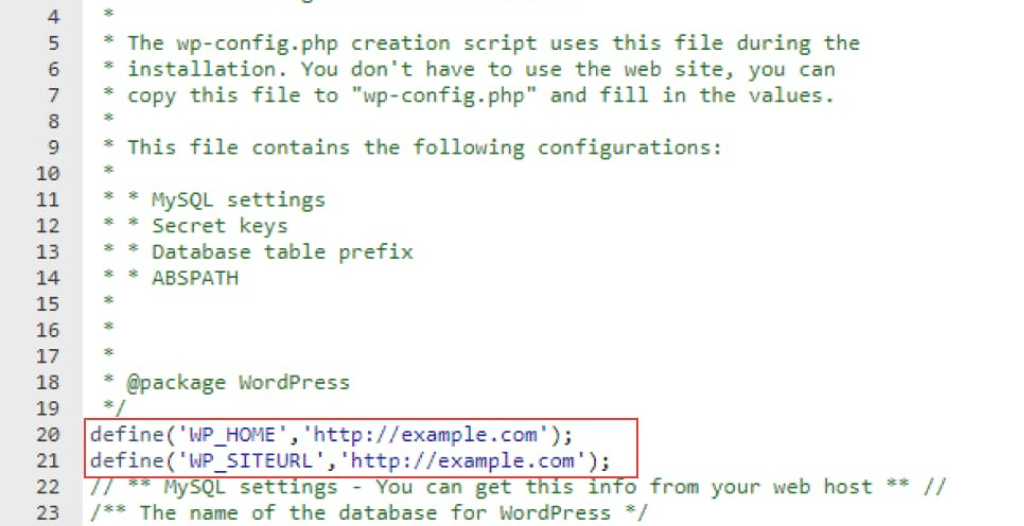
Open the wp-config.php file in a text editor. This file is located in the root folder of your WordPress installation.
Scroll down to the section labeled “That’s all, stop editing!”
Replace “https://example.com” with the URL of your homepage.
Save the wp-config.php file and upload it to your hosting server.
Go to the WordPress dashboard and navigate to the “Settings” menu.
Click the “Reading” option.
Under the “Front page displays” section, select the “A static page” option and choose the page you want to use as your homepage from the dropdown menu.
Click the “Save Changes” button to save your settings.
Your homepage should now be set up and visible to visitors when they visit your site.
How to Set s Homepage in WordPress through the Database?
You will need to follow these steps:
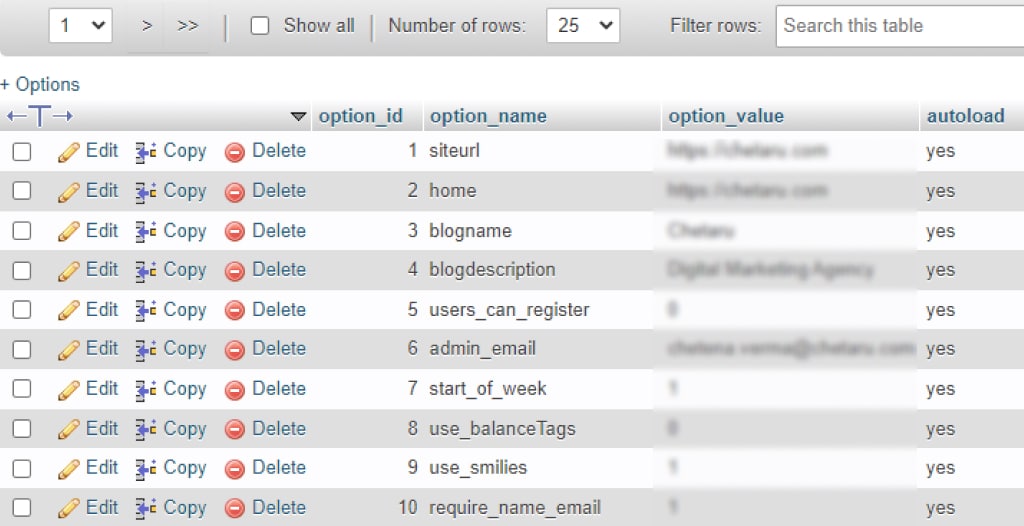
Access the database for your WordPress installation using a database management tool such as phpMyAdmin.
Navigate to the “wp_options” table.
Find the row with the option_name “show_on_front” and change the option_value to “page.”
Find the row with the option_name “page_on_front” and change the option_value to the ID of the page you want to use as your homepage. You can find the ID of a page by going to the “Pages” menu in the WordPress dashboard and hovering over the page title. The ID will be displayed in the URL in your browser window’s bottom left corner.
Save your changes and exit the database management tool.
Your homepage should now be set up and visible to visitors when they visit your site.
Note: It is important to make sure you have a recent database backup before making any changes. Modifying the database directly can be risky and cause problems if not carefully done.
How to Set a Homepage in WordPress through SQL?
You will need to follow these steps:
Access the database for your WordPress installation using a database management tool such as phpMyAdmin.
Select the database that contains your WordPress installation from the list on the left.
Click the “SQL” tab.
In the text field, enter the following SQL query:
UPDATE wp_options SET option_value='page' WHERE option_name='show_on_front';

UPDATE wp_options SET option_value='[page_id]' WHERE option_name='page_on_front';
Replace “[page_id]” with the ID of the page you want to use as your homepage. You can find the ID of a page by going to the “Pages” menu in the WordPress dashboard and hovering over the page title. The ID will be displayed in the URL in your browser window’s bottom left corner.
Click the “Go” button to execute the query.
Your homepage should now be set up and visible to visitors when they visit your site.
Note: It is important to ensure you have a recent database backup before making any changes. Modifying the database directly can be risky and cause problems if not carefully done.
How to Set a Homepage in WordPress Using a Page That Has Already Been Published through the Dashboard?
You will need to follow these steps:
Log in to the WordPress dashboard with your administrator account.
Go to the “Pages” menu and click on the page that you want to use as your homepage.
Edit the page as needed.
Set your homepage as your site’s front page by going to the “Settings” menu and clicking “Reading.”
Under the “Front page displays” section, select the “A static page” option and then choose the page you just edited as the “Front page.”
Click the “Save Changes” button to save your settings.
Your homepage should now be set up and visible to visitors when they visit your site.
How to Set a Homepage in WordPress through the Customizer?
You will need to follow these steps
Log in to the WordPress dashboard with your administrator account.
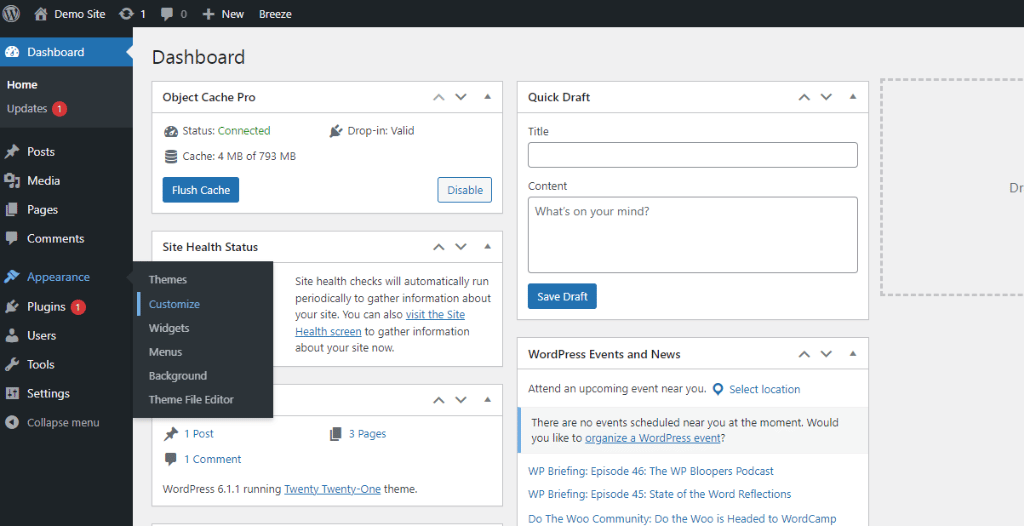
Go to the “Appearance” menu and click “Customize.”
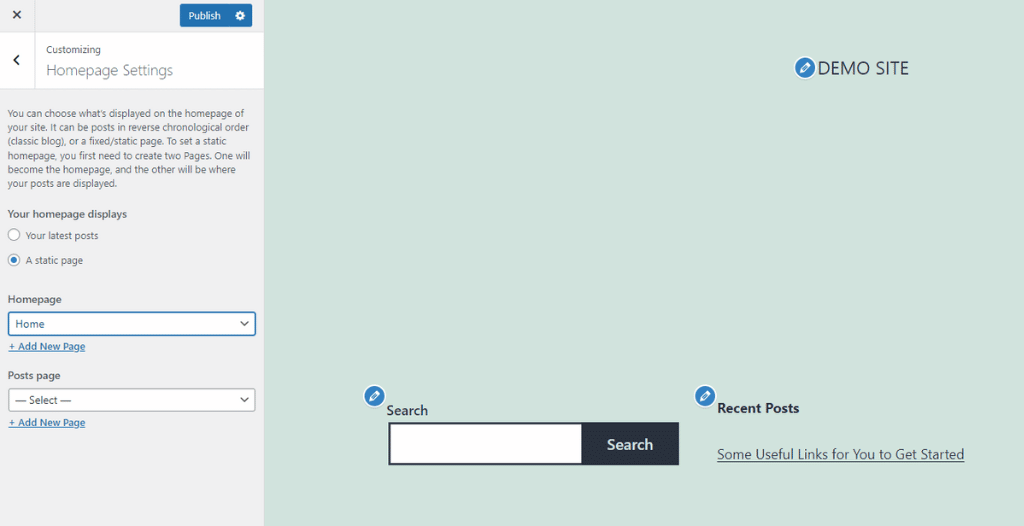
In the customizer, click on the “Static Front Page” option.
Under the “Front page displays” section, select the “A static page” option and choose the page you want to use as your homepage from the dropdown menu.
Click the “Publish” button to save your changes.
Your homepage should now be set up and visible to visitors when they visit your site.
Note: A customizer is a tool that allows you to preview and customize the appearance and settings of your site. It provides a convenient way to make changes to your site without affecting the live version. You can access the customizer from the dashboard or the front end of your site by clicking the “Customize” button in the top admin bar.
Once your homepage is set up, you can customize its appearance and add content using the WordPress visual editor. You can also use widgets and plugins to add functionality to your homepage.
Conclusion
In conclusion, setting up a homepage in WordPress is a simple process that can be accomplished in just a few steps. By selecting a static page as the homepage and then creating a new page or selecting an existing one as the content for the homepage, you can easily customize the appearance and content of your homepage to suit your needs. Additionally, you can use the various customization options available in the WordPress theme and page editor to further personalize your homepage and make it stand out. With a little bit of planning and creativity, you can create a professional and engaging homepage that reflects the style and personality of your business or personal brand.
A manufacturing industry is a company that produces physical products, typically by transforming raw materials into finished goods through mass production. This can involve various activities, such as assembling components, processing raw materials through various methods (such as machining or molding), and testing and inspecting the finished products.
Some Examples of Manufacturing Industries
There are many different types of manufacturing businesses, and they can be found in a wide range of industries. Some examples include:
Assembling: This manufacturing business combines various components to create a finished product. Examples include assembling automobiles, computers, or furniture.
Fabrication: Fabrication businesses create products by shaping and forming raw materials, such as metal or plastic, using processes such as welding, cutting, and molding.
Food and beverage: Food and beverage manufacturing businesses produce a wide range of products, including baked goods, beverages, and packaged meals.
Chemical: Chemical manufacturing businesses produce various chemical products, such as plastics, pharmaceuticals, and cleaning products.
Textile: Textile manufacturing businesses produce fabrics and other textiles, such as clothing and home furnishings.
Printing: Printing businesses produce printed materials, such as books, newspapers, and packaging.
Machining: Machining businesses use machine tools to cut, shape, and finish raw materials, such as metal and plastic, to create finished products.
Medical device: Medical device manufacturing businesses produce a wide range of products, including surgical instruments, medical implants, and diagnostic equipment.
Marketing Challenges That manufacturer experiences
Starting a manufacturing business online can be daunting, and many manufacturers experience numerous pain points. Some common pain points are:
Limited online presence
Many manufacturers may need a stronger online presence or be more effective in utilizing digital marketing channels to reach potential customers. They need help generating leads or sales online.
Competition
There may be high competition among manufacturers in certain industries, making it difficult to stand out and attract customers online.
E-commerce challenges
Setting up and managing an e-commerce platform can be challenging, especially for manufacturers who may need to gain experience with online sales. This can include payment processing, order fulfillment, and customer service.
Lack of knowledge or resources
Manufacturers may need more expertise or resources to market and sell their products online effectively. This can include a need for more expertise in digital marketing or a lack of resources to invest in online marketing efforts.
Website design and user experience
A manufacturer’s website should be well-designed and user-friendly to convert visitors into customers effectively. A manufacturer’s website could be better designed, easier to navigate, or less effective at generating business online.
Lack of customer trust
Customers may be hesitant to purchase from a manufacturer’s website if they do not trust the business or are concerned about the security of their personal and financial information.
Limited payment options
If a manufacturer’s website only offers a limited range of payment options, it may be less convenient for customers and discourage them from making a purchase.
Digital Marketing Strategies for Manufacturing Companies
Optimizing a website for search engines can help a manufacturing company attract more organic traffic and improve its visibility in search engine results pages (SERPs). This can be done through keyword research, on-page optimization, and building high-quality backlinks.
Content marketing
Creating and sharing valuable, relevant, and consistent content can help attract and retain a clearly defined audience and gain profitable customer action. This can include blog posts, articles, videos, infographics, and social media posts.
Email marketing
Sending targeted and customized emails to potential customers can help manufacturing companies build relationships and drive sales. This can include newsletters, promotional emails, and automated email campaigns.
Social media marketing
Social media channels such as Facebook, Twitter, and LinkedIn can help a manufacturing company connect with potential customers and promote its products or services. This can include creating and sharing content, running paid advertisements, and engaging with followers.
Paid advertising
Manufacturing companies can use paid advertising platforms such as Google Ads or Facebook Ads to reach a targeted audience and drive traffic to their website.
Trade shows and events
Attending trade shows and events can help a manufacturing company connect with potential customers and industry professionals and showcase its products or services.
Public relations
Working with the media and using tips such as press releases, media interviews, and speaking engagements can help a manufacturing company build credibility and reach a wider audience.
By combining these marketing strategies and tactics, manufacturing companies can effectively promote their products or services and drive sales.
What Does SEO Stand for in Manufacturing?
SEO stands for Search Engine Optimization. It refers to optimizing a website or online content to rank higher in search engine results pages (SERPs) and attract more organic traffic. In manufacturing, professional SEO services can improve the visibility of a manufacturing company’s website or products in search engine results, making it more likely that probable customers will find the company’s website when searching for relevant products or services.
Some common SEO tactics for manufacturing companies include optimizing product pages for relevant keywords, creating high-quality content that addresses common customer questions or pain points, and building backlinks from other reputable websites. By improving their SEO, manufacturing companies can increase the chances of their products or services being found by potential customers and ultimately drive more sales.
Optimize a Manufacturing Website to Rank Higher in Search Engines
Identify the keywords potential customers use to search for products or services related to your manufacturing company and include them in your website’s content, titles, and tags.
Optimize your website’s content
Make sure that your website’s content is relevant, well-written, and easy to read. Use headings, bullet points, and short paragraphs to break up content and make it more visually appealing and easy to scan.
Make sure your website is mobile-friendly
With the increasing use of mobile devices to access the internet, it’s important to ensure that your website is optimized for mobile viewing. This includes using a responsive design, fast loading times, and easy-to-use navigation.
Improve the speed of your website
A slow-loading website can negatively impact your ranking in search results. Use tools like Google’s PageSpeed Insights to identify areas for improvement and make your website faster.
Use alt tags for images
Alt tags are a text description of an image displayed if the image cannot be shown. They also provide search engines with more information about the content of your website.
Use header tags
Header tags (H1, H2, H3, etc.) help to break up your content and make it easy for search engines to understand the structure of your website. Make sure to use header tags appropriately to help search engines identify the hierarchy of your content.
Use internal linking
Linking to other pages on your website can help search engines understand your website’s structure and improve your pages’ ranking. Use informative anchor text when linking to other pages on your website.
Use social media
Social media can be a powerful method for driving traffic to your website. Use social media to advertise your website and engaging with potential customers.
Build high-quality backlinks
One way to improve your website’s ranking in search engine results is to build high-quality backlinks from other reputable websites. This can be done through tactics such as guest blogging or participating in industry-specific forums.
Claim and optimize your Google My Business listing
How to Track the Success of Your Manufacturing Marketing Campaign
Traffic
The amount of traffic that a manufacturing business’s website receives can be an important indicator of its online success. A higher traffic volume can indicate that the website ranks well for relevant keywords and attracts many potential customers.
Keyword rankings
A manufacturing business should track its orders for relevant keywords to see how well its website performs in search results. This can help the company identify areas where it is doing well and where it may need improvement.
Conversion rates
The conversion rate is the percentage of website visitors who take the desired steps, such as making a purchase or filling out a form. A higher conversion rate can indicate that a manufacturing business’s website effectively converts visitors into customers.
Bounce rate
The bounce rate is the percentage of website visitors who leave a website after viewing only one page. A high bounce rate can indicate that a manufacturing business’s website could more effectively engage visitors or provide them with the information they want.
Time on site
The amount of time visitors spend on a manufacturing business’s website can be a good indicator of the website’s relevance and quality. A longer time on site can indicate that visitors find the website helpful and engage with its content.
Return visits
The number of visitors who return to a manufacturing business’s website can indicate the website’s value and the strength of the business’s brand. A high number of return visits can indicate that the website is meeting the needs of its visitors and that they are likely to return in the future.
Conclusion
SEO for manufacturing companies is vital to driving online traffic and improving conversions. Following the tips in this blog post, you can create an effective SEO strategy tailored to your manufacturing company. If you need help getting started, experts at Chetaru can assist you with developing a comprehensive SEO plan to help you achieve your marketing goals.
Magento is a powerful open-source eCommerce platform that offers merchants great flexibility and control over their online stores. It’s a top-rated platform with a large and active development community, and plenty of Magento experts can assist you in getting the most out of it.
Introduction
If it’s an industry that has gained high popularity in the modern world is the eCommerce industry. Online shopping has become the norm of the day, as more people opt for the greater convenience of online stores than physical stores. With eCommerce, you need just a few clicks on your phone or laptop to complete a business deal.
To facilitate smoother eCommerce business operations, several websites offer business owners a platform where they can connect with customers and sell products. And one such website that has been at the forefront is Magento. This article discusses what benefits you can expect from using Magento websites and the cons associated with these.
Pros of Magento
Magento websites offer numerous features and advantages to users. Consider five major benefits you can expect to derive from using this platform:
1. It Offers Numerous Built-in Features
One aspect of Magento that distinguishes it from other similar platforms is that it offers a wide range of features that are not available on other platforms. For example, Magento websites allow users to vary the price of specific products according to the intended audience or group of customers. You can set a particular process for your staff and a different price for VIPs.
Other unique features offered by Magento allow for multiple currencies, multiple stores, multiple languages, and even multiple locations. The variety and uniqueness of features make Magento a better option than Woocommerce, Shopify, Volusion and other similar eCommerce platforms.
2. It is a Scalable and Global Platform
Every business person dreams of one thing: To expand their business and increase their profit. When conducting business via an eCommerce website, you want the platform to accommodate your expanding business and handle the increasing quantity of products and sales. However, some eCommerce platforms cannot handle the growth of businesses, which hinders the firm’s expansion and progress.
On the contrary, the Magento platform is designed to handle and support the expansion of businesses with ease. It helps thousands of transactions and up to 500,000 products within an hour. Even better, the platform allows users to customize it without any constraints.
3. It is Flexible
The Magento platform uses open-source technology. This technology allows users to modify the source code to fit their requirements and preferences. Modifying the source code also allows you to customize all your templates and build on-brand storefronts that look appealing to your customers.
Besides, Magento allows the integration of different purposes, such as importing products by third parties. The flexibility of Magento makes it possible to analyze the performance of different eCommerce website designs and get real-time information about the website.
4. It is Mobile-Friendly
Did you know that 45% of consumers shop online using their mobile phones at least once daily? Indeed, if your eCommerce business is to succeed, it needs to have a mobile-friendly configuration. After all, the trend of internet browsing has now shifted to phones and mobile devices.
Fortunately, the eCommerce website design of Magento is very mobile-friendly. The platform allows merchants to create a mobile site easily and provides the customer with the best mobile viewing experience and user-friendly interface. In turn, a mobile-friendly configuration reduces bounce rate and increases sales.
5. It has Large Community Support
Approximately 250,000 business people use Magento as their leading eCommerce platform. Due to this large community of workers, the platform has been improved to include many plugins and extensions that improve the users’ experience. Besides, you can expect quick support and many useful resources to help you find effective solutions when you encounter problems.
Cons
Despite the numerous benefits that Magento offers, it is not devoid of negatives. Here are three cons associated with using this popular eCommerce platform:
1. It is Time-Consuming
One of the major disadvantages of Magento is that it has a slow loading time. The slow loading time is due to the platform’s flexible architecture, making it time-consuming and complicated to set it up. Therefore, making customizations on the platform is more difficult than on other eCommerce platforms.
However, slow loading time is mainly experienced in the community version of Magento. So if you want a smoother eCommerce process and faster loading times, you would do well to go for the Enterprise or Premium Enterprise Magento versions.
2. It Requires Technical Support
The Magento eCommerce website design includes many customizing features and complex architecture. For example, the platform possesses over 200 database tables and more than 20,000 files. Therefore, to set up a successful shop on the Magento platform, you will need more time to learn and master the system and have the expertise and a thorough knowledge of the core software.
If you lack the skills or do not have a technical team to assist you, you may opt to hire a specialist or an experienced Magento developer who understands your shop’s needs. However, this would mean additional costs for you.
3. It is Expensive
While the Magento platform’s community version is free, the Enterprise version goes for more than $15,000. Besides, the Premium Enterprise version (intended for larger businesses and companies) goes for more than $50,000 annually.
Also, if you cannot install the extension, you will be charged an extra third-party fee. And if you are looking to create a highly customized store, you will need to invest in costly Magento development services and plugin support. Furthermore, the online platform has many associated hosting and maintenance costs, which may burden your wallet.
Conclusion
Magento is one of the best platforms to choose from when starting an eCommerce business. The platform offers great flexibility, extensive features, and good community support. And even though it has several associated cons, the advantages outweigh the disadvantages. Indeed, Magento is just the ideal eCommerce website design you need to help you grow your business and future-proof it!
If you’re running a business, it’s important to make sure that you’re doing everything you can to ensure it’s successful. One of the best ways to do this is to ensure you’re using SEO to your advantage. SEO can help to boost your website’s ranking in search engines, which can help to bring more traffic to your site. This can result in more customers and more sales for your business.
Introduction
You need SEO if your business has been in the market for years or has just started. Without good search engine optimization (SEO) practices, your online business may not fare well in the highly competitive market. Poor SEO practices could mean the closure of your business, even if you have been in the market for years.
But what exact role does SEO play in the success of your business? Consider these seven ways how SEO helps your business stand out from the competition and achieve true success in the market:
It Saves You a Lot of Marketing Costs
Many marketing campaigns, such as pay-per-click, are costly. On the contrary, SEO is one of the most cost-effective marketing strategies you can use in digital marketing. But wait, doesn’t SEO cost money as well? So how is it a cheap form of a marketing program?
First, compared with other types of campaigns, SEO is much cheaper. Also, considering how much SEO benefits a business, we can say that the payoff is much grander than the costs incurred in optimizing the website. Think about it, good SEO implementation in your company will not only ensure the current success of your business but also build your business to become one of the strongest and most popular brands shortly. And what marketing strategy could be better than that which saves you costs and ensures your business’s future success simultaneously?
It Boosts Your Credibility
Search engines consider websites that use good SEO strategies relevant and trustworthy. In turn, they rank these high in the search results, boosting the overall credibility of the business. And credible online businesses attract more customers than those that do not seem trustworthy.
Also, to achieve an SEO-optimized website, you will have to spend more time improving your site and generating better content. This will increase the loading speed of your web pages and rank your website even higher on search engines. The higher your website ranks, the more credible your website and business appear.
It Enhances the User Experience
As a business owner, SEO can help make your website search engine-friendly. In turn, this makes the website user-friendly, ensuring that all customers and visitors to your site have an excellent experience that keeps them coming back for more.
It would help if you had extra effort to generate content to increase your website and ensure a good user experience. In addition to creating unique content, add backlinks to every webpage and make changes to your website to become more responsive. Not only will these SEO services give your website a robust site structure, but they will also make navigation much easier, in turn enhancing the overall user experience.
It Supports Content Marketing
SEO and original content go hand-in-hand. When you create unique content for your target audience, including videos, text, and images, your website will rank in the top search engine results pages (SERPS).
Similarly, SEO supports content marketing by making your efforts worthwhile. Your marketing efforts will generate positive results when you create original content and use keywords that rank high in search engines. Also, since search engines consider the “freshness” of content when ranking webpages, ensure that you update your content regularly, such that your website visitors always have access to new and updated content.
Take, for instance, marketing campaigns, such as social advertising and PPC. Both of these marketing strategies focus on demographics, making your online business only visible to a defined target audience. On the contrary, SEO focuses on keywords, targeting these in such a way that your business attracts more prospects interested in doing business with you. Therefore, SEO can be said to help you reach a wider audience than most other marketing campaigns.
It Gives You a Competitive Advantage
Did you know that approximately 71% of all small businesses have an online presence? The high number of businesses with websites increases the competition in the market. And what makes this competition even stiffer is that most of these businesses also invest in SEO.
Therefore, you need to invest heavily in SEO for your business to stand out from the competition. Investing in SEO will give you a competitive advantage over businesses dealing with similar products and services. Besides outranking your competition, you will also gain a higher market share and generate more revenue than your competitors.
It Helps You Rank Higher in Local Searches
Local searches refer to any searches people make for products and services within their geographical location. A good example of a local search would be ” plumbers near me” or “pizza takeaways near me.” Usually, 80% of all local searches that are made on the devices lead to conversions.
Local SEO can help your business rank high in local search results on search engines. And when you rank high, you attract more customers, generating more traffic and increasing the conversion rate. Besides, as market research has proven, most customers who buy from you might eventually become loyal returning customers, especially if they visit your physical store and experience your high-quality services.
Therefore, you need to include SEO practices in your digital marketing strategy. And even if you do not know how to go about this, consult our professional SEO services, and we will help you build an SEO-optimized website that will attract even more customers and keep them coming back!
Pay Per Click (PPC) is a form of online advertising where advertisers pay a fee each time one of their ads is clicked. It’s a way to buy visits to your website rather than attempt to attract them organically.
Introduction
Have you ever seen advertisements alongside the search results when browsing the internet? These advertisements, whether on Google or other search engines, are a form of pay-per-click (PPC) advertising.
Pay-per-click, or PPC, is an advertising model commonly used in online campaigns to drive more traffic to a website. It is considered one of the most crucial aspects of digital marketing, especially considering how effective the strategy is in increasing the visibility of a website. Therefore, people looking to successfully market their products or services should consider engaging in PPC advertising.
But what exactly is PPC? And how does it work? Read this article to find out PPC meaning and the different PPC services associated with this form of advertising!
What is Pay-Per-Click Advertising?
Pay-per-click is a digital marketing model aiming to generate traffic to a particular website. With this advertising model, the advertiser pays a set fee to the publisher (or host website) each time an ad is clicked on. In other words, the company or firm looking to drive traffic to their website pays for targeted visits to their landing pages.
PPC ads come in different forms depending on the type of product or service being advertised. They can be made up of videos, images, text, or even a combination of these types. Also, the ads come in a wide range of sizes and shapes. They are usually designed to appear on different search engines, social media platforms, and websites. They feature an appealing design that tempts website visitors to click on them and engage with the ad.
How Does Pay-Per-Click Advertising Work?
An important fact to note is that PPC advertising varies from one platform to another. However, regardless of the platform used, all advertising processes follow these six simple steps:
Identify and analyze your marketing objectives.
Choose your ideal type of campaign.
Refine your audience targeting, schedule, devices, and settings.
Outline your bidding strategy and intended budget.
Input your landing page or destination URL.
Start building your PPC ad, after which it can then be added to the host website pages for marketing.
But what if you want your PPC ads to appear more prominently alongside the search engine results than your competitors? Contrary to what most people think, paying a higher fee does not mean your ads will rank high on the Search Engine Results Page (SERP). Instead, all PPC ads are subject to the Ad Auction, an automated process that search engines, such as Google, use to analyze the validity and relevance of any ads that appear on the SERPs.
Also, factors such as the amount of money you pay for every click and when and where the PPC ad appears are determined algorithmically considering your campaign settings, budget, ad quality, bid and the ad’s relevance. However, if you always create trustworthy and relevant PPC campaigns, you can rest assured of having higher positioning on search engine results, as well as lower costs of PPC advertising.
Advantages of Pay-Per-Click
So why should you consider including PPC services in your digital marketing strategy? Consider these four advantages that you stand to gain from engaging in PPC advertising:
1. Saves Costs
PPC is one of the most cost-effective methods of advertising sellers can engage in. Since advertisers only pay the host website when an online ad gets clicked on, they save on a lot of cash which would’ve otherwise been spent investing into multiple campaigns whose profitability cannot be measured quantitatively.
Besides, the fee you pay the host website is very trivial, considering the worth of every click. Say, for instance, that you pay a fee of $3 for every click. If this particular click results in a $500 sale or more, you will have made a significant profit worth more than the fee you pay. This makes PPC very cost-effective and a worthwhile model of advertising to undertake.
2. Provides Ad Information
When you start PPC advertising, you want to create ads that drive traffic to your site, not dormant ads that do not generate positive results. However, you cannot determine how well an ad is performing if you do not have access to this information.
Fortunately, most platforms that offer PPC services provide the advertiser with all the information they need to analyze the performance of their ads. Some of the information included the total number of impressions made on the ad, conversions, clicks, and any other information about what is happening with the ad. With this information, the advertiser can customise the ad to attract a higher number of the target audience and generate more conversions.
3. Reaches the Target Audience
PPC advertising offers many segmentation options, ensuring that you do not get to waste even a single click. After all, only your target audience will be able to see your ads. And since someone who is part of your target audience has a higher likelihood of clicking on the ads, you can expect to yield better results from your advertising. Besides, the more your ads get clicked on, the lower the overall cost of the ads will be.
4. Guarantees Better Performance and Visibility
In other advertising models, the advertiser is required to pay a fee for their ads to be shown without any guarantee that the ads will generate positive results. On the contrary, pay-per-click allows advertisers to pay only for the site visits they receive, which guarantees the performance of their ads.
Even better, some sites allow you to choose when and where your ads will be shown. Not only does this permit you to choose as many locations and platforms as possible, but you can also choose specific sites that your target audience frequently visits. This strategy can help you drive more website traffic and increase your conversion rate.
Conclusion
So, is Pay-Per-Click or PPC worth it? Absolutely! When you understand the key concepts of PPC advertising and learn how to use it well, you can rest assured of higher traffic towards your site, which will lead to more conversions and sales. Indeed, PPC advertising is compulsory for all those looking to improve their digital marketing strategies!
Search engine optimization, or SEO, is the process of improving the ranking of a website on search engines. The higher the ranking, the more likely people find the website. This is important because a high ranking means more traffic to the website, which can lead to more sales and customers.
Introduction
Do you own an online business? If so, it is high time you pay extra attention to your website’s search engine optimization (SEO). SEO is a crucial digital marketing tool that drives more traffic and conversions, increasing your website’s visibility and helping your business grow and become more profitable. However, note that how you use SEO could either mean your business’s success or complete failure.
To check the success of your business, you require to use SEO in the right way. Yet, it is impossible to use SEO correctly if you lack a basic understanding of what it is and how it works. This is why in this article, we discuss what SEO is, what it entails, and why SEO is important. Having this information will help you understand this vital digital marketing tool, such that you can use it in a way that will grow your business. Read along!
What is SEO?
SEO is an acronym for Search Engine Optimization. It refers to orienting a website to drive more traffic and rank high on the result pages of search engines. The main goal of SEO is to rank your website on the very first page of search results when a user types a search term that involves your target audience. And by ranking your web pages high, SEO increases your website’s visibility, generating more traffic.
Creating the perfect website that can be easily found and understood by all search engines – Search engines tend to rank higher websites that are not only easy to find but also easy to understand and index.
Why SEO is Important
The online market is becoming increasingly crowded daily, making it more competitive now than ever! Almost every business now has online visibility and is fighting for the top position on search engine results pages (SERPS). And most of these businesses are trying to improve the ranking of their websites by focusing on their SEO marketing strategies.
Therefore, unless you carry out effective SEO marketing and ensure your website is optimized, you risk your website ranking too low, which could lead to lower profits and even the eventual closure of your business. Consider these four ways how SEO helps you remain at the top of the competition and generate more sales than your competition:
1. SEO Improves Your Visibility and Rankings
Good SEO practices help to increase the visibility of your website. This makes it easier for your target audience or prospects to find your site when searching for particular products or services. Also, note that visibility goes hand-in-hand with your website’s ranking; the higher your ranking on search engine organic results, the more visible your site will be and the higher the chances that prospects will click on it.
But just how important are high rankings and better visibility on search engines? Well, online marketing statistics show that approximately 75% of internet users do not scroll past the first page of search engine results. Therefore, unless your website ranks on the first page of SERPs, you risk not getting any clicks, which means very few to zero conversions on your website.
When a website moves up by just one spot in search engine results, it increases CTR by 30.8%.
These two research findings indicate the importance of ranking a site; websites that rank high register the highest web traffic. However, your website will not rank high on search engines just out of the blue. On the contrary, you must do effective SEO marketing if your site is in the top spots on SERPs. SEO increases your site’s visibility and ranking, giving you a higher ranking that translates to increased web traffic to your site.
3. SEO Improves Overall User Experience
To make your website rank high in search engines and generate more sales, you need to focus on two types of SEO: On-page SEO and Content SEO. Also known as on-site SEO, on-page SEO helps you optimize your pages to improve your website’s ranking and earn organic traffic. On the other hand, content SEO helps you generate great content that ranks all your web pages high on search engines.
Both on-page SEO and content SEO improve your website’s usability, contributing to a positive customer experience. For example, when you use SEO services that make your website more responsive, people can access your web pages on their laptops, desktops, tablets, and even mobile phones. Also, good SEO practices will increase the load speed of your web pages, reducing your bounce rate and increasing your conversions.
4. SEO Increases Your Page Authority
Page Authority (PA) shows how well a specific webpage will rank on different search engines. It features scores ranging from 0 to 100; the higher your page authority score, the higher your website will rank on SERPs. And as discussed in the points above, a higher website ranking translates to better visibility and increased web traffic.
In addition, a high PA score gives your website more credibility, so your target audience finds it relevant and trustworthy. Therefore, they will be motivated to visit your website and stay there longer as they trust that they will find what they are looking for.
Conclusion
To stay at the top of today’s competitive market, you need to do more than have an online presence; you also need to ensure that your website and content are SEO-optimized. Practicing good SEO practices will ensure that your web pages consistently rank high so that you generate the most web traffic and acquire as many sales conversions as possible!
Search engine optimization (SEO) is the best and most essential and practical strategy you can use. SEO benefits your website rank higher in search engine results pages (SERPs), which means you get more organic traffic and potential customers. SEO can help improve your ROI by up to 200%! That’s why partnering with a professional SEO services company can help you achieve the best results for your business is so important. This post will discuss how professional SEO services can help improve your ROI by 200%.
Search Engine Optimization, or SEO, is the approach of improving the ranking of a website on search engines like Google and Bing. A well-optimized site will rank higher in the search results, making it more likely to be seen by potential customers. While many DIY SEO guides are available online, hiring a professional SEO company is the best way to ensure top rankings. Some of the benefits that a professional SEO service can provide:
Traffic is only part of the equation – you also need to convert visitors into paying customers. A good SEO professional will help you increase traffic and work on strategies to improve your conversion rate. It will result in a higher return on investment (ROI) for your business.
3. Sustainable results:
Unlike some marketing tactics (such as pay-per-click advertising), the results from SEO are long-lasting. Once you’ve achieved a high ranking, it takes less work to maintain that position than in the first place. This makes SEO an efficient and cost-effective marketing strategy in the long run.
4. Competitive advantage:
In today’s digital world, businesses must have an online presence to compete. However, only having a website is insufficient – you need to ensure that potential customers can find it when searching for relevant keywords. A professional SEO company can help you get ahead of your competition by optimizing your site for search engines.
5. Peace of mind:
Working with a professional SEO company removes optimization’s guesswork. You can be confident that your website is in good hands and that the techniques used are effective and up-to-date. This can free up your time to focus on running your business.
How Professional SEO services can help improve your ROI by 200%
As an entrepreneur, you know that generating leads is essential to your bottom line. But you might not realize that the quality of those leads is just as important as the quantity. That’s where professional SEO services come in. Optimizing your website for search engines can ensure that your target customers find you online. And when they do, they’re more likely to be qualified prospects ready to buy. Research has shown that businesses that invest in SEO see an average ROI of 200%. So if you’re not currently working with an SEO agency, now is the time to switch. You could be seeing a significant boost in sales and profits in no time.
How to Choose the Right SEO company for Your Business
When it comes to promoting your service or product online, there are a lot of factors to consider. One of the most important is choosing the right SEO company. With so many options, it can be tough to know where to start.
Tips to assist you in selecting the perfect SEO company for your business:
First, consider your budget. It’s essential to find an SEO company that fits within your budget. Otherwise, you may end up overspending or not getting the results you’re looking for.
Second, look at the company’s track record. What sort of outcomes have they been able to achieve for their clients? This will give you a better plan of what to expect if you work with them.
Third, ask around. Discuss with other businesses in your industry and see who they’ve worked with. This can give you some good insights into which companies are worth considering.
Finally, trust your gut. If a company doesn’t feel right, move on to another option. There are plenty of great SEO companies, so there’s no need to settle for anything less than perfect. Following these tricks will assist you in finding the right one for your business.
The Future of SEO and How It Will Continue to Benefit Businesses
There is no secret that SEO has become essential to doing business online. In a world where the first page of Google gets the lion’s share of traffic, companies must ensure that their website is optimized for search engines if they want to be successful. However, with the changing landscape of the internet, it can be challenging to keep up with the latest SEO trends. Fortunately, some tried-and-true methods will continue to benefit businesses in the future. One of the essential things companies can do is create high-quality content relevant to their niche. Search engines are getting better at recognizing low-quality content, so it is essential to ensure that your content is well-researched and engaging. In addition, building a solid backlink profile will also help to improve your website’s ranking. Reaching out to other niche websites in your industry and guest blogging on high-authority sites can help you to build valuable backlinks. Finally, keeping up with the latest algorithm changes is essential for any business that wants to stay ahead of the curve.
The Bottom Line
SEO in digital marketing is a vital part of doing business online, and it will only become more critical in the future. By creating high-quality content, building a solid backlink profile, and staying up-to-date with the latest algorithm changes, you can ensure that your website always has a strong presence in search results. You can check our FAQ for more details
If you’re running a WordPress website, you must use an SEO plugin. There are a lot of different plugins out there, so it can be hard to decide which one is the best for you. Below, we will list some popular SEO plugins. In this blog, we’ll discuss each plugin in detail and help you decide which one is right for you!
Hubspot
Hubspot’s WordPress plugin is a powerful tool to help you get the most out of your website. The plugin allows you to easily connect your WordPress site to Hubspot, making it easy to manage your content and track your results. In addition, the plugin provides several powerful features that can help you improve your website’s performance. For example, the plugin includes a built-in SEO tool to help you optimise your site for search engines. Additionally, the plugin consists of a social media integration tool that makes it easy to share your content on social media. With these powerful features, Hubspot’s WordPress plugin can help you take your website to the next level.
Yoast SEO
WordPress is a popular content management system that helps users easily create and manage their website content. One of the most valuable attributes of WordPress is its plugin architecture, which allows users to extend the functionality of their site with additional features. One popular plugin is Yoast SEO, which helps users to optimise their sites for search engines. Yoast SEO provides various features that allow users to improve their site’s ranking on search engine results pages. For example, Yoast SEO can help users to choose the right keywords for their site and to ensure that their site’s content is well-structured and easy to read. In addition, Yoast SEO can also generate an XML sitemap for your site, which helps search engines to index your site’s content more effectively. As a result, Yoast SEO can be a valuable tool for any WordPress user who wants to improve their site’s visibility in search engine results pages.
MonsterInsight
MonsterInsight is a powerful WordPress plugin that helps you to collect data and analytics about your website traffic. It provides detailed reports about your visitors, including their location, browser, and operating system. MonsterInsight allows you to track conversions and sales and see which of your marketing campaigns are most effective. By identifying your website traffic, you can make informed decisions about how to improve your site and grow your business. MonsterInsight is easy to set up and use, and it’s an essential tool for any WordPress user who wants to understand their website traffic.
Redirection
The Redirection WordPress plugin is a handy tool to help you manage your website’s redirects. Whether moving pages around or changing your domain name, the plugin makes it easy to set up redirects so visitors redirect to the correct page. The plugin also keeps track of your website’s redirects, so you can see how often each redirect is used and ensure that all of your website’s links are working correctly. The Redirection WordPress plugin is an excellent option if you’re looking for an easy way to manage your website’s redirects.
SEOPress
When it comes to SEO, there are a lot of factors to consider. From choosing the right keywords to optimising your website for search engines, it can be hard to keep up with all the latest changes. That’s where SEOPress comes in. SEOPress is a WordPress plugin that helps you automatically optimise your website for search engines. SEOPress allows you to choose the right keywords, create custom titles and descriptions, and even track your rankings over time. Best of all, SEOPress is free and easy to use. This plugin is ideal for business owners who think it’s time for a website redesign. So if you’re looking for a way to improve your website’s SEO, be sure to give SEOPress a try.
WpRocket
WpRocket is a powerful caching plugin for WordPress that can significantly improve the performance of your website. Caching helps to speed up the loading of pages by storing a copy of the page in the browser’s cache so that it does not need to reload every time the user visits the site. WpRocket uses this by creating cached versions of your pages and serving them to users instead of loading the entire page each time. It can dramatically improve page load times and increase search engine rankings and traffic. In addition, WpRocket also includes several other performance-enhancing features, such as minification and Gzip compression. Combined, these make WpRocket an essential tool for any custom WordPress website design looking to improve its performance.
Conclusion
Many different WordPress SEO plugins are available, and choosing the right one for your site can be challenging. However, considering your needs and objectives, you can narrow down the choices and find the best plugin. Whether you’re looking for an easy way to optimise your website or a comprehensive solution that covers all aspects of SEO, there’s a WordPress plugin that’s right for you.
If you’ve had your website for at least a year and expected it to generate organic traffic and revenue, but it’s not happening, something is amiss. In this article, we’ll explore eight common reasons why your website may not be ranking on Google and provide practical solutions to address each issue. By improving your website’s content quality, avoiding duplicate content, aligning with search intent, targeting the right keywords, establishing topical authority, building a strong backlink profile, improving domain authority, addressing technical problems, and utilizing social media, you can increase your website’s visibility and achieve higher search engine rankings.
Content Quality
One significant reason websites struggle to rank is due to poor content quality. Google values high-quality content that is relevant and useful to users. If your website has limited or low-quality content, it may result in lower search engine rankings. To improve your website’s content, consider the following steps:
Conduct keyword research: Start by conducting keyword research to identify the topics and search terms your target audience is searching for. This will help you create content that aligns with their interests.
Create a content calendar: Creating a content calendar will allow you to plan and organize your content creation efforts, ensuring a consistent stream of high-quality, relevant, and engaging content.
Diversify content formats: Diversify your content formats by incorporating blog posts, videos, infographics, and podcasts. This will keep your visitors engaged and cater to different preferences.
Incorporate internal links: Incorporating internal links will guide users to relevant content and increase the time they spend on your website.
Duplicate Content
Duplicate content refers to content that appears on multiple pages of your website or other websites, which confuses search engines and makes it difficult to determine which page to rank. To avoid duplicate content issues, consider the following strategies:
Conduct a content audit: Conduct a content audit to identify pages on your website that have duplicate content. This will help you identify opportunities to improve your website’s content and eliminate redundancy.
Use canonical tags: Using canonical tags can help search engines understand which page on your website is the original source of the content and which pages are duplicates.
Avoid content scraping: It’s crucial to avoid content scraping, which involves copying content from other websites and using it on your own. Instead, focus on creating unique, high-quality content that sets you apart from competitors.
Missing Search Intent
Even if your content is of high quality, it may not rank if it doesn’t align with the search intent of users. Search intent refers to the purpose behind a user’s search query. For example, Google may not prioritize a top 10 list for a question keyword. To ensure your articles match search intent, it’s essential to understand the intent behind different types of keywords and create content that fulfills those intents. This alignment will improve your chances of ranking higher.
Targeting Wrong Keywords
Many new websites make the mistake of targeting keywords that are too difficult for them to rank. It’s important to assess the websites that are ranking on page one for your chosen keywords. If they all have high domain authority, it may be challenging for your new website to compete. Instead, focus on targeting keywords that are within your reach and show evidence that you can rank for them.
Missing Topical Authority
If your website has only a few articles on a particular topic, Google may not perceive you as an authority on that topic. To rank successfully, it’s important to cover the greater topic comprehensively. By creating a substantial amount of high-quality content that covers different aspects of the topic, you’ll establish topical authority and increase your chances of ranking for related keywords.
Insufficient Backlink Profile
Newer websites often struggle to rank due to a lack of backlinks. Backlinks are links from other websites pointing to your site and are considered a signal of credibility and trustworthiness. To build a strong backlink profile, you can employ strategies such as guest blogging, reaching out to influencers in your industry, and creating shareable content that naturally attracts backlinks. Acquiring high-quality backlinks will improve your website’s authority and visibility.
Low Domain Authority
Domain authority is a metric that measures the overall strength and credibility of your website. It is influenced by factors such as the quality and quantity of backlinks, the age of your domain, and the relevance of your content to your target audience. To improve your domain authority, consider the following steps:
Focus on creating high-quality content: Focus on creating high-quality content that is informative and relevant to your target audience. This will attract backlinks and improve your domain authority over time.
Build high-quality backlinks: Build high-quality backlinks from reputable websites to signal to search engines that your website is credible and trustworthy.
Optimize your website for search engines: Ensure your website’s structure is well-organized, use relevant keywords, and ensure it is mobile-friendly.
Technical Problems
While less common, technical issues can harm your website’s ranking and user experience. Ensure your website is optimized for search engines, loads quickly, is mobile-friendly, and provides a good user experience. Address technical errors such as broken links, missing alt tags, slow page loading times, and other issues that affect your website’s functionality. Tools like Google Search Console, Google PageSpeed Insights, GTmetrix, SEMrush, Ahrefs, and Screaming Frog SEO Spider can help you identify and fix technical issues.
By addressing the aforementioned reasons why your website may not be ranking on Google, you can improve your website’s visibility and search engine rankings. Enhancing content quality, avoiding duplicate content, aligning with search intent, targeting appropriate keywords, establishing topical authority, building a strong backlink profile, improving domain authority, addressing technical problems, and leveraging social media will contribute to increased visibility, organic traffic, and business success. Implement these strategies and monitor your progress to continuously improve your website’s performance.