WordPress vs Magento: A Comparative Analysis of E-Commerce Capabilities

Introduction to WordPress and Magento

WordPress and Magento are two popular platforms catering to different needs and requirements in the world of content management systems (CMS). Whether you’re a small business owner or an individual looking to build an online presence, it’s essential to understand each platform’s key differences and features to make an informed decision.

Overview of WordPress

WordPress is a widely used CMS known for its user-friendly interface and versatility. As a blogging platform, WordPress has evolved into a robust CMS that powers a significant portion of the Internet. Websites can be created and customized easily using themes, plugins, and templates. Its intuitive website builder and extensive library of plugins make it an ideal choice for individuals and businesses looking for a flexible and scalable solution.

Overview of Magento

On the other hand, Magento is a CMS specifically designed for e-commerce websites. It caters to businesses that require a robust and feature-rich platform to manage their online stores. Magento offers advanced e-commerce functionalities, including inventory management, payment integration, and order tracking. With its focus on scalability and flexibility, Magento is well-suited for businesses looking to expand their online presence and handle large transactions. However, it requires some technical expertise and may not be as user-friendly as WordPress. 

Understanding Content Management Systems (CMS)

Both WordPress and Magento fall under the category of content management systems (CMS). A CMS software application allows users to create, manage, and publish digital content without requiring extensive coding knowledge. It provides a user-friendly interface, enabling individuals and businesses to effectively organize and present their content. CMS platforms like WordPress and Magento offer a wide range of features and functionalities to meet the diverse needs of website owners.

As you explore the differences between WordPress and Magento, you must consider your specific business goals, budget, technical expertise, and scalability requirements. Each platform has its strengths and weaknesses, and understanding them will help you decide which CMS is the right fit for your needs.

Critical Differences Between WordPress and Magento

When comparing WordPress and Magento, it’s essential to understand the critical differences between these two popular content management systems (CMS). Each platform serves a distinct purpose and caters to different target audiences. Let’s explore the key differences in purpose and target audience, scalability and flexibility, and e-commerce functionality.

Purpose and Target Audience

Blogs, business websites, portfolios, and e-commerce stores can all be built with WordPress, a versatile CMS. It offers an intuitive interface and a vast library of themes and plugins. It is well-suited for small to medium-sized businesses and individuals seeking a professional online presence. Users of all technical abilities can use WordPress because of its user-friendly nature.

On the other hand, Magento is built explicitly for e-commerce websites. It offers robust features and functionalities tailored to meet the needs of online stores, including product management, inventory control, payment gateways, and customer management. With its focus on e-commerce, Magento is ideal for businesses looking to establish a comprehensive online shopping experience. However, setting up and maintaining may require more technical knowledge or professional assistance.

Scalability and Flexibility

Scalability and flexibility are essential considerations when choosing a CMS for your website. WordPress is known for its scalability, allowing sites to grow and handle increasing traffic without significant performance issues. WordPress provides a variety of themes, plugins, and templates to suit different types of websites. It can easily accommodate additional features and functionalities as your business expands.

Magento, on the other hand, is renowned for its exceptional scalability. It is designed to handle large-scale e-commerce websites with thousands of products, complex catalogs, and high traffic. Magento’s advanced infrastructure and architecture make it a powerful platform for businesses with ambitious growth plans.

E-commerce Functionality

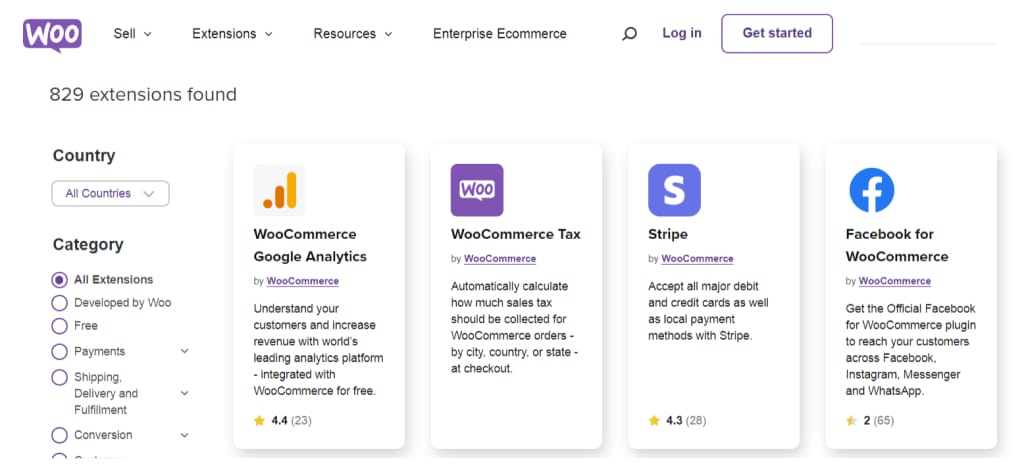
While both WordPress and Magento offer e-commerce functionality, their approaches differ. WordPress utilizes the popular WooCommerce plugin, which seamlessly integrates with the CMS, transforming a WordPress website into a full-fledged online store. It’s easy to use, customizable, and offers a variety of extensions for enhancing your e-commerce capabilities with WooCommerce. However, it may not be as feature-rich as Magento regarding complex e-commerce requirements.

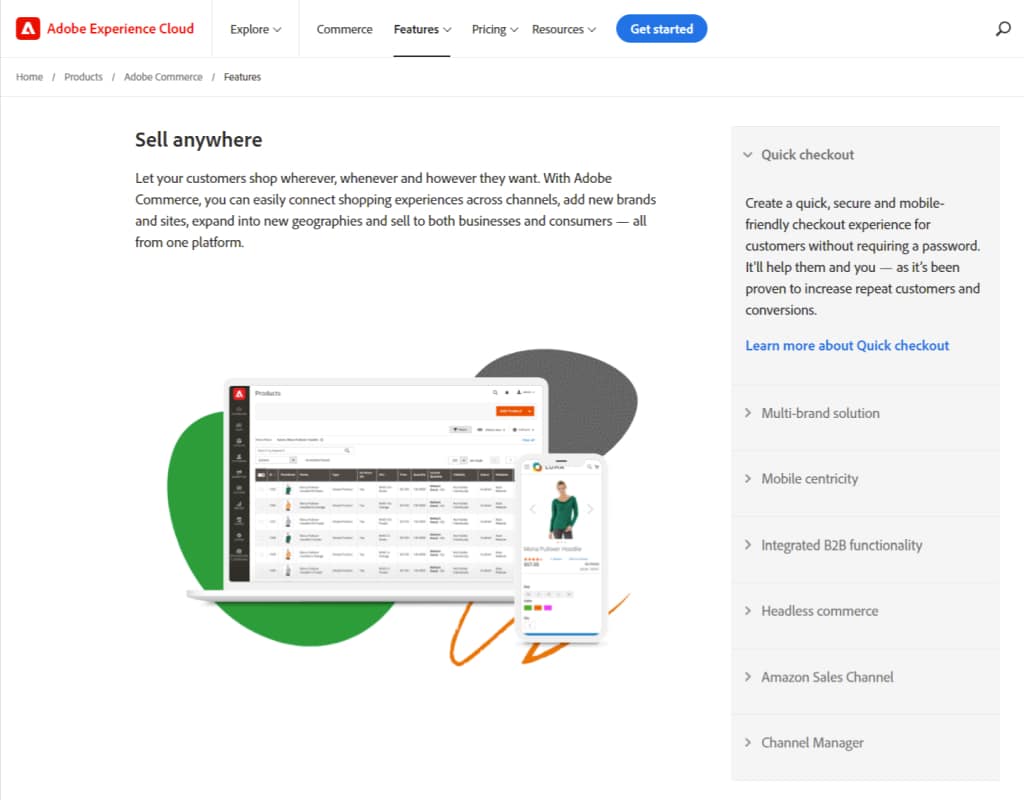
Magento, purpose-built for e-commerce, provides a comprehensive suite of features tailored for online stores. It offers advanced inventory management, multi-store functionality, cross-selling and upselling capabilities, and robust reporting tools. These features make Magento a preferred choice for businesses that require extensive e-commerce functionality and have an enormous product catalog.

Understanding the differences in purpose and target audience, scalability and flexibility, and e-commerce functionality between WordPress and Magento is essential in making an informed decision for your website. Consider your business goals, technical expertise, and the specific requirements of your online presence to determine which CMS is the right fit for you.

Comparing Features and Functionality

When considering WordPress and Magento as content management systems (CMS), it’s essential to compare their features and functionality to determine which platform best suits your needs. This section will explore three key aspects: website design and customization, plugin and extension ecosystem, and SEO and marketing capabilities.

Website Design and Customization

Designing and customizing websites is accessible with WordPress and Magento. WordPress provides a vast collection of themes and templates, allowing you to change your website’s appearance quickly. Customizing these themes further to match your brand’s identity can create a unique online presence. Check out our article on WordPress themes for more information.

For online stores, Magento offers a variety of customizable templates and layouts specifically designed for e-commerce. These templates provide the necessary functionality and design elements to create visually appealing and user-friendly e-commerce websites. However, customization in Magento may require more technical expertise compared to WordPress.

Plugin and Extension Ecosystem

The availability of plugins and extensions dramatically enhances the functionality of both WordPress and Magento. WordPress boasts a vast ecosystem of plugins, allowing users to add various features and extend the capabilities of their websites. From SEO optimization to e-commerce integration, there is a plugin for almost every need. Explore our article on WordPress plugins to find out more.

As an e-commerce-focused platform, Magento offers a robust marketplace of extensions that cater specifically to online store requirements. These extensions provide advanced functionalities such as inventory management, payment gateways, and customer relationship management. However, it’s important to note that Magento extensions are often more expensive than WordPress plugins and may require technical expertise for installation and customization.

SEO and Marketing Capabilities

WordPress and Magento provide solid foundations for implementing SEO strategies and marketing campaigns. WordPress offers a range of SEO plugins that enable you to optimize your website’s content, improve search engine rankings, and track analytics. WordPress has built-in features that make creating and publishing engaging content easy, which is critical to attracting and retaining visitors. Visit our article on WordPress SEO for more insights.

As an e-commerce platform, Magento includes several built-in SEO features that help optimize product pages, URLs, and metadata. It also provides advanced marketing features such as upselling, cross-selling, and promotional pricing options, essential for driving sales. Additionally, Magento offers integrations with popular email marketing tools and analytics platforms to help you track and analyze your marketing efforts.

Both WordPress and Magento can be compared based on these features and functionalities. When deciding, Consider your website requirements, business goals, and technical expertise.

Considerations for Choosing Between WordPress and Magento

When deciding between WordPress and Magento as your content management system (CMS), there are several important considerations to remember. You can make an informed decision based on these factors if you evaluate them. Here are three critical reviews for choosing between WordPress and Magento:

Budget and Resources

One of the first considerations is your budget and available resources. WordPress is known for its affordability and accessibility. It offers a wide range of free and premium themes, plugins, and templates that can be used to create a professional-looking website without breaking the bank. The WordPress community also provides extensive support and resources, making it easier for small businesses with limited resources to get started.

On the other hand, Magento tends to be more resource-intensive in terms of cost and expertise. It is a robust e-commerce platform designed for larger businesses with complex requirements. Magento offers extensive customization options and advanced e-commerce functionalities, but it may require more development, hosting, and ongoing maintenance investment.

Business Goals and Requirements

Understanding your business goals and requirements is crucial when choosing between WordPress and Magento. WordPress is a versatile CMS suited for a wide range of websites, including blogs, portfolios, small business websites, and even e-commerce sites, with the help of plugins like WooCommerce.Using it is simple and easy, with a user-friendly interface.

On the other hand, Magento is specifically tailored for e-commerce businesses. Customer segmentation and inventory management are among its advanced features. Magento may be the better choice if your primary focus is on building a robust online store with complex product catalogs and a seamless shopping experience.

Technical Expertise and Support

Another important consideration is your technical expertise and support. WordPress is renowned for its user-friendly interface, making it accessible to users with little technical knowledge. The platform offers many documentation, tutorials, and forums to help you navigate website development and management challenges.

While Magento provides comprehensive e-commerce capabilities, it requires a more substantial technical understanding. Developing and maintaining a Magento website typically requires advanced coding skills or the assistance of a professional developer. Magento does offer support through its community and official documentation, but it may be more suitable for businesses with a dedicated IT team or the resources to outsource technical support.

You can make a well-informed decision between WordPress and Magento by carefully considering your budget, business goals, and technical expertise. Remember to assess your specific requirements and evaluate how each platform aligns with your long-term goals. Whether you prioritize affordability, flexibility, or advanced e-commerce functionalities, choosing the suitable CMS will set the foundation for your online success.

Conclusion

When choosing between WordPress and Magento, there is no one-size-fits-all answer. Each platform offers strengths and considerations that need to be weighed against your business needs and goals.

WordPress may be the right choice if you are looking for a versatile and user-friendly platform that excels in content management and website design. With its extensive collection of themes, plugins, and templates, you can create a highly customizable and visually appealing website that aligns with your brand. WordPress also offers a website builder that simplifies creating and managing your site. Check out our article on WordPress design for more information.

On the other hand, if your main focus is on e-commerce functionality and scalability, Magento may be the preferred option. Magento provides robust e-commerce features, such as inventory management, product catalogs, and payment gateways, making it ideal for businesses that want to establish an entire online store. However, setting up and maintaining requires more technical expertise and resources. Consider factors like budget, technical expertise, and the size of your business when deciding if Magento is the right fit for you.

Ultimately, choosing between WordPress and Magento depends on thoroughly evaluating your business goals, budget, resources, and technical expertise. If you still have doubts or need further guidance, consulting with a professional web development agency can provide valuable insights tailored to your specific requirements.

Remember, other content management systems are also available, such as Wix, Squarespace, Drupal, and many more. Exploring and comparing different platforms is essential to find the one that best aligns with your business needs. Check out our articles on WordPress vs. Wix, WordPress vs. Squarespace, and WordPress vs. Drupal for further comparisons.

Understanding each platform’s strengths and weaknesses will help you make an informed decision that will serve your business well in the digital age.
WordPress vs Blogger: Which Platform Should You Use for Your Blog?

Choosing the Right CMS for Your Website

A website’s content management system (CMS) should be chosen carefully. A CMS enables you to create, modify, and manage your website’s content without extensive technical knowledge. This section will emphasize the significance of selecting a suitable CMS and provide an overview of two popular options: WordPress and Blogger.

The Importance of Choosing the Right CMS

Selecting the appropriate CMS for your website is crucial as it impacts not only the ease of managing your content but also your site’s overall functionality and scalability. A well-suited CMS ensures you can effectively create, update, and optimize your website, allowing you to focus on your core business objectives.

Moreover, a CMS plays a vital role in website design, customization, search engine optimization (SEO), and user experience. It determines how easily you can add new features, integrate plugins, and adapt your website to meet evolving needs. Therefore, making an informed choice is essential to empower your website and maximize its potential.

An Overview of WordPress and Blogger

WordPress is a widely recognized CMS that powers millions of websites across various industries. It offers comprehensive features, high flexibility, and extensive customization options. A WordPress website can be customized with themes, plugins, and templates. To learn more about WordPress themes, plugins, and templates, check out our article on WordPress themes and plugins.

On the other hand, Blogger is a more straightforward CMS that primarily focuses on blogging. Creating and publishing blog posts is easy with its user-friendly interface. While Blogger may be suitable for individuals looking for a straightforward and hassle-free blogging platform, it has certain limitations and constraints, especially regarding customization and scalability.

To decide which CMS suits your website, it’s essential to compare and evaluate various factors, such as design and customization, SEO capabilities, and scalability. In the following sections, we will explore these aspects in more detail, comparing WordPress and Blogger.

WordPress: The Powerhouse CMS

Regarding content management systems (CMS), WordPress stands out as a powerhouse in the industry. Many website owners choose it because of its features and flexibility. Let’s explore some key aspects that make WordPress a top contender.

Features and Flexibility of WordPress

Website owners can take advantage of a variety of features provided by WordPress. Whether you’re running a small blog, an e-commerce store, or a corporate website, WordPress offers the tools and functionalities to support your goals.

You can create and manage blog posts, pages, media files, and more with WordPress. Its intuitive interface allows you to easily navigate and organize your content, making updating and maintaining your website simple.

Furthermore, WordPress offers extensive customization options, allowing you to personalize the look and feel of your website. You can choose from various themes to give your website a unique and professional appearance.

Customization Options

WordPress goes beyond aesthetics with its customization options. Its flexibility allows you to tailor your website to suit your specific needs. Create a website aligned with your branding by quickly changing the layout, colors, and fonts.

In addition, WordPress offers a wide variety of plugins that can extend its functionality. These plugins cover various purposes, from SEO optimization to e-commerce integration. They enable you to add features and enhance the user experience of your website. To learn more about the vast array of plugins available, check out our article on WordPress plugins.

Plugins and Themes

WordPress boasts a rich ecosystem of plugins and themes contributing to its popularity. The availability of numerous templates allows you to choose a design that suits your website’s niche and style. The templates can be customized to fit your brand and provide a seamless user experience. 

Moreover, the extensive collection of plugins empowers you to transform your website into a feature-rich platform. From search engine optimization (SEO) to social media integration, there’s a plugin for almost any functionality you desire. These plugins can enhance your website’s performance, security, and functionality. For more information on the benefits of using plugins, visit our article on WordPress website builder.

By leveraging the features, customization options, plugins, and themes offered by WordPress, you can create a website that meets your current needs and allows for future growth and scalability. Take the time to explore the possibilities and evaluate how WordPress can empower your website.

Blogger: Simplicity and Ease of Use

In contrast to the feature-rich WordPress, Blogger offers a more straightforward approach to website creation and management. Let’s take a closer look at the features, interface, and limitations of Blogger.

Overview of Blogger’s Features

Blogger provides essential features for creating and maintaining a blog or a basic website. The user-friendly interface makes it easy for beginners to use. With Blogger, you can create and publish blog posts, customize the appearance of your site, and interact with your readers through comments.

Additionally, Blogger provides a selection of templates that can be customized to suit your preferences. While the range of templates is more limited than WordPress, they still offer various options.

User-Friendly Interface

Blogger’s interface is designed to be intuitive and user-friendly. It simplifies creating and publishing content, making it accessible to individuals with limited technical knowledge. The straightforward interface allows users to focus on content creation without being overwhelmed by complex settings and options.

With Blogger, you can easily navigate through the dashboard, manage your posts, and customize the appearance of your site. The user-friendly interface makes updating and maintaining your website easy without requiring extensive technical expertise.

Limitations and Constraints

Blogger offers simplicity and ease of use, but it has limitations. One of the main limitations is the need for more flexibility and customization options compared to WordPress. Blogger provides a limited set of features and templates, which may need to be improved for users who require advanced customization or specific functionalities.

Another constraint of Blogger is the ownership and control of your website. Since Blogger is a hosted platform, your website is owned by Google. You have limited control over the medium and may be subject to Google’s terms and policies.

Furthermore, Blogger has fewer options for extending your website’s functionality than WordPress. While Blogger does support some basic features like adding widgets and gadgets, it needs WordPress’s extensive plugin ecosystem. WordPress provides a vast library of plugins that allow you to enhance your website with various functionalities, such as SEO optimization, social media integration, and e-commerce capabilities.

Considering these limitations and constraints, evaluating your website’s needs and priorities is essential before choosing Blogger as your CMS. If you don’t require advanced customization or extensive functionality, Blogger can be a suitable choice if simplicity and ease of use are your primary concerns.

In the next section, we will compare WordPress and Blogger in terms of design and customization, SEO capabilities, and scalability to help you make an informed decision.

Comparing WordPress and Blogger

When considering a content management system (CMS) for your website, it’s essential to compare the features and capabilities of different platforms. This section will compare WordPress and Blogger regarding design and customization, SEO capabilities, scalability, and growth potential.

Design and Customization

WordPress is known for its extensive design and customization options. With a wide range of themes, plugins, and templates, WordPress allows you to create a highly personalized and visually appealing website. The flexibility of WordPress enables you to customize your site’s appearance, layout, and functionality to align with your brand and meet your specific requirements. You can easily change the look and feel of your website by installing and activating different themes or customizing the CSS code.

On the other hand, Blogger offers more limited design options. While it provides a selection of templates and allows some customization through HTML editing, the range of design possibilities is more restricted than WordPress. Blogger is better suited for users who prefer simplicity and ease of use over extensive design customization.

SEO Capabilities

WordPress has a clear advantage in terms of SEO (Search Engine Optimization). WordPress is built with SEO in mind and offers a range of SEO-specific plugins that can help improve your website’s visibility in search engine rankings. These plugins allow you to optimize your website’s meta tags, generate XML sitemaps, and improve your site’s overall SEO performance. Additionally, WordPress provides greater control over your site’s URL structure, making it easier to create search engine-friendly URLs.

Blogger also includes basic SEO features, such as the ability to customize meta tags and submit sitemaps. However, it needs a more extensive range of SEO plugins and advanced customization options that WordPress offers. If SEO is a significant priority for your website, WordPress is the most suitable choice.

Scalability and Growth Potential

When it comes to scalability and growth potential, WordPress shines. From tiny blogs to large e-commerce sites, WordPress is highly scalable. With its robust content management system, WordPress allows you to quickly manage and organize a vast amount of content. Moreover, the availability of many plugins and a thriving developer community ensures you can continually enhance and expand your website’s functionality as your business grows.

Bloggers, on the other hand, may have limitations when it comes to scalability. It is primarily designed for blogging purposes and may not provide the flexibility and advanced features required for larger, more complex websites.

WordPress offers more outstanding design and customization options, superior SEO capabilities, and enhanced scalability than Blogger. However, choosing between the two ultimately depends on your needs, goals, and resources. Evaluate your website requirements and consider your budget, technical expertise, and long-term goals before making an informed decision. For more information on WordPress and other CMS comparisons, check out our WordPress vs. Wix and WordPress vs. Squarespace articles.

Considerations for Your Website

Before choosing between WordPress and Blogger as your CMS (Content Management System), it’s essential to consider various factors that will impact the success of your website. By carefully evaluating these considerations, you can make an informed decision that aligns with the purpose and goals of your website.

Purpose and Goals of Your Website

The first consideration is to determine the purpose and goals of your website. Are you looking to create a personal blog, an online store, or a professional business website? Understanding the specific requirements of your website will help you assess which CMS is better suited to meet your needs. WordPress offers many themes, plugins, and templates, making it a versatile choice for various website types. On the other hand, Blogger provides a straightforward platform for those seeking simplicity and ease of use.

Budget and Resources

Another crucial consideration is your budget and the resources available to you. WordPress is an open-source CMS, which means it is free to use. However, you may need to invest in additional hosting and domain registration resources. Additionally, if you require professional assistance for customizations or technical support, you may incur costs related to Custom WordPress website development. In contrast, Blogger is a free platform with hosting and a domain name, making it a cost-effective choice for those with limited budgets.

Technical Expertise and Support

Consider your level of technical expertise and the availability of support. WordPress offers a robust community with extensive documentation, CMS tutorials, and active forums, making finding solutions to technical issues easier. Numerous professional developers and agencies also specialize in WordPress, providing expert assistance. As a more straightforward platform, Blogger requires less technical knowledge and provides essential support. However, the level of customization and advanced features may be limited.

By carefully considering the purpose and goals of your website, your budget, and available resources, as well as your technical expertise and the need for support, you can determine which CMS, whether WordPress or Blogger, is the best fit for your website. Remember to weigh the pros and cons, assess your needs and priorities, and ultimately make a decision that empowers your website to succeed.

Making the Decision

After exploring the features and capabilities of WordPress and Blogger, it’s time to make an informed decision based on your needs and priorities. Consider each platform’s pros and cons and evaluate which aligns best with your requirements.

Weighing the Pros and Cons

To make an informed decision, let’s weigh the pros and cons of WordPress and Blogger:

WordPress Pros and Cons

ProsCons
Extensive customization options with a wide range of themes and plugins.Requires more technical expertise for initial setup and
maintenance.
Powerful content management system with a vast array
of features and capabilities.
Self-hosted, which means you need to manage your own hosting and security.
Scalable and adaptable, suitable for small blogs and large websites alike.Additional costs for premium themes and plugins.

Blogger Pros and Cons

ProsCons
Simplicity and ease of use, ideal for beginners or those
looking for a straightforward blogging platform.
Limited customization options compared to WordPress.
Fully hosted by Google, eliminating the need
for separate hosting.
Fewer built-in features and functionalities.
Seamless integration with other Google services.Limited growth potential for larger websites.

Evaluating Your Needs and Priorities

To make the final decision, evaluating your specific needs and priorities is essential. Consider the following factors:

  1. Purpose and Goals: Determine the primary purpose of your website. Are you building a blog, an online store, or a corporate website? Consider the features and capabilities that are crucial for achieving your goals. WordPress offers a broader range of options and flexibility, making it suitable for various websites.
  2. Budget and Resources: Assess your budget and available resources. While both WordPress and Blogger have free options, WordPress may require additional investment for premium themes, plugins, and hosting. On the other hand, Blogger is fully hosted by Google, eliminating the need for separate hosting costs.
  3. Technical Expertise and Support: Evaluate your technical expertise level and support resources’ availability. If you have experience with website development or have access to technical assistance, WordPress can provide you with a robust and customizable platform. However, if you prefer a more straightforward, user-friendly interface with built-in support, Blogger may be more suitable.

Considering these factors and weighing the pros and cons, you can decide on the best CMS for your website. Remember to explore additional resources and seek advice from professionals to ensure you choose the platform that best aligns with your specific needs and goals.

WordPress vs Joomla: A Comprehensive Comparison for Website Builders

Introduction to Content Management Systems (CMS)

Content Management Systems (CMS) are vital in creating and managing websites in the ever-evolving digital landscape. Whether you’re a small business owner, a blogger, or an aspiring entrepreneur, understanding what a CMS is and the importance of choosing the right one is essential for establishing a successful online presence.

What is a Content Management System?

It is software that facilitates creating, modifying, and organizing digital content on a website. It provides a user-friendly interface, allowing individuals with little to no technical expertise to easily manage and update their website’s content.

Utilizing a Content Management System (CMS) empowers you to generate and share diverse content forms, encompassing text, visuals, videos, and beyond. It centralizes all your content in a structured manner, making organizing and retrieving information easier. CMS platforms also offer a variety of themes, plugins, and templates that can be used to customize your website’s design and functionality. CMS provides individuals and businesses with a flexible platform for establishing an online presence without extensive coding knowledge. Check out our article on WordPress themes to explore the different design options available for WordPress.

Importance of Choosing the Right CMS

Selecting the suitable CMS is crucial as it directly impacts your website’s performance, user experience, and scalability. Here are a few reasons why choosing a suitable CMS is essential:

  1. Ease of Use: A user-friendly CMS simplifies managing and updating your website, allowing you to focus more on creating valuable content. WordPress, for example, is known for its intuitive interface and user-friendly features. 
  2. Customization and Flexibility: A robust CMS offers a wide range of customization options, empowering you to tailor your website to your needs and brand identity. WordPress provides an extensive collection of plugins and widgets, enabling you to add functionality and enhance the user experience. Discover more about WordPress plugins in our article on WordPress plugins.
  3. Community Support and Resources: A strong and active community of users and developers is a significant advantage when using a CMS. It ensures you can access support, documentation, tutorials, and updates, helping you troubleshoot issues and stay up-to-date with the latest advancements. Particularly, WordPress has a large and vibrant community that constantly contributes to its growth. 
  4. Security and Updates: A trusted content management system (CMS) consistently issues updates and patches to safeguard your website against vulnerabilities and cyber threats. WordPress, for instance, has dedicated security teams and a robust update system that ensures the platform remains secure and reliable. Discover more about WordPress security in our article on WordPress security.

Choosing the suitable CMS is a decision that should be based on careful consideration of your specific needs, priorities, and long-term goals. Understanding the features, strengths, and weaknesses of different CMS options, such as WordPress and Joomla, can help you make an informed decision. Explore our articles on WordPress vs. Wix, WordPress vs. Squarespace, and more to compare different CMS platforms and find the one that aligns with your requirements.

WordPress: An Overview

When considering content management systems (CMS), WordPress stands out as one of the most popular and widely used platforms. Individuals and businesses increasingly use WordPress to create and manage their online presence. WordPress has a user-friendly interface and a wide range of features.

Features and Capabilities of WordPress

WordPress offers many features and capabilities that make it a robust CMS. Here are some key highlights:

  1. Ease of Use: WordPress boasts a user-friendly interface, making it accessible to beginners and experienced users. It provides a simple yet intuitive dashboard that allows users to navigate and manage their website easily.
  2. Customization: WordPress offers a vast selection of themes and templates that enable users to create visually appealing websites without any coding knowledge. These themes can be customized to match individual preferences and branding. Explore various WordPress themes and templates to enhance your website’s look and feel.
  3. Plugins: One of the major strengths of WordPress is its extensive library of plugins. These plugins add functionality and expand the capabilities of your website. Whether you need to optimize your site for search engines, enhance security, or integrate e-commerce features, a plugin is available to meet your needs. Discover a wide range of WordPress plugins to improve your website’s functionality.
  4. Website Builder: With its block-based editor, Gutenberg, WordPress offers a powerful and flexible website-building experience. This drag-and-drop editor simplifies creating and arranging content on your web pages. Get started with the WordPress website builder to design your website with ease.

Strengths and Weaknesses of WordPress

While WordPress has numerous advantages, it’s essential to consider its strengths and weaknesses:

Strengths:

  • Popularity and Community Support: WordPress enjoys a large, active community of developers and users. This means a wealth of resources, tutorials, and support is available to help you navigate any challenges.
  • Scalability: WordPress is highly scalable, allowing you to start small and expand your website as your needs grow. It can handle everything from simple blogs to complex e-commerce sites.
  • Flexibility: With its wide range of themes, plugins, and customization options, WordPress provides the flexibility to create a website that matches your unique requirements.

Weaknesses:

  • Security: As a popular CMS, WordPress can be a target for hackers. A website can be significantly enhanced in terms of security if you implement best practices and use security plugins. Learn more about WordPress security to protect your website from vulnerabilities.
  • Learning Curve: While WordPress is relatively user-friendly, there can still be a learning curve, especially for beginners. However, with abundant tutorials and guides available, mastering WordPress is within reach for most users.

By understanding WordPress’s features, capabilities, and strengths, you can make an informed decision when choosing a CMS for your website. Consider your specific needs and priorities to determine whether WordPress is the right fit for you.

Joomla: An Overview

Joomla is another popular option when considering content management systems (CMS). Joomla is an open-source CMS offering various features and capabilities for building and managing websites. Let’s look at what Joomla offers and its strengths and weaknesses.

Features and Capabilities of Joomla

Joomla provides comprehensive features that make it a versatile CMS for various websites. Some key features and capabilities of Joomla include:

  • User-friendly interface: Joomla offers a user-friendly interface, allowing users to manage their website content easily. It provides a structured and intuitive backend, making it accessible for beginners and experienced users.
  • Flexible content management: Joomla offers robust content management capabilities, allowing users to organize and categorize their content effectively. It supports creating multiple content types, such as articles, blog posts, and multimedia content.
  • Powerful templating system: Joomla’s templating system allows users to customize the appearance of their website easily. A wide range of Joomla templates can be customized to suit individual preferences.
  • Extensibility through extensions: Many Joomla extensions have been developed by a thriving community of developers. These extensions add functionalities to the core CMS, enabling users to enhance their website’s capabilities and meet specific requirements.
  • Multilingual support: Joomla has built-in multilingual support, allowing users to create websites in multiple languages. International businesses and organizations will significantly benefit from this feature.

Strengths and Weaknesses of Joomla

As with any CMS, Joomla has its own set of strengths and weaknesses. Understanding these can help you determine if Joomla is the right choice for your website. Here are some notable strengths and weaknesses of Joomla:

Strengths:

  • Advanced user management: Joomla provides advanced user management capabilities, making it suitable for websites that require complex user hierarchies and access levels.
  • Robust e-commerce functionality: Joomla offers a range of e-commerce extensions, making it a suitable choice for creating online stores and managing product catalogs.
  • Scalability: Joomla is highly scalable and can easily handle large and complex websites.

Weaknesses:

  • Learning curve: Joomla has a steeper learning curve compared to other CMS options. It may require more time and effort for beginners to become proficient in using Joomla.
  • Limited theme options: Although Joomla provides a range of templates, it’s worth noting that there may be a more limited selection compared to some other CMS platforms.
  • Plugin compatibility: Some Joomla plugins may need to be regularly updated or supported, which could impact their compatibility with the latest versions of Joomla.

By understanding Joomla’s features, capabilities, strengths, and weaknesses, you can decide whether it aligns with your website’s requirements. Consider your website’s complexity, target audience, and specific functionalities needed to determine if Joomla is the suitable CMS for you.

Comparing WordPress and Joomla

Regarding WordPress vs. Joomla, both content management systems (CMS) have strengths and weaknesses. Let’s compare them regarding ease of use, user-friendliness, customization and flexibility, community support and resources, and security and updates.

Ease of Use and User-Friendliness

WordPress is widely known for its user-friendly interface and intuitive design. It prioritizes simplicity, making it accessible to users of all skill levels. With its extensive library of themes and plugins, WordPress offers a wide range of customization options without requiring extensive technical knowledge. Additionally, it provides a visual editor that allows users to create and edit content easily.

However, Joomla has a steeper learning curve and may better suit users with some technical expertise. Although its features and functionality are robust, its interface could be more straightforward for beginners.

Customization and Flexibility

WordPress excels in terms of customization and flexibility. It offers thousands of free premium themes, allowing users to create visually stunning websites tailored to their needs. With plugins, users can add features such as contact forms, e-commerce capabilities, and more to the site. WordPress provides a wide range of themes and plugins to enhance the design and functionality of your website.

As with WordPress, Joomla offers a variety of templates and extensions. However, Joomla provides a robust framework for more complex websites and advanced functionality, making it a viable choice for larger or more intricate projects.

Community Support and Resources

The WordPress community is large and active. This vibrant community ensures continuous development, frequent updates, and many support resources. WordPress developers can access tutorials and forums for answers to their questions. The extensive WordPress CMS tutorials available online make it easier for users to navigate and utilize the platform effectively.

Joomla also has a supportive community, although smaller than the WordPress community. Users can find assistance through forums and community-driven resources. A robust support network and abundant help make WordPress popular for beginners.

Security and Updaoth WordPress and Joomla prioritize security and regularly release updates to address vulnerabilities and improve system performance. However, WordPress may be a more frequent target for potential security threats due to a more extensive user base. It is crucial to keep WordPress websites up to date and implement security measures, such as using reliable plugins and following best practices to ensure a secure website. WordPress security is an essential aspect that should be taken seriously to protect your online presence.

Joomla also provides regular updates to address security issues and enhance the platform’s stability. While Joomla’s security measures are robust, it is essential to stay vigilant and follow recommended security practices to maintain the security of your Joomla website.

These factors indicate that both WordPress and Joomla have strengths and weaknesses. When choosing between the two, you must consider your specific needs, technical expertise, and the customization required for your website. By identifying your priorities and evaluating the features of each CMS, you can make an informed decision that aligns with your goals.

Which CMS is Right for You?

When deciding between WordPress and Joomla as your content management system (CMS), you must consider several factors to make an informed decision. Here are some critical considerations for choosing a CMS:

Identifying Your Needs and Priorities

Before selecting a CMS, it’s crucial to identify your specific needs and priorities. Consider the following questions:

  • What type of website do you need? Is it a blog, an e-commerce site, or a portfolio?
  • Do you have any specific features or functionality requirements?
  • How important is ease of use and user-friendliness to you?
  • Are you looking for a CMS with a large community and ample resources for support?

Understanding your needs and priorities allows you to narrow your options and determine which CMS best aligns with your requirements.

Considerations for Choosing a CMS

When comparing WordPress and Joomla, there are a few essential considerations to keep in mind:

  1. Ease of Use and User-Friendliness: Its user-friendly interface and intuitive navigation make it an excellent choice for beginners. On the other hand, Joomla may have a steeper learning curve and require some technical expertise.
  2. Customization and Flexibility: A wide range of themes and plugins are available for WordPress and Joomla. However, WordPress has a more extensive selection of themes and plugins, giving you more flexibility in design and functionality.
  3. Community Support and Resources: A wide variety of resources, tutorials, and forums are available for WordPress users. Joomla also has a supportive community, which may not be as extensive as WordPress.
  4. Security and Updates: WordPress and Joomla regularly release updates to enhance security and fix vulnerabilities. However, WordPress has a more comprehensive user base, which can make it a more attractive target for hackers. It is crucial to prioritize security measures and keep your CMS and plugins up to date.

Making an Informed Decision

Choosing the suitable CMS ultimately depends on your specific needs, preferences, and level of expertise. WordPress may be the better choice if you value ease of use, a large community, and a vast selection of themes and plugins. On the other hand, if you require more advanced functionality and have some technical knowledge, Joomla could be a suitable option.

To delve deeper into the comparison between WordPress and other CMS platforms, check out our articles on WordPress vs. Wix, WordPress vs. Squarespace, and WordPress vs. Drupal. These resources can help you decide based on your specific requirements.

Remember, selecting a suitable CMS is crucial in building a successful website. Take the time to research, evaluate your needs, and consider the pros and cons of each platform to ensure your website meets your goals and expectations.

WordPress vs Shopify – Which CMS Powers Your Online Store?

Introduction to WordPress and Shopify

Content management systems (CMS) are crucial in website creation and management. A user-friendly interface makes it easy for individuals and businesses to create, edit, and manage their website content. Two popular CMS options are WordPress and Shopify. While both are practical tools for building websites, they have distinct features and functionalities that cater to different needs.

Overview of Content Management Systems (CMS)

Users can create, manage, and modify website content with a content management system. Centralizing digital content makes it easier for individuals and businesses to maintain an online presence.

CMS platforms like WordPress and Shopify offer many features, including website customization, content creation and management, e-commerce functionality, and search engine optimization (SEO) capabilities. Website development is simplified, allowing users to focus on creating engaging content and providing seamless user experiences.

Introduction to WordPress

WordPress is a versatile and widely-used CMS that powers millions of websites worldwide. As an open-source platform, its source code is freely available and can be modified as needed. Themes, plugins, and templates available on WordPress allow users to customize their websites to reflect their unique brand. Both beginners and experienced developers can use its intuitive interface and comprehensive documentation.

WordPress is known for its flexibility and scalability. It is used for many websites, from simple blogs and portfolios to complex e-commerce stores and corporate websites. Its robust website builder capabilities enable users to create and manage websites easily. 

Introduction to Shopify

Shopify is a CMS specifically designed for e-commerce websites. It provides comprehensive tools and features to help businesses establish and manage online stores. Shopify offers a user-friendly interface that simplifies building and customizing e-commerce websites. It includes built-in e-commerce functionality, such as inventory management, payment gateways, and order tracking.

Shopify is renowned for its seamless integration with various third-party applications and services, allowing businesses to enhance their online stores with additional features. It offers a range of themes and templates tailored explicitly for e-commerce, enabling users to create visually appealing and functional online stores. 

Understanding the basics of WordPress and Shopify is the first step in determining which CMS best suits your needs. In the following sections, we will delve deeper into the features and functionalities of these platforms, exploring aspects such as website customization, e-commerce capabilities, cost, ease of use, SEO, and support. This will equip you with the necessary knowledge to make an informed decision for your business.

Comparing WordPress and Shopify

WordPress and Shopify are popular content management systems (CMS) for websites and e-commerce stores. Each platform offers unique features and advantages. This section will compare these two CMS platforms regarding website customization and flexibility, e-commerce functionality, and cost and pricing models.

Website Customization and Flexibility

WordPress is renowned for its extensive customization options. With thousands of themes, templates, and plugins, users can tailor their website design to suit their needs. Whether you’re a small business owner or an individual blogger, the flexibility of WordPress allows for endless creative possibilities. Additionally, the open-source nature of WordPress enables developers to create custom WordPress website and build upon the existing framework. For more information on WordPress themes and plugins, visit our articles on wordpress themes and wordpress plugins.

On the other hand, Shopify provides a user-friendly interface that simplifies website customization. While the options may not be as extensive as WordPress, Shopify offers a collection of professionally designed themes optimized for e-commerce. These themes can be customized to match your brand aesthetic. Shopify also provides a dedicated website builder that allows users to modify their website’s appearance and layout easily. Shopify may be a suitable choice if you’re looking for a hassle-free website setup. 

E-commerce Functionality

Regarding e-commerce functionality, Shopify is specifically designed for online stores. You can manage product listings, inventory, orders, and payments with it. Businesses seeking a quick way to establish an online store will find Shopify’s built-in e-commerce capabilities ideal. However, if you want to add e-commerce functionality to a WordPress website, you can integrate plugins such as WooCommerce. For further information, please read our article on wordpress vs. WooCommerce.

Cost and Pricing Models

WordPress has no licensing fees since it is a free and open-source platform. You must purchase a domain name and web hosting service to make your website live. In addition, premium themes and plugins may incur additional fees. The overall cost of a WordPress website will depend on your specific needs and the hosting provider you choose. For more details on the cost of WordPress website development, please visit wordpress website development.

Shopify operates on a subscription-based pricing model. It offers various plans with different features and pricing tiers, allowing businesses to choose the most suitable option based on their budget and requirements. Shopify’s pricing includes hosting, security, and technical support. While this eliminates the need for separate hosting and additional costs, it’s essential to consider the ongoing subscription fees when evaluating the cost of using Shopify.

When comparing WordPress and Shopify in terms of cost, evaluating your long-term goals and budget constraints is crucial. WordPress may offer a more cost-effective solution for small businesses or individuals with limited resources. However, Shopify provides an all-in-one package that simplifies the setup and maintenance.

By considering factors such as website customization, e-commerce functionality, and cost, you can decide between WordPress and Shopify based on your specific needs and goals. Remember to assess your requirements, research available options, and weigh the pros and cons of each platform before making a final choice.

Ease of Use and User-Friendliness

When comparing WordPress and Shopify, it’s essential to consider both platforms’ ease of use and user-friendliness. This section will explore three critical aspects: website setup and configuration, content creation and management, and design and themes.

Website Setup and Configuration

Setting up a website can be crucial for any business or individual. WordPress offers a straightforward installation process, especially if you choose a managed WordPress hosting provider. Many hosting providers offer one-click WordPress installations, simplifying the setup process for users.

On the other hand, Shopify is a fully hosted platform, so the setup process is even more streamlined. Users can sign up for a Shopify account and start their online store immediately. With Shopify, you won’t have to worry about technical aspects, including hosting, security, and updates.

Content Creation and Management

Content creation and management are essential components of any website. WordPress excels in this area with its intuitive content management system (CMS). Users can easily create, edit, and publish content using the WordPress dashboard. The platform offers a powerful editor with a familiar interface, allowing users to format text, insert images, and embed media effortlessly. WordPress also provides many plugins and themes for creating and managing content. 

Shopify, on the other hand, is primarily focused on e-commerce functionality. While it provides a blogging feature, it is less robust than WordPress’s content creation and management capabilities. Shopify’s blogging capabilities are designed to support e-commerce websites, providing essential elements for publishing articles and optimizing them for search engines. However, if content creation and management are a top priority for your website, WordPress offers a more comprehensive solution.

Design and Themes

The visual appearance of a website is crucial in creating a positive user experience. Both WordPress and Shopify offer a wide range of themes and templates to choose from. WordPress boasts a vast library of free and premium themes, allowing users to customize the design of their website according to their needs and preferences. These highly customizable themes can be modified using the WordPress Customizer or additional page builders. 

Similarly, Shopify provides a selection of professionally designed themes that cater to e-commerce websites. Users benefit from seamless browsing thanks to responsive and mobile-friendly themes. Shopify themes can be customized using the built-in theme editor or editing the theme’s code directly.

Both platforms offer design flexibility, but WordPress provides a broader range of options, including themes for non-e-commerce websites. Furthermore, WordPress offers customization possibilities through plugins and page builders, allowing users to create unique and visually appealing websites.

In terms of ease of use and user-friendliness, Shopify has an advantage due to its streamlined setup process and focus on e-commerce functionality. However, WordPress offers greater flexibility and customization options, making it a popular choice for users who prioritize content creation, management, and design versatility. Ultimately, the decision between WordPress and Shopify will depend on your business’s specific needs and goals.

SEO and Marketing Capabilities

When comparing WordPress and Shopify, it’s essential to consider their respective SEO and marketing capabilities. These factors are crucial in driving traffic to your website and promoting your business.

Search Engine Optimization (SEO)

Both WordPress and Shopify provide solid foundations for implementing effective SEO strategies. With WordPress, you have more flexibility and control over your SEO efforts. You can utilize various WordPress SEO plugins to optimize meta tags, titles, and URLs, generate XML sitemaps, and control your site’s overall structure. WordPress allows easy integration with third-party tools and plugins to enhance your SEO efforts.

On the other hand, Shopify also offers built-in SEO features that allow you to optimize your website for search engines. You can edit meta tags, URLs, and alt tags for images, and Shopify automatically generates sitemaps for your online store. However, the level of customization and control may be more limited than WordPress.

Blogging and Content Marketing

WordPress has long been known for its superior blogging capabilities. It started as a blogging platform and has evolved into a powerful content management system. With its intuitive interface and extensive blogging features, WordPress provides a user-friendly environment for creating, managing, and promoting blog content. You can easily customize the design of your blog, organize your posts into categories and tags, and engage with your readers through comments and social sharing.

Shopify, on the other hand, offers basic blogging functionality. While you can create and manage blog posts, the features and customization options are more limited than WordPress. WordPress may be better if content marketing and blogging are central to your business strategy.

Integration with Marketing Tools

Both WordPress and Shopify offer integration with various marketing tools to streamline your marketing efforts. WordPress provides a wide range of plugins that allow you to connect your website with email marketing services, social media platforms, analytics tools, and more. This flexibility enables you to create comprehensive marketing campaigns and track their effectiveness.

On the other hand, Shopify has built-in marketing features that make it easy to manage your marketing efforts within the platform. You can create and track marketing campaigns, launch promotions, and integrate with popular email marketing providers. While the options may be more limited than WordPress, Shopify provides a convenient, all-in-one solution for managing your online store and marketing activities.

Ultimately, the choice between WordPress and Shopify regarding SEO and marketing capabilities depends on your specific needs and goals. WordPress may be better if you prioritize flexibility, customization, and extensive marketing features. However, Shopify might be the right choice if you prefer a more streamlined approach and an all-in-one solution for your online store and marketing efforts. Consider your resources, business objectives, and the level of control you require when deciding.

Support and Community

When choosing a content management system (CMS) like WordPress or Shopify, it’s essential to consider the support and community behind each platform. A robust support system and an active community can greatly benefit users. Let’s explore the customer support, developer community, resources, updates, and security for both WordPress and Shopify.

Customer Support

WordPress boasts a large and helpful community, making finding answers to common questions and issues easy. While WordPress.org doesn’t offer direct customer support, numerous forums, tutorials, and documentation are available. Additionally, many WordPress themes and plugins have support channels providing specific assistance to those products.

In contrast, Shopify offers 24/7 customer support via phone, email, and live chat. Their dedicated support team can help users with any technical or platform-related queries. This direct support level can be valuable, especially for those who prefer immediate assistance.

Developer Community and Resources

WordPress has a vast and ever-growing developer community. This means that a wide range of resources, plugins, themes, and templates are available to users. The community contributes to developing new features, security patches, and updates, ensuring the platform remains robust and up-to-date. The availability of a wide range of plugins and themes allows users to customize their websites to meet their specific needs. You can explore WordPress themes, plugins, and website design more in our articles on WordPress themes, WordPress plugins, and WordPress design.

Shopify also has an active developer community and provides comprehensive documentation and resources for developers. This allows developers to create custom themes, plugins, and integrations to enhance the functionality of Shopify stores. However, Shopify’s ecosystem focuses more on e-commerce so that the available resources may be more tailored to that niche.

Updates and Security

The security of users’ websites is a priority for WordPress and Shopify. WordPress regularly releases updates to address vulnerabilities, improve performance, and introduce new features. Users can easily update their WordPress installations with just a few clicks. Additionally, various security plugins are available to enhance the security of WordPress websites. You can learn more about WordPress security in our article on WordPress security.

As a hosted platform, Shopify takes care of updates and security for its users. This means that updates are automatically applied to the forum, eliminating users needing to update their websites manually. Shopify also employs robust security measures to protect sensitive customer data and ensure secure transactions.

When it comes to support and community, both WordPress and Shopify have their strengths. WordPress offers a vast community and numerous resources, while Shopify provides direct customer support and a focused developer community. When deciding what level of support and help will work best for your business, consider your specific needs and preferences.

Making the Right Choice for Your Business

When choosing between WordPress and Shopify, it’s essential to assess your needs and goals and consider the resources available to you. By carefully evaluating these factors, an informed decision aligned with your business needs can be achieved.

Assessing Your Needs and Goals

Start by determining the specific needs and goals of your business. Consider the type of website you want to create and the features and functionalities you require. If you’re primarily focused on e-commerce, Shopify may be a better fit as it offers a robust and specialized platform for online stores. On the other hand, if you’re looking for a versatile content management system (CMS) that allows for more flexibility and customization, WordPress might be the right choice.

Additionally, think about the scalability of your business. If you anticipate significant future growth and expansion, choosing a platform to accommodate these changes is essential. WordPress and Shopify offer scalability, but WordPress provides more flexibility and options for customization.

Considering Your Resources

Consider the resources available to you, such as time, budget, and technical expertise. WordPress is an open-source platform, which means it’s free to use, but you’ll need to invest in hosting and domain registration. It also requires more technical know-how to set up and manage, especially if you opt for self-hosted WordPress. However, there are many resources available, such as WordPress themes and plugins, that can simplify the process.

On the other hand, Shopify is a hosted solution that provides an all-in-one package, including hosting, security, and support. This can be advantageous for those with limited technical knowledge or who prefer a more hands-off approach to website management. However, it’s essential to consider the cost of Shopify plans, transaction fees, and additional expenses for premium themes and apps.

Final Thoughts on WordPress vs. Shopify

In conclusion, WordPress and Shopify are potent platforms with strengths and advantages. WordPress offers greater flexibility and customization options, making it suitable for various websites, from blogs to complex e-commerce stores. On the other hand, Shopify specializes in e-commerce and provides a user-friendly interface, making it ideal for those who prioritize simplicity and convenience.

Ultimately, the choice between WordPress and Shopify depends on your needs, goals, and resources. Take the time to thoroughly evaluate both platforms, consider your long-term plans, and weigh the pros and cons of each. Whether you choose WordPress or Shopify, remember that ongoing support and maintenance are essential for the success of your website.

WordPress vs Drupal: The Battle of Customization and Flexibility

Understanding Content Management Systems (CMS)

Before diving into the comparison between WordPress and Drupal, it’s essential to clearly understand what a Content Management System (CMS) is and why choosing the suitable CMS is crucial for your business.

What is a CMS?

CMS software applications allow users to create, manage, and modify digital content without extensive technical expertise. A user-friendly interface simplifies the process of publishing, organizing, and updating content. CMSs make adding and editing text, images, videos, and other multimedia elements easy for content creators and website owners.

Users can design and customize their websites with the help of CMS platforms, which offer a variety of features and functionalities. These features often include built-in templates, plugins, and themes that simplify the design and development. Some popular CMS platforms include WordPress, Drupal, Joomla, and others.

Importance of Choosing the Right CMS

In order to establish a successful online presence, it is crucial that a suitable CMS is chosen. The CMS you choose will significantly impact your website’s overall performance, flexibility, and scalability. Here are a few key reasons why choosing a suitable CMS is essential:

  1. Ease of Use: A user-friendly CMS allows individuals with little technical expertise to manage and update their websites efficiently. This eliminates the need for constant reliance on web developers or designers, saving time and money.
  2. Customization Options: You should be able to customize your website according to your unique requirements. You can create a visually appealing and functional website using a CMS that provides a variety of themes, templates, and plugins. Check out our article on WordPress themes and WordPress plugins for more information.
  3. Community Support and Resources: A strong and active community of users and developers is valuable for troubleshooting issues, seeking advice, and staying updated with the latest trends and updates. A CMS with a large and supportive community, like WordPress, ensures that you have access to a wealth of knowledge and resources.
  4. Scalability and Performance: Your website needs to scale as your business grows. Choosing a CMS that can handle increased traffic, content, and functionality is vital. A scalable CMS like WordPress allows you to expand your website without compromising performance or user experience. Learn more about WordPress scalability in our article.

By considering these factors, you can select a CMS that meets your business needs. In the following sections, we will compare WordPress and Drupal based on various criteria to help you determine which CMS best fits your specific requirements.

WordPress: A Powerful CMS

When choosing a content management system (CMS), WordPress stands out as one of the most popular and influential options available. With its user-friendly interface, extensive customization capabilities, and a vast library of themes and plugins, WordPress has become the go-to choice for individuals and businesses.

Overview of WordPress

WordPress is an open-source CMS that was initially developed as a blogging platform. Over time, it has evolved into a versatile system that can create various websites, from simple blogs to complex e-commerce stores and corporate websites. Its flexibility and scalability make it a preferred choice for businesses of all sizes.

One of the critical strengths of WordPress is its ease of use. Individuals with minimal technical expertise can navigate the WordPress dashboard and build their website. Using the intuitive interface, users can create and manage content, add images and multimedia, and customize the appearance of their sites. Thousands of themes and plugins also enable users to tailor their websites to their needs.

Key Features of WordPress

WordPress offers a plethora of features that contribute to its popularity and versatility. Some of the key features include:

  • Customizability: With WordPress, you have complete control over the design and functionality of your website. Utilize the extensive theme and template library to create a visually appealing website. You can further enhance the functionality of your site by utilizing a wide range of plugins. You can hire a custom WordPress web design company to design your
  • SEO-friendly: Search engine optimization (SEO) is built into WordPress. Various SEO plugins and a clean, organized code structure enable you to optimize your website for search engines. You can increase your site’s visibility and organic traffic this way.
  • Scalability: Whether you’re starting with a simple blog or planning to expand your website into a full-fledged e-commerce store, WordPress can accommodate your needs. Its scalability allows you to add new features and functionalities as your business grows. To explore the scalability options of WordPress, visit our article on WordPress scalability.
  • Community support: WordPress boasts a large and active community of developers, designers, and users. This vibrant community provides ongoing support, regular updates, and a wealth of resources for troubleshooting and enhancing your WordPress website. 

WordPress’s extensive features and user-friendly interface make it an ideal CMS for individuals and businesses looking to establish a strong online presence. However, you should consider your specific needs and requirements before making a final decision. To learn more about the factors to consider when choosing a CMS, proceed to the next section on Considerations for Choosing a CMS.

Drupal: Another Contender

In content management systems (CMS), Drupal is a strong contender alongside WordPress. Drupal offers a robust and flexible platform for building and managing various sizes and complexities of websites.

Overview of Drupal

Drupal is an open-source CMS that has gained popularity for its scalability and versatility. It is known for its ability to handle large and complex websites, making it a preferred choice for organizations with extensive content management needs. Drupal’s flexibility allows developers to create highly customized websites tailored to specific requirements.

With a strong focus on security, Drupal has built-in features and modules that help protect websites from vulnerabilities. Multilingual support makes it an ideal choice for businesses targeting global markets.

Key Features of Drupal

  1. Content Management: Drupal offers a powerful content management system that allows users to create, organize, and publish content easily. It provides a flexible content architecture, allowing content types, fields, and taxonomies to be customized.
  2. Customization and Flexibility: Drupal’s modular architecture enables developers to create highly customized websites. It offers a vast library of modules, themes, and templates that can be easily integrated and customized to meet specific design and functionality requirements.
  3. Scalability and Performance: Drupal is well-known for its ability to handle high traffic and large volumes of content. It is designed to scale effortlessly, making it suitable for websites that experience exponential growth. With proper optimization and caching strategies, Drupal can deliver excellent performance.
  4. Community and Support: Developers, designers, and users actively contribute to the continuous improvement of Drupal. The community provides extensive support, documentation, and resources, making it easier for users to troubleshoot issues and enhance their Drupal websites.
  5. Security: Drupal prioritizes safety and has a robust security infrastructure. It regularly releases security updates and patches to protect websites from vulnerabilities. Additionally, Drupal’s access control and permission system allows administrators to manage user roles and permissions effectively.

When considering Drupal as a CMS option, assessing your business needs and requirements is essential. Understanding the technical expertise available within your team and the complexity of your website project will help inform your decision. 

In the next section, we will compare WordPress and Drupal across various factors, including ease of use, customization options, community support, and scalability, to help you decide on the most suitable CMS for your needs.

Comparing WordPress and Drupal

Regarding choosing a content management system (CMS), two popular options are WordPress and Drupal. Both platforms have their strengths and features that cater to different needs. Let’s compare these CMSs’ ease of use, customization options, community support and resources, and scalability and performance.

Ease of Use

WordPress is widely known for its user-friendly interface and intuitive design. With its user-friendly interface, users can easily create and manage content, add media, and customize their websites. Its easy-to-use setup process makes it accessible even for users with limited technical knowledge. WordPress also offers a vast library of plugins and themes, making it even easier to use. Explore our collection of WordPress themes and plugins to see the customization possibilities.

On the other hand, Drupal has a steeper learning curve compared to WordPress. Advanced features and customization options require more technical expertise to use. While Drupal provides robust functionality for complex websites and enterprise-level projects, it may need to be more user-friendly for beginners or those with limited technical skills.

Customization Options

In terms of customization, both WordPress and Drupal offer extensive options. WordPress boasts a vast collection of themes and templates, allowing you to quickly change your website’s look and feel. These themes are designed to cater to various industries and niches, providing flexibility in design. Please take a look at our selection of WordPress templates for inspiration.

You can also customize your Drupal website’s appearance with various themes and templates. However, Drupal’s strength lies in handling complex and highly customizable websites. It offers advanced customization options and allows developers to create unique and intricate designs, making it ideal for large-scale projects or websites that require extensive customization.

Community Support and Resources

WordPress and Drupal have active and supportive communities contributing to their growth and development. WordPress has a vast and diverse community of developers, designers, and users who actively share their knowledge and expertise. This results in many resources, tutorials, and forums where users can seek assistance and guidance. 

Drupal, too, has a dedicated community that provides support and resources to users. The Drupal community is known for its technical expertise and offers comprehensive documentation, forums, and ongoing development efforts. This community-driven support ensures that users can find assistance when needed.

Scalability and Performance

WordPress and Drupal can handle websites of various sizes and complexities. WordPress is often favored for its scalability, as it can efficiently manage websites ranging from simple blogs to e-commerce platforms. With proper optimization and hosting, WordPress websites can handle high-traffic loads without compromising performance. It is essential to consider factors such as WordPress security and scalability when planning for growth.

On the other hand, Drupal is renowned for its scalability and performance capabilities. It is designed to handle large and complex websites with heavy traffic. Drupal’s modular architecture and robust framework make it an excellent choice for enterprise-level projects where scalability and performance are crucial.

When deciding between WordPress and Drupal, it is essential to consider your specific business needs, technical expertise, and long-term goals. These factors will help you determine which CMS best aligns with your requirements. Your website can meet your unique needs and provide seamless user interaction with a suitable CMS.

Making the Right Decision

When choosing the perfect Content Management System (CMS) for your business, there are several considerations to remember. The most critical aspect of choosing a CMS is to assess your needs and make an informed choice based on your goals and business requirements.

Considerations for Choosing a CMS

Before diving into the specifics of WordPress and Drupal, evaluating your unique needs is essential. Ask yourself the following questions:

  1. What are your website goals? Consider whether you need a simple blog or a complex e-commerce platform. Understanding the purpose and scope of your website will help guide your CMS selection.
  2. What level of technical expertise do you have? Assess your team’s technical skills and determine whether you require a CMS that is beginner-friendly or one that offers advanced customization options.
  3. What is your budget? Consider the financial resources for CMS implementation, ongoing maintenance, and potential future scalability.
  4. Do you require specific features or functionality? Identify the must-have features your website needs, such as e-commerce capabilities, multilingual support, SEO optimization, or integration with other systems.
  5. What level of support do you need? Evaluate the level of technical support and resources you require, including the availability of documentation, community forums, and professional assistance.

Assessing Your Business Needs

Once you clearly understand your requirements, it’s time to evaluate how well WordPress and Drupal align with your business needs. Consider the following factors:

  1. Ease of Use: Due to its easy-to-use interface, WordPress is accessible to both beginners and non-technical users. On the other hand, Drupal requires a steeper learning curve and is better suited to developers.
  2. Customization Options: Both WordPress and Drupal offer extensive customization capabilities. However, Drupal provides more flexibility and scalability for complex and enterprise-level websites, while WordPress excels in simplicity and provides a vast library of themes, plugins, and templates for customization.
  3. Community Support and Resources: WordPress boasts a large and active community, translating to a wealth of resources, tutorials, and user support. Drupal has a dedicated community, but its user base is smaller than WordPress.
  4. Scalability and Performance: Drupal is known for its scalability and ability to handle large, complex websites with high traffic. WordPress, while also scalable, may require additional optimization measures to ensure optimal performance for more significant sites.

Making an Informed Choice

Ultimately, the decision between WordPress and Drupal depends on your specific needs and priorities. WordPress may be the ideal choice if you’re a small business looking for a user-friendly CMS with many themes and plugins. On the other hand, if you require advanced customization options and scalability for complex websites, Drupal might be the better fit.

Consider contacting a professional web development agency or consulting with experts to help you make an informed decision. Depending on your business needs, they can provide valuable insights and guidance.

Your choice of CMS will have a significant impact on your online success. The decision that sets your business on the path to digital success can be made by carefully considering your needs and weighing the pros and cons of each CMS.

WordPress vs Squarespace: Choosing the Perfect Platform for Your Website

Introduction to WordPress and Squarespace

When it comes to building a website, WordPress and Squarespace are two popular choices that offer different approaches to website creation and management. Both platforms have unique strengths and features, making them suitable for various types of users and website needs.

Overview of WordPress

A content management system (CMS) like WordPress powers over 40% of the internet’s websites. It is an open-source platform that is free to use and can be customized extensively with themes and plugins.

Using WordPress, users can create visually appealing and professional-looking websites using a variety of themes and templates. These themes can be further customized to meet specific design requirements. Plugins for the platform, ranging from SEO optimization to e-commerce functionality, extend the functionality of a WordPress website.

With its extensive community support and wealth of online tutorials and resources, WordPress is a popular choice for individuals and businesses looking for scalability, customizability, and flexibility in their website development. From simple blogs to complex e-commerce stores, users can create a wide range of websites with the platform.

Overview of Squarespace

Squarespace is a website builder that offers an all-in-one solution for creating and managing websites. It provides users with a range of professionally designed templates that can be customized to create visually stunning websites without coding knowledge.

Squarespace focuses on providing a user-friendly and intuitive interface that simplifies the website-building process. It offers a drag-and-drop editor, making creating and arranging content elements on web pages accessible. Squarespace also includes built-in features for e-commerce, blogging, and marketing, allowing users to manage their online presence efficiently.

While Squarespace may have fewer customization options than WordPress, it offers a streamlined and user-friendly experience for individuals and small businesses looking for a simple, intuitive website-building solution. It is trendy among users who prioritize design aesthetics and want a hassle-free website management experience.

To compare WordPress and other website builders more, check out our articles on WordPress vs. Wix and WordPress vs. Shopify.

WordPress and Squarespace have their strengths and considerations, and understanding their key features, customization options, ease of use, SEO capabilities, pricing, and support can help you decide which platform best suits your website requirements.

Key Features and Capabilities

When comparing WordPress and Squarespace, it’s essential to consider their key features and capabilities. It is possible to create and manage websites effectively using both platforms.

WordPress Features and Capabilities

WordPress is a powerful and versatile content management system (CMS) widely used for building websites of all types. Some of the key features and capabilities of WordPress include:

  1. Extensive Theme Library: WordPress offers a wide selection of themes that allow users to customize the appearance and layout of their websites. These themes cater to various industries and design preferences.
  2. Plugin Ecosystem: With the help of plugins, users can extend the functionality of their Custom WordPress websites design. Thousands of plugins offer contact forms, SEO optimization, e-commerce integration, and more features.
  3. Flexible Templates: WordPress allows users to create custom templates and layouts using its template hierarchy system. This allows for greater design flexibility and customization options.
  4. Built-in Blogging: WordPress originated as a blogging platform and still excels. It offers comprehensive blogging features, including categories, tags, comments, and scheduling capabilities.
  5. SEO Optimization: WordPress is well-known for its strong SEO capabilities. Users can improve their visibility and ranking by optimizing websites for search engines.

Squarespace Features and Capabilities

Website builders like Squarespace offer an all-in-one solution for creating and managing websites. Some of the key features and capabilities of Squarespace include:

  1. Modern Templates: Squarespace provides users with visually appealing and modern templates. These templates are designed to be mobile-responsive and create a seamless user experience.
  2. Integrated Features: Squarespace includes integrated features, such as e-commerce functionality, blogging capabilities, and built-in analytics. These features are designed to work seamlessly together, simplifying website management.
  3. Drag-and-Drop Editor: Squarespace’s intuitive drag-and-drop editor allows users to easily customize their websites’ layout, design, and content without coding knowledge.
  4. Mobile App: Squarespace offers a mobile app that allows users to manage and update their websites on the go. This is particularly useful for users who need to make quick edits or publish content while away from their computers.
  5. Built-in SEO: Squarespace provides users with tools and features to optimize their websites for search engines. This includes customizable meta tags, clean URLs, and automatic sitemap generation.

WordPress and Squarespace have unique features and capabilities catering to user preferences and website needs. Considering these factors is essential when deciding which platform best fits your website requirements.

Customization and Flexibility

When it comes to building a website, customization and flexibility are key factors to consider. This section will explore the customization and flexibility options both WordPress and Squarespace offer.

WordPress Customization and Flexibility

Individuals and businesses alike enjoy WordPress’ extensive customization capabilities. WordPress offers thousands of themes, templates, and plugins to customize your website.

Themes provide the foundation for the design and layout of your website. There is a vast library of free and premium themes to choose from, catering to various industries and aesthetics. Themes can be further customized to match your brand identity, allowing you to create a website that is visually appealing and unique from others. For more information on WordPress themes, check out our article on WordPress themes.

In addition to themes, WordPress offers a plethora of plugins that enhance the functionality of your website. With these plugins, you can add contact forms, social media integration, and e-commerce features. The flexibility of WordPress means that you can easily extend the functionality of your website as your needs evolve. To explore the wide range of plugins available, visit our article on WordPress plugins.

Furthermore, WordPress provides developers with the freedom to customize the code and design of their websites. This flexibility allows for limitless possibilities, making WordPress a powerful platform for creating highly customized websites. With the help of a skilled Custom WordPress website development team, you can achieve a website that aligns perfectly with your vision.

Squarespace Customization and Flexibility

While Squarespace offers a user-friendly website builder, its customization options are more limited than WordPress. Squarespace provides a selection of professionally designed templates that can be customized to a certain extent. However, the level of customization is less extensive than that of WordPress.

Squarespace templates allow for modifications in terms of colors, fonts, and layouts. However, the ability to customize the code and design is more restricted than WordPress. While Squarespace offers a visually appealing and cohesive design experience, it may provide different flexibility for those with unique or complex design requirements.

It’s important to note that Squarespace aims to simplify the website creation process for users needing more technical expertise. This ease of use comes at the expense of some customization options. However, Squarespace may suit individuals or businesses looking for a streamlined website-building experience with a visually stunning result.

When considering customization and flexibility, WordPress offers a broader range of options, allowing for greater control over the design and functionality of your website. Squarespace, on the other hand, provides a more simplified and user-friendly approach to customization. Assessing your specific needs and technical expertise will help determine which platform best suits your website-building journey.

Ease of Use and User-Friendliness

One crucial factor to consider when comparing WordPress and Squarespace is their ease of use and user-friendliness. Both platforms strive to provide intuitive interfaces and user-friendly experiences, but they do have differences in terms of customization options and learning curves.

WordPress Ease of Use and User-Friendliness

WordPress is a powerful content management system (CMS) that offers various customization options and flexibility. While it may require a slightly steeper learning curve compared to Squarespace, WordPress provides more control over the design and functionality of your website.

With WordPress, you can choose from thousands of themes and plugins to customize your website’s appearance and extend its capabilities. Themes allow you to change your website’s look and layout, while plugins add specific features and functionality. These options will enable you to create a unique and tailored website to suit your needs.

While WordPress offers extensive customization options, it’s important to note that beginners may require some time to familiarize themselves with the platform. However, numerous tutorials and resources are available online to help navigate the process of building and managing a WordPress website. For more guidance, you can explore our collection of WordPress CMS tutorials.

Squarespace Ease of Use and User-Friendliness

Squarespace is known for its user-friendly interface and intuitive design. It offers a more streamlined and simplified website creation process compared to WordPress. Squarespace provides professionally designed templates that are ready for use and require minimal customization. These templates are visually appealing and responsive, ensuring your website looks great on different devices.

One of the advantages of Squarespace is its all-in-one platform, which includes hosting, domain registration, and SSL security. This eliminates the need for users to manage these aspects separately, making it a convenient option for those who prefer a hassle-free experience.

Squarespace’s drag-and-drop editor allows users to easily modify and rearrange the elements of their website without any coding knowledge. This user-friendly interface makes creating and updating content straightforward and ideal for individuals who want a simple website-building process.

Regarding ease of use and user-friendliness, Squarespace provides a more beginner-friendly experience with its intuitive interface and pre-designed templates. However, it’s essential to consider the trade-off between simplicity and customization options when choosing the right platform for your website.

WordPress and Squarespace have strengths and considerations regarding ease of use and user-friendliness. By understanding the differences between the two platforms, you can decide which suits your needs for building and managing your website best.

SEO and Performance

When comparing WordPress and Squarespace, it’s essential to consider their performance and SEO capabilities. Your website’s ranking in search engines, and efficiency are determined by both platforms.

WordPress SEO and Performance

WordPress is renowned for its excellent SEO capabilities. With a wide range of WordPress SEO plugins, such as Yoast SEO and All in One SEO Pack, you can optimize your website’s content, meta tags, and URLs to improve its visibility in search engine results. These plugins offer valuable insights and recommendations to enhance your website’s SEO performance.

In terms of performance, WordPress offers flexibility and scalability. You can choose themes, plugins, and templates to customize your website and optimize its performance. Additionally, WordPress provides various caching and optimization plugins to improve page load speeds and enhance the overall user experience.

To further optimize your WordPress, following best practices such as optimizing image sizes, leveraging browser caching, and utilizing a content delivery network (CDN) is essential. Following these steps, you can make your website fast, responsive, and search engine-friendly.

Squarespace SEO and Performance

While Squarespace offers some SEO capabilities, it may not be as extensive as WordPress. Squarespace allows users to optimize their website’s essential SEO elements, including page titles, meta descriptions, and URLs. However, it may offer a different level of control and customization than WordPress.

In terms of performance, Squarespace offers a reliable and stable platform. It handles website hosting and infrastructure, ensuring that your website operates smoothly. Squarespace also includes built-in features for image optimization and responsive design, which can contribute to better performance and user experience.

However, it’s important to note that its closed ecosystem may limit Squarespace’s performance. While it simplifies website management, it may offer a different level of flexibility and scalability than WordPress. Customization options may be more restricted, and advanced optimization techniques may not be available.

In conclusion, WordPress and Squarespace have their strengths and weaknesses regarding SEO and performance. WordPress provides extensive SEO capabilities and offers greater flexibility for optimization and customization. On the other hand, Squarespace provides a stable platform with built-in features for performance optimization but may have limited customization options. A website’s SEO and performance ultimately depend on your specific needs and priorities.

Pricing and Cost

When considering a content management system (CMS) for your website, evaluating the pricing and cost associated with each option is essential. In this section, we will compare the pricing and prices of WordPress and Squarespace to help you make an informed decision.

WordPress Pricing and Cost

WordPress is an open-source CMS, meaning the software is free to use. However, there are other costs to consider when using WordPress. Let’s break down the key aspects:

  • Hosting: You must choose a hosting provider for your WordPress website. Hosting costs can vary depending on the provider and the plan you choose. Shared hosting plans are generally more affordable, while dedicated hosting can be more expensive but offers better performance and security.
  • Domain Name: To have a professional online presence, you must purchase a domain name for your WordPress website. Based on the domain extension and availability, domain names typically cost $10 to $20 per year.
  • Themes and Plugins: With WordPress, you can customize and enhance the functionality of your website with a vast library of themes and plugins. While many free options are available, premium themes and plugins can range from $30 to $100 or more, depending on the complexity and features they offer.
  • Development and Maintenance: If you need more technical expertise or time to build and maintain your WordPress website, you may need to hire a WordPress developer or agency. The cost of development and maintenance depends on the complexity of your website and the rates of the professionals you hire.

Squarespace Pricing and Cost

In its pricing plans, Squarespace offers an all-in-one platform that includes hosting, templates, and customer support. Here are the key aspects to consider regarding the pricing and cost of Squarespace:

  • Subscription Plans: Squarespace offers different monthly subscription plans, starting from $12 to $40 or more, depending on your required features and capabilities. These plans include hosting, domain registration, and access to their website builder.
  • Templates: The Squarespace website builder offers a variety of beautifully designed templates. Subscription plans include templates that can be customized to fit your brand.
  • Additional Features: Squarespace offers other features and services, such as e-commerce capabilities, email marketing, and advanced analytics. Some of these features may require upgrading to a higher-priced plan or paying extra fees.

It’s essential to consider both the immediate and long-term costs when comparing the pricing of WordPress and Squarespace. While WordPress has more flexibility and allows for greater customization, it may require a higher initial investment in hosting, themes, and plugins. On the other hand, Squarespace offers a more streamlined and all-inclusive pricing structure, making it easier to budget for your website expenses.

Ultimately, the choice between WordPress and Squarespace should be based on your needs, budget, and technical expertise. Assessing the pricing and cost is just one aspect of the comparison. Before deciding, consider other factors like customization, ease of use, SEO capabilities, and support.

Support and Community

It is essential to have access to reliable support and an active community when choosing a content management system (CMS). This section will explore WordPress and Squarespace’s support and community aspects.

WordPress Support and Community

WordPress boasts a vast and thriving community of users, developers, and enthusiasts. This open-source platform has a dedicated support forum where users can seek assistance from fellow community members. The forum contains helpful discussions, tutorials, and troubleshooting guides addressing various WordPress-related topics. Numerous blogs, websites, and online communities provide in-depth information, tutorials, and tips on effectively using WordPress.

WordPress is widely used and continuously evolving; it’s relatively easy to find answers to your questions through a quick search or by reaching out to the community. Furthermore, with a wide range of plugins and themes available, users can tap into the expertise of developers and designers who create these resources.

Squarespace Support and Community

Squarespace, being a closed platform, provides its users comprehensive support through various channels. 24/7 live chat and email support are available to ensure users receive assistance as soon as possible. Squarespace also offers an extensive knowledge base, which includes guides, tutorials, and videos that cover different aspects of using the platform.

While Squarespace does not have a large open community like WordPress, they have an active official forum where users can connect, ask questions, and share their experiences. This forum is monitored by Squarespace staff, ensuring that users receive accurate and reliable information.

Squarespace’s dedicated support team and official forum provide users the assistance they need to overcome challenges.

WordPressSquarespace
Support OptionsCommunity forum, blogs, websites,
online resources
24/7 live chat and email support,
knowledge base, official forum
Availability of ResourcesAbundance of resources due to
large community
Official resources provided by
Squarespace
Community InteractionActive community participationOfficial forum for user interaction

WordPress and Squarespace offer support and community resources to help users make the most of their platforms. However, the open-source nature of WordPress provides a broader range of resources and a more extensive community-driven support system. On the other hand, Squarespace’s closed platform ensures dedicated support and reliable official resources.

When choosing between the two platforms, consider the level of support and community interaction that aligns with your needs and preferences.

WordPress vs Wix – Making the Right Choice For Your Business

Introduction to WordPress and Wix

When it comes to building a website, WordPress and Wix are two popular platforms that offer different approaches to website creation and management. Understanding the key characteristics of each forum is essential in making an informed decision for your website needs.

Overview of WordPress

WordPress is a highly versatile and widely used content management system (CMS) that powers more than 40% of websites on the internet. Using it, you can create websites of all types, from simple blogs to complex e-commerce stores.

The most significant advantage of WordPress is its flexibility and scalability. Many themes and plugins can be used to customize and extend the functionality of websites. WordPress offers many options, whether for a sleek, modern design or a specific feature.

Additionally, WordPress provides a user-friendly interface that allows individuals with little to no coding experience to manage and update their websites easily. Its intuitive back-end dashboard enables users to create and publish content, manage media files, and control various aspects of their website.

To learn more about WordPress and its features, check out our article on WordPress features.

Overview of Wix

On the other hand, Wix is a website builder offering a simplified approach to website creation. With its drag-and-drop editor, users can create visually appealing websites without knowing any coding.

Different types of websites and industries can be accommodated with Wix templates. These templates are designed with a focus on aesthetics and ease of use, making it simple for users to create professional-looking websites.

While Wix provides a simpler and more streamlined website-building process, it may have limitations in terms of customization and scalability compared to WordPress. However, for individuals who prioritize ease of use and quick website setup, Wix can be an excellent choice.

To explore more about Wix and its offerings, you can refer to our article on Wix templates.

Understanding the key differences and features of WordPress and Wix will help you make an informed decision based on your specific needs and requirements. Consider factors such as customization options, scalability, and ease of use as you weigh the pros and cons of each platform.

WordPress vs Wix -Key Differences

When deciding between WordPress and Wix as your website platforms, it’s essential to consider the key differences. Understanding these differences will help you make an informed decision aligning with your needs and goals. Let’s explore the differences in ease of use, customization options, flexibility, and scalability.

Ease of Use

One of the primary considerations when choosing a website platform is ease of use. Wix is known for its user-friendly interface and intuitive drag-and-drop editor, making it accessible even for individuals with little to no technical expertise. You can easily customize your website by dragging and dropping elements.

On the other hand, WordPress has a steeper learning curve initially, especially for beginners. However, when you become familiar with the platform, it offers more advanced customization options. With the help of WordPress page builders and themes, such as those available in the WordPress website , you can create highly customized and professional-looking websites.

Customization Options

Customization is another crucial aspect to consider. A wide variety of templates are available on Wix, making it easy to create visually appealing websites quickly and easily. Your site will look great on any device with these mobile-responsive templates. However, the level of customization within each template may be limited compared to WordPress.

WordPress, on the other hand, offers a vast library of themes and templates that cater to various industries and design preferences. You can further customize these themes to meet the specific needs of your website with these themes. Additionally, WordPress offers a wide range of plugins, and extensions that add functionality to your site. These plugins allow you to add features such as contact forms, e-commerce capabilities, and SEO optimization, giving you more control and flexibility over your website’s customization.

Flexibility and Scalability

If you plan on growing your website over time, flexibility and scalability are important considerations. WordPress, being an open-source content management system, offers unparalleled flexibility. A simple blog for an e-commerce site can be created with it. With WordPress, you can completely control and customize your website’s code per your requirements. This flexibility makes WordPress a popular choice for developers and businesses alike. WordPress offers seamless integration with various third-party services and tools, allowing you to expand your website’s functionality.

On the other hand, Wix provides a more streamlined and user-friendly experience but may have limitations regarding advanced customization and scalability. While Wix offers a wide range of features and apps to enhance your website’s functionality, it may not be as flexible as WordPress regarding custom development.

Considering the differences in ease of use, customization options, flexibility, and scalability will help you decide between WordPress and Wix. Assess your specific needs and goals, and weigh the pros and cons of each platform to find the one that aligns with your requirements.

Comparing Website Design and Templates

One crucial aspect to consider when comparing WordPress and Wix as website platforms is the design and templates they offer. Creating a visually appealing and professional-looking website is possible with both platforms.

WordPress Themes

WordPress offers a vast library of themes you can choose a best suitable theme and build a custom WordPress website design of your business. These themes range from simple and elegant to complex and feature-rich, catering to various industries and website types. With thousands of free premium themes available, it’s easy to find a free premium theme that meets your aesthetic preferences and business needs.

You can customize WordPress themes to match your brand identity with colors, fonts, and other design elements. Many themes also come with built-in customization options, giving you the flexibility to modify and fine-tune the appearance of your website without any coding knowledge.

To explore different WordPress themes and find the perfect one for your website, check out our article on WordPress themes.

Wix Templates

On the other hand, Wix offers a wide selection of templates specifically designed for various industries and purposes. These templates are pre-designed with different layouts, styles, and functionality, making creating a professional-looking website without extensive design skills easy.

Wix templates are highly visual and modern, catering to the latest web design trends. They are categorized based on industry or website type, allowing you to find a template that aligns with your business needs quickly. While Wix templates offer many customization options, they are generally more rigid than WordPress themes.

If you’re looking for a user-friendly website builder with ready-made templates, Wix might be the right choice. To explore different Wix templates and find the one that suits your website, visit the Wix website.

Regarding website design and templates, both WordPress and Wix offer a range of options to help you create a visually appealing and professional website. Whether you prefer the extensive customization capabilities of WordPress themes or the user-friendly approach of Wix templates, consider your design preferences and website goals to determine which platform best fits your needs.

WordPress vs Wix – Understanding Website Functionality and Features

When comparing WordPress and Wix, it is crucial to understand each platform’s website functionality and features. WordPress and Wix provide a range of tools and options to enhance your website’s functionality and user experience. Let’s explore the plugins and extensions in WordPress and the apps and features Wix offers.

Plugins and Extensions in WordPress

A WordPress website can be extended with plugins, which are add-ons that enhance its functionality. You can customize and improve your website with thousands of plugins to meet your needs.

Plugins are designed to serve various purposes, such as improving website performance, adding contact forms, integrating social media, optimizing search engine visibility, and much more. Whether you want to create an online store, optimize your website for SEO, or add advanced security features, a plugin is likely available to fulfill your requirements.

It’s important to note that while the availability of plugins in WordPress provides excellent flexibility, choosing plugins wisely is essential. Selecting too many plugins or using outdated ones may impact website performance and security. Always ensure that you choose reputable and frequently updated plugins from trusted sources. For a comprehensive list of popular plugins and their functionalities, visit our article on WordPress plugins.

Apps and Features in Wix

Wix offers a different approach when it comes to website functionality and features. Instead of plugins, Wix provides a variety of apps that can be integrated into your website. These apps offer a range of features and tools to enhance your Wix website’s functionality and user experience.

Wix apps cover many functionalities, including e-commerce, booking systems, social media integration, marketing tools, and more. By browsing the Wix App Market, you can find apps that suit your specific needs and seamlessly integrate them into your website.

Similar to WordPress plugins, it’s essential to choose apps that are reputable and regularly updated. Users can review and rate apps on the Wix App Market, which can help them make informed decisions.

To explore the available apps and features in Wix, visit the Wix App Market directly from your Wix dashboard. Business tools, marketing, and design categories can categorize apps.

Regardless of your chosen platform, both offer a wide range of options for enhancing your website’s functionality. It is essential to factor in the specific features and functionalities you need for your website before choosing between WordPress plugins and Wix apps.

When selecting and integrating plugins or apps, prioritize your website’s performance, security, and scalability. Conduct thorough research, read reviews, and choose reputable tools to ensure a smooth and efficient website experience for you and your visitors.

SEO and Marketing Capabilities

When comparing WordPress and Wix as content management systems (CMS), it’s essential to consider their SEO and marketing capabilities. Both platforms offer various tools and features to help optimize your website for search engines and promote your online presence.

WordPress SEO Capabilities

WordPress is widely known for its strong SEO capabilities. Your website’s content and structure can be optimized to improve search engine visibility. With WordPress, you have complete control over your meta tags, URL structure, and header tags. This allows you to optimize your content with targeted keywords and improve your website’s chances of ranking higher in search engine results.

It Offers various WordPress SEO plugins that further enhance its capabilities. These plugins, such as Yoast SEO and All in One SEO Pack, provide features like XML sitemaps, breadcrumb navigation, and keyword analysis. They also offer guidance on improving your content’s readability, ensuring your website is search engine-friendly and user-friendly.

For more information on WordPress plugins and how they can enhance your website’s SEO, check out our article on WordPress plugins.

Wix SEO Capabilities

The SEO capabilities of Wix have improved significantly over the years. While it may not offer the same level of control and customization as WordPress, it does provide a user-friendly interface for optimizing your website’s SEO.

Wix offers built-in SEO tools that guide you through optimizing your website. These tools include the ability to customize your meta tags, title tags, and URL slugs. The sitemap generated by Wix automatically aids search engines in crawling and indexing your website.

Furthermore, Wix provides SEO apps that can enhance your website’s visibility. These apps offer keyword analysis, backlink monitoring, and competitor analysis. They can help you identify areas for improvement and optimize your website’s SEO strategy.

To learn more about Wix and its features, check out our article on Wix website builder.

When choosing a CMS, take into account your specific goals and needs. WordPress may be better if you require more control and customization over your SEO strategy. On the other hand, if you prefer a user-friendly interface with built-in SEO tools, Wix can provide a more straightforward solution.

Remember, effective SEO involves more than just the capabilities of the CMS. It requires regular content updates, keyword research, and a comprehensive marketing strategy. Your business objectives can be aligned with the SEO capabilities of each platform by understanding its SEO capabilities.

Pricing and Support

When considering a website builder or content management system (CMS), evaluating the pricing and support options is essential. This section will explore the pricing plans and support offerings for both WordPress and Wix.

WordPress Pricing and Support

WordPress is an open-source CMS, meaning the software is free to use. However, additional costs are involved in creating and maintaining a WordPress website. These costs typically include domain registration, web hosting, premium themes, and plugins.

The pricing for these additional components can vary depending on your specific needs and preferences. Domain registration and web hosting costs can range from a few monthly dollars to higher amounts for more advanced hosting options. Premium themes and plugins may also come at an additional cost, although many free options are available in the WordPress repository.

A large community of users and developers supports WordPress. Numerous online forums, documentation resources, and tutorials are available to help users troubleshoot issues and find solutions to common problems. Additionally, many hosting providers offer customer support specific to WordPress installations.

Wix Pricing and Support

Many developers and users actively provide support for WordPress. Their plans start with a free option, which includes Wix branding and limited features. Wix offers premium programs with more advanced features and customization options.

The pricing plans from Wix generally include web hosting, templates, and customer support. The cost increases as you move up the plan tiers, unlocking more features and resources. Wix also offers a domain registration service, which can be purchased separately or included in some of their premium plans.

When it comes to support, Wix provides customer assistance through various channels. They have a support center with articles, tutorials, and FAQs to help users navigate their platform. The Wix website also offers email support and a dedicated customer support team.

Both WordPress and Wix have their pricing structures and support systems. You’ll choose what’s best for you depending on your needs, budget, and technical expertise. Evaluating the costs associated with each platform and considering the available support level is essential to ensure a smooth website-building experience.

In the next section, we will discuss additional factors to consider when deciding between WordPress and Wix, including customization options, flexibility, and scalability.

Making the Right Choice

When choosing between WordPress and Wix, it’s essential to consider your specific needs and requirements. Both platforms have strengths and weaknesses, so understanding what you prioritize in a website builder will help you make an informed decision.

Considerations for Your Needs

To determine which platform is right for you, consider the following factors:

  1. Ease of Use: Evaluate your comfort level with website development and design. WordPress offers more flexibility and customization options but requires a steeper learning curve. On the other hand, Wix is known for its beginner-friendly interface and intuitive drag-and-drop editor. If you’re a novice or prefer a more straightforward website-building experience, Wix may be your better choice.
  2. Customization Options: Assess your desire for customization and control over your website’s design and functionality. WordPress provides extensive customization capabilities through its vast collection of themes and plugins. Wix offers pre-designed templates that can be customized to suit your needs, while WordPress allows you to create a unique and tailored website.
  3. Flexibility and Scalability: Consider your long-term goals for your website. WordPress is highly scalable and can handle complex websites with large amounts of content. It is the preferred choice for businesses and individuals who anticipate significant growth. While suitable for smaller websites, Wix may have scalability and advanced functionality limitations.

Remember to assess other factors such as budget, technical capabilities, and the specific features you require for your website. Considering these considerations, you can better determine which platform aligns with your needs.

Weighing the Pros and Cons

To further assist you in making a well-informed decision, let’s briefly examine the pros and cons of each platform:

If you weigh the pros and cons of each platform based on your preferences and needs, you can decide which platform is best for you.

WordPress Pros and Cons

ProsCons
Highly customizable and flexibleSteeper learning curve for beginners
Vast collection of themes and pluginsRequires regular updates and maintenance
Extensive developer community and supportMay require additional plugins for advanced
functionality
Ideal for complex websites and scalable projectsMore technical knowledge may be necessary for
advanced customizations

Wix Pros and Cons

ProsCons
User-friendly interface and drag-and-drop editorLimited flexibility and customization options
Wide selection of pre-designed templatesDependency on Wix platform for hosting and technical support
All-in-one platform with hosting and technical maintenanceLimited scalability for larger websites
Quick setup and easy-to-use featuresLess control over website code and backend

Ultimately, the choice between WordPress and Wix depends on your comfort level with website development, the level of customization and scalability you require, and your long-term goals for your website. Whether you choose WordPress’s flexibility and extensibility or Wix’s simplicity and convenience, both platforms have their merits.

Customize to Conquer: Elevate Your Website with Expert WordPress Customization

The Power of WordPress Customization

WordPress customization is a powerful tool that allows you to tailor your website to your needs and preferences. By customizing your WordPress website, you can create a unique and personalized online presence that stands out. Let’s explore the benefits of WordPress customization and how it can elevate your website.

Understanding the Benefits of WordPress Customization

One of the key benefits of WordPress customization is the ability to create a visually appealing website that aligns with your brand identity. With thousands of themes and templates available, you can select a design that reflects your style and captures the essence of your business. These themes provide a solid foundation for your website’s aesthetics, allowing you to customize colors, fonts, and layouts to create a balanced and visually stunning web presence. Please take a look at our article on WordPress themes for more information.

Beyond the look and feel, WordPress customization also enables you to boost the functionality of your website. You can add your website’s latest features and capabilities by leveraging a vast library of plugins and extensions. Whether you need an e-commerce solution, a booking system, or a contact form, a plugin is available to meet your specific requirements. These plugins empower you to create a seamless user experience and provide valuable functionality to your visitors. Discover more about WordPress plugins in our article on WordPress plugins.

How Customization Can Elevate Your Website

Customizing your WordPress website goes beyond aesthetics and functionality. It also plays a vital part in optimizing performance and ensuring responsiveness across different devices. By utilizing caching and optimization plugins, you can increase your website’s loading speed and give visitors a smooth browsing experience. Additionally, you can optimize your code and database to streamline the performance and efficiency of your website. Learn more about optimizing your custom WordPress website in our article on WordPress optimization.

A responsive and mobile-compatible website is essential in today’s mobile-centric world. WordPress customization allows you to implement a responsive design that automatically adjusts and adapts to various screen sizes. You can also incorporate mobile-friendly features and plugins that enhance the mobile browsing experience. This assures that your website looks and functions perfectly on smartphones and tablets. Check out our article on responsive design for more insights.

Furthermore, WordPress customization addresses crucial considerations such as security and maintenance. By implementing security measures, such as strengthening website security and performing regular updates and maintenance, you can safeguard your website against potential threats and vulnerabilities. Our article on WordPress security provides valuable information on securing your WordPress website.

Consider hiring a custom WordPress development company to maximize WordPress customization. These experts possess the necessary skills and expertise to bring your customization ideas to life. They can guide you through the process, offer valuable insights, and ensure your website reflects your vision and goals. Learn more about hiring a WordPress development company in our article on WordPress development.

By harnessing the power of WordPress customization, you can create a website that looks appealing, functions seamlessly, and gives an exceptional user experience. Take advantage of the vast customization options available within WordPress to elevate your website and make a lasting impression on your audience.

Customizing the Look and Feel

Customizing the look and feel is key when creating a unique and visually appealing website. WordPress offers a broad range of options to customize your website’s appearance, including themes and templates and the capability to customize colors, fonts, and layouts.

Themes and Templates

WordPress provides an extensive collection of themes that are the foundation for your website’s design. Themes define the overall look, layout, and functionality of your website. They offer various styles and features to suit different industries and purposes. Whether you’re creating a personal blog, an online store, or a corporate website, there’s a theme out there for you.

Themes can be easily installed and activated from the WordPress dashboard. They provide a pre-designed structure and layout, which you can customize further to meet your requirements. Some themes also come with predefined templates for different pages, such as the homepage, About page, and contact page. These templates save you time and effort by providing a ready-made layout you can customize with your content.

To explore the wide range of available themes and templates, visit our article on WordPress themes. Choosing a theme that aligns with your brand, provides the desired features, and offers responsive design for optimal viewing on various devices is important.

Customizing Colors, Fonts, and Layouts

To make your website unique, WordPress allows you to customize various visual elements, including colors, fonts, and layouts. This level of customization helps you create a symmetrical and visually appealing website that reflects your brand identity.

With WordPress, you can easily customize the colors of your website by selecting from a range of predefined color schemes or manually choosing specific colors for different elements. This allows you to align the website’s color palette with your brand’s colors or create a unique color scheme that best represents your style.

In addition to colors, you can customize fonts to enhance your website’s overall look and readability. WordPress provides a wide selection of fonts, or you can upload custom fonts to maintain consistency with your brand’s typography.

Furthermore, WordPress allows you to adjust the layout of your website by arranging content elements, such as headers, footers, sidebars, and widgets. You can easily customize the placement and appearance of these elements using the WordPress customization tools or by utilizing specific themes that offer advanced layout options.

To learn more about the process of customizing colors, fonts, and layouts in WordPress, visit our article on WordPress theme customization.

You can use the various customization options to reflect your brand identity and gives a seamless user experience. Use the available options to their full potential to create a website representing your brand.

Enhancing Functionality

In addition to customizing the look and feel of your WordPress website, enhancing functionality is an essential aspect of WordPress customization. By leveraging the power of plugins and extensions and adding custom features and functionality, you can take your website to the next level.

Plugins and Extensions

WordPress gives an extensive library of plugins and extensions that can expand the functionality of your website. These plugins are like add-ons that you can install to enhance specific features or add new capabilities to your site. Whether you require a contact form, an e-commerce solution, or an SEO tool, a plugin is likely available to meet your needs.

When choosing plugins, it’s important to consider compatibility, performance, and security factors. Opt for well-maintained plugins that are frequently updated and have positive user reviews. Additionally, be mindful of how many plugins you install, as too many can impact website performance. For more information on WordPress plugins and their installation, refer to our comprehensive guide on wordpress plugins.

Adding Custom Features and Functionality

While plugins can provide a wide range of functionality, there may be instances where you require custom features unique to your website or business. You can opt for custom development to add the desired functionality in such cases.

Custom development allows you to tailor your website to your requirements and create a unique online presence. This may involve creating custom post types, integrating third-party APIs, or developing custom templates and layouts. Hiring an experienced WordPress development company is advisable to ensure seamless integration and optimal performance. They can guide you through the process and bring your vision to life.

By enhancing the functionality of your WordPress website with plugins and custom development, you can unlock a world of possibilities and provide a better user experience for your visitors. Regularly update your plugins and custom features to ensure compatibility and security. For more information on WordPress development and customization, check out our article on wordpress development.

With a well-customized WordPress website, you can create a digital platform that looks great and meets the specific needs of your business or organization. Take advantage of the extensive library of plugins, extensions, and custom development options to make your website a powerful and functional tool for achieving your goals.

Optimizing Performance and Speed

To ensure a smooth and systematic website experience for your visitors, optimizing the performance and speed of your WordPress site is crucial. This section will explore two key elements of performance optimization: caching and optimization plugins and streamlining code and database.

Caching and Optimization Plugins

Caching is an approach that stores a static version of your website’s pages, allowing them to be served to visitors more quickly. By implementing caching, you can significantly decrease the load time of your website and enhance overall performance.

There are various caching and optimization plugins available for WordPress that simplify the process of implementing caching on your site. These plugins build static HTML files of your web pages and serve them to visitors instead of dynamically generating them each time. This reduces the processing load on your server and speeds up page rendering.

Some popular caching plugins include WP Super Cache, W3 Total Cache, and WP Rocket. These plugins provide a range of features, such as browser caching, minification of CSS and JavaScript files, and content delivery network (CDN) integration. By utilizing these plugins and configuring them according to your specific needs, you can effectively optimize the performance and speed of your WordPress site.

Streamlining Code and Database

Optimizing the code and database of your WordPress site is another crucial step in improving performance and speed. Bloated or inefficient code can slow down your website. At the same time, a cluttered database can affect the loading time of your pages.

To streamline your code, it is essential to use clean and optimized themes and templates and avoid excessive use of plugins. Bloated themes or plugins can introduce unnecessary code and functionality, negatively impacting your site’s performance. Consider using lightweight and well-coded themes and templates. For more information on WordPress themes, check out our article on wordpress themes.

Regularly reviewing and optimizing your database is also important. WordPress stores significant data in its database, including content, settings, and plugin data. Over time, this data can accumulate and slow down your site. Utilizing plugins such as WP-Optimize or Advanced Database Cleaner can help you clean up your database by removing unnecessary data, optimizing tables, and reducing overhead.

By streamlining your code and database, you can improve the efficiency of your WordPress site, resulting in faster load times and overall performance.

Optimizing the performance and speed of your WordPress site is crucial for providing an excellent user experience and improving your search engine rankings. You can ensure that your website performs at its best by implementing caching and optimization plugins and streamlining your code and database. For more information on WordPress customization, check out our article on wordpress customization.

Ensuring Responsiveness and Mobile Compatibility

A responsive and mobile-compatible website is essential in today’s digital landscape. With the increasing use of smartphones and tablets, many users visit websites on their mobile devices. To provide an optimal user experience, ensuring that your WordPress website is responsive and supports mobile-friendly features is crucial.

Responsive Design

Responsive design is critical to ensuring that your website transforms to different screen sizes and devices. With responsive design, the layout and content of your website automatically modify to fit the screen it is being viewed on, whether it’s a desktop, laptop, tablet, or smartphone. This removes the need for separate mobile versions of your website and provides a consistent and user-friendly experience across all devices.

To achieve responsive design, it is important to choose a responsive WordPress theme or customize your existing theme to be responsive. Numerous responsive WordPress themes can adapt to various screen sizes and resolutions. These themes typically utilize flexible grids, fluid images, and CSS media queries to ensure your website looks great on any device. For more information on WordPress themes, check out our article on WordPress themes.

Mobile-Friendly Features and Plugins

In addition to responsive design, incorporating mobile-friendly features and plugins can further enhance the mobile experience of your WordPress website. These features and plugins optimize your website’s functionality and appearance, specifically for mobile users.

Some popular mobile-friendly features and plugins include:

  • Mobile navigation: Implementing a mobile-friendly navigation menu that is easy to use on smaller screens.
  • Touch-friendly elements: Make sure that buttons, links, and other interactive factors are large enough and spaced appropriately for touchscreens.
  • Accelerated Mobile Pages (AMP): Implementing AMP technology to create faster-loading versions of your web pages for mobile devices.
  • Mobile-specific widgets: Use widgets for mobile devices, such as click-to-call buttons or mobile-friendly contact forms.

By incorporating these mobile-friendly features and plugins, you can provide a seamless mobile experience for your website visitors. To learn more about WordPress plugins and their functionalities, refer to our article on WordPress plugins.

Ensuring your WordPress website is responsive and mobile-compatible is crucial for beneficially reaching and engaging with your audience. By adopting responsive design principles and incorporating mobile-friendly features and plugins, you can provide an optimal user experience across a vast range of devices, enhancing the overall success of your website.

Security and Maintenance Considerations

Regarding managing a WordPress website, security and maintenance should be top priorities. By prioritizing these aspects, you can ensure your website’s safety and smooth functioning. Let’s explore some key considerations in this regard.

Strengthening Website Security

WordPress websites are popular targets for hackers and malicious activities. Strengthening your website’s security is essential to safeguard your website and protect user data. Here are some measures you can take:

  1. WordPress and Plugins Updated: Updating your WordPress core files and plugins is crucial to patch any vulnerabilities and ensure you benefit from the latest security enhancements. Learn more about WordPress updates.
  2. Use Strong Passwords: Choose unique passwords for all user accounts, including the administrator account. Consider using a password manager to generate and store complex passwords securely.
  3. Implement Two-Factor Authentication: Adding an extra layer of security through two-factor authentication (2FA) can significantly decrease the chance of unauthorized access to your website. There are several plugins available that offer 2FA functionality.
  4. Install a Security Plugin: Utilize security plugins to add an extra layer of protection to your website. These plugins can help with malware scanning, firewall protection, and login security.
  5. Regular Backups: Implement a regular backup strategy to ensure you always have a recent copy of your website’s data. This allows for easy restoration in case of any security breaches or data loss. Explore our article on WordPress backups for more information.

Regular Updates and Maintenance

Regularly updates and maintain to your website running smoothly and securely. Here are some maintenance tasks you should consider:

  1. Software Updates: Apart from updating WordPress core file plugins for security, regular updates ensure compatibility with the latest features and improvements. Keep updated with the current versions of WordPress and plugins.
  2. Database Optimization: Optimize your website’s database by removing unnecessary data, such as spam comments and post revisions. Database optimization improves website performance and reduces resource usage.
  3. Performance Monitoring: Regularly monitor your website’s performance to analyze any issues impacting user experience. Use tools like Google PageSpeed Insights to identify areas for improvement.
  4. Broken Link Check: Perform periodic checks to spot and fix broken links on your website. Broken links can impact user experience and SEO.
  5. Plugin Review: Regularly review your installed plugins and remove any that are no longer in use or have become outdated. Unused plugins can pose security risks and slow down your website.

By prioritizing security and maintenance, you can ensure that your WordPress website remains secure, up-to-date, and performs optimally. Regularly review your website’s security measures and perform necessary updates and maintenance tasks to keep your website in top shape.

Hiring a WordPress Development Company

When it comes to WordPress customization, sometimes it’s best to seek the expertise of a professional WordPress development company. These companies have the knowledge and experience to take your website to the next level. However, choosing the right company is crucial for a successful partnership. Here are some important factors to consider and questions to ask potential developers.

Factors to Consider

  1. Experience and Expertise: Look for a WordPress development company with a great track record of working with clients and delivering successful projects. Check their portfolio to see if they have experience in the specific type of customization you are looking for.
  2. Reputation and Reviews: Research the company’s reputation by reading reviews and testimonials from its past clients. This will give you insights into their professionalism, reliability, and the quality of their work.
  3. Communication and Collaboration: Effective communication is key to a successful partnership. Consider the company’s responsiveness and ability to understand and address your requirements. Look for a company that values collaboration and keeps you involved throughout the customization process.
  4. Cost and Budget: Determine your budget for the project and find a WordPress development company that offers services within your price range. However, remember that the cheapest option may not always provide the best results. Consider the value and quality of the services offered.
  5. Support and Maintenance: Find out if the company provides ongoing support and maintenance services after the complete customization. A reliable company will offer post-launch support, updates, and assistance with any issues.

Questions to Ask Potential Developers

  1. Can you provide examples of similar projects you have worked on? This will give you an idea of their experience and expertise in the specific type of customization you require.
  2. What is your process for WordPress customization? Understanding their workflow and methodology will help you assess their approach and determine if it aligns with your expectations.
  3. How do you handle project timelines and deadlines? It’s important to ensure the company can deliver the customization within your desired timeframe.
  4. What level of involvement do you expect from the client during the customization process? Clarify the level of collaboration and communication expected from you to ensure a smooth and successful project.
  5. What ongoing support and maintenance services do you provide? Ensure the company offers post-launch support, updates, and assistance to keep your customized website running smoothly.
  6. What are your pricing and payment terms? Discuss the pricing structure, payment schedule, and any additional costs that may arise during the customization process.

Considering these elements and asking the right questions, you can choose a reputable and reliable WordPress development company to bring your customization vision to life. Remember to communicate your requirements clearly and establish a solid partnership to elevate your website and achieve your goals.

Cracking the Code: Dominate Search Engines with WordPress SEO

The Importance of SEO for WordPress Websites

SEO (Search Engine Optimization) plays a crucial role when building a successful online presence. This is especially true for WordPress websites, which benefit greatly from implementing effective SEO strategies. In this section, we will explore the importance of SEO for WordPress websites and why WordPress is a popular choice for SEO.

Understanding SEO and Its Benefits

SEO involves optimizing your website to upgrade its visibility and ranking on search engine results pages (SERPs). By implementing latest SEO best practices, you can increase organic (non-paid) website traffic, attract potential customers, and enhance your online presence.

The benefits of SEO go beyond just increasing website traffic. Effective SEO can help you:

  1. Improve Brand Visibility: By appearing higher on search engine results, you increase brand visibility and awareness among your target audience.
  2. Drive Targeted Traffic: Through proper keyword targeting and optimization, SEO helps attract users actively searching for the products or services you offer.
  3. Build Credibility and Trust: A well-optimized website that ranks high on search engines is seen as more credible and trustworthy by users.
  4. Enhance User Experience: SEO involves optimizing various aspects of your website, such as website speed, mobile responsiveness, and user-friendly navigation, leading to an improved user experience.
  5. Increase Conversion Rates: When your website ranks high and offers a seamless user experience, visitors will likely convert into customers.

Why WordPress is a Popular Choice for SEO

WordPress is a widely popular content management system (CMS) known for its user-friendly interface and powerful SEO capabilities. Here are some reasons why WordPress is a preferred choice for implementing SEO:

  1. SEO-friendly Architecture: WordPress offers clean and well-structured code, making it easy for search engines to crawl and index the website’s content. Additionally, it provides various SEO plugins and features that simplify the optimization process.
  2. Flexible and Customizable: With thousands of WordPress themes and plugins accessible, you can easily customize your website to meet your SEO needs. These themes and plugins offer features for optimizing headers, meta tags, URLs, and more.
  3. Content Management: WordPress is renowned for its robust content management capabilities, allowing you to create and organize high-quality and relevant content. This is crucial for attracting and engaging your probable audience and improving your search engine rankings.
  4. Regular Updates: WordPress releases updates to enhance security, performance, and SEO capabilities. These updates help ensure that your website adheres to the latest SEO standards and practices.
  5. Large Community Support: WordPress has a vast community of developers, SEO experts, and enthusiasts who actively contribute to its growth. This means you can easily find resources, tutorials, and support to optimize your WordPress website for search engines.

By leveraging the power of SEO and utilizing the SEO-friendly features of the WordPress platform, you can dominate search engines and drive significant organic traffic to your website. Your custom WordPress website can thrive in the competitive online landscape with proper optimization techniques and ongoing efforts.

Optimizing Your WordPress Website for Search Engines

Optimizing various aspects of your site is important to ensure that your custom WordPress website is simply discoverable by search engines and ranks good in search results. This section will discuss three key areas to focus on:

  • Choosing an SEO-friendly theme.
  • Optimizing website structure and navigation.
  • Creating high-quality and relevant content.

Choosing an SEO-friendly Theme

The theme you choose for your WordPress website’s SEO performance is crucial. An SEO-friendly theme has clean code, optimized structure, and responsive design. This ensures that search engines can effortlessly crawl and index your website, improving visibility.

Consider page loading speed, mobile responsiveness, and customizable options when selecting a theme. Look for regularly updated themes to ensure compatibility with the latest WordPress versions and plugins. Additionally, prioritize themes that offer SEO-specific features, such as built-in schema markup or compatibility with popular SEO plugins.

For more information on WordPress themes and their impact on SEO, check out our article on wordpress themes.

Optimizing Website Structure and Navigation

An organized website structure and intuitive navigation are essential for users and search engines. A well-structured website allows search engines to understand the hierarchy and relationship between different pages, making indexing and ranking your content easier.

To optimize your website structure:

  1. Create a logical hierarchy of pages and organize them into relevant categories and subcategories.
  2. Ensure your navigation menu is clear, concise, and easy to navigate.
  3. Use descriptive and keyword-rich anchor text for internal links within your content, helping search engines understand the context and relevance of each page.

For more tips on optimizing your website structure and navigation, check out our article on wordpress website.

Creating High-Quality and Relevant Content

Quality content is the piller of any successful SEO strategy. When creating content for your WordPress website, focus on providing valuable information that meets the requirements of your target audience. High-quality content gets visitors and encourages them to stay on your site, reducing bounce rates and improving engagement metrics.

Ensure your content is well-written, informative, and optimized with relevant keywords. Use headings and subheadings to form your content and make it easier to read. Incorporate internal links to relevant articles or pages within your website to guide visitors to related content. This also helps search engines understand the interconnectedness of your content.

Remember to regularly update your content, adding new information, and keeping it fresh. This indicates to search engines that your website is active and relevant. For more guidance on content creation, check out our article on wordpress blog.

By optimizing your WordPress website in these areas, you lay a solid foundation for effective SEO. However, there are additional techniques and strategies to explore, such as on-page SEO, technical SEO, and SEO plugins. Stay tuned as we dive into these topics in the upcoming sections.

On-Page SEO Techniques for WordPress

Implementing on-page SEO techniques is essential to improve the visibility of your WordPress website in search engine results. These techniques focus on optimizing various elements within your website to make it more search engine-friendly. In this section, we will explore three key on-page SEO techniques for WordPress:

  • Utilizing proper title tags and headings
  • Optimizing meta tags and descriptions
  • Using SEO-friendly URLs and permalinks

Utilizing Proper Title Tags and Headings

Title tags and headings play a crucial role in SEO as they provide context about the content on your web pages. It’s important to ensure that your title tags accurately reflect the topic of each page and incorporate relevant keywords. This helps search engines acknowledge the content and improves the chances of your website appearing in relevant search results.

In WordPress, you can set the title tag for each page using an SEO plugin or by editing the page’s HTML directly. Additionally, structuring your content with proper headings (H1, H2, H3, etc.) helps organize the information and makes it easier for search engines to recognize the hierarchy of your content. Utilize relevant keywords in your headings to further enhance the SEO value of your pages.

Optimizing Meta Tags and Descriptions

Meta tags and descriptions provide concise summaries of the content on your web pages. These factors are displayed in search engine results and can greatly influence whether users click through to your website. When optimizing meta tags and descriptions, it’s important to include relevant keywords and create compelling, informative descriptions that attracts users to visit your site.

WordPress offers various SEO plugins that simplify the process of optimizing meta tags and descriptions. These plugins allow you to customize the metadata for each page, ensuring that it aligns with the content and keywords. By crafting engaging meta tags and descriptions, you can boost the click-through rate from search engine results and gain huge organic traffic to your website.

Using SEO-friendly URLs and Permalinks

URL structure is an often overlooked but crucial aspect of on-page SEO. Using SEO-friendly URLs can improve the visibility of your web pages in search results and make it easier for search engines to appreciate your content. When creating URLs for your WordPress website, consider the following best practices:

  • Keep URLs concise and descriptive, incorporating relevant keywords.
  • Use hyphens (-) to separate words, rather than underscores or spaces.
  • Avoid using special characters or excessive numbers in your URLs.
  • Customize your permalink structure in WordPress to reflect your content hierarchy.

By using SEO-friendly URLs and permalinks, you enhance the readability of your website’s URLs for both search engines and human visitors. This enhance the overall user experience and can positively impact your search engine rankings.

Implementing these on-page SEO techniques in your WordPress website can significantly enhance its visibility and appeal to search engines. Remember to choose an SEO-friendly theme, optimize your website structure and navigation, and create high-quality and relevant content to further boost your SEO efforts. For more information on optimizing your WordPress website, check out our articles on wordpress themes and wordpress website.

Technical SEO for WordPress

In addition to optimizing the content and structure of your WordPress website, it’s important to focus on technical SEO aspects to ensure optimal performance in search engine rankings. This section will cover key technical SEO techniques for WordPress, including website speed and performance optimization, implementing XML sitemaps, and managing redirects and broken links.

Optimizing Website Speed and Performance

Website speed and performance play a vital part in user experience and SEO. A slow-loading website can negatively impact your search engine rankings and result in higher bounce rates. Here are some techniques to optimize website speed and performance:

  • Enable caching: Utilize caching plugins to store static versions of your webpages, reducing the time it takes to load.
  • Optimize images: Compress and resize images to decrease file size without sacrificing image quality. This can significantly improve page load times.
  • Minify CSS and JavaScript: Remove unnecessary characters and whitespace from your CSS and JavaScript files to reduce their file size.
  • Use a content delivery network (CDN): A CDN helps deliver your website content from servers closer to your visitors, resulting in faster loading times.
  • Selecting a reliable web hosting provider: Select a hosting provider with excellent performance, reliable uptime, and fast server response times.

Implementing these optimizations will improve user experience and enhance your website’s appearance in search engine results.

Implementing XML Sitemaps

An XML sitemap is a file that create lists of all the pages on your website, helping search engines analyze the structure and organization of your content. By properly implementing XML sitemaps, you can ensure that search engines crawl and index your pages more efficiently. Here are some best practices for implementing XML sitemaps:

  • Use a plugin: WordPress offers various plugins that can generate XML sitemaps automatically, such as the Yoast SEO plugin or the Google XML Sitemaps plugin.
  • Submit your sitemap to search engines: Once you have generate your XML sitemap, submit it to search engines like Bing Webmaster Tools and Google Search Console to facilitate the crawling and indexing process.

By providing search engines with a clear roadmap of your website’s structure, you increase the likelihood of your content being discovered and ranked appropriately.

Managing Redirects and Broken Links

Redirects and broken links can impact user experience and SEO. When a page on your website is moved or deleted, it’s crucial to redirect visitors to the correct page or provide them with relevant alternative content. Here’s how you can effectively manage redirects and broken links:

  • Implement 301 redirects: Use 301 redirects to new URLs from Old URLs, preserving the link equity and ensuring a seamless user experience.
  • Regularly check for broken links: Use plugins or online tools to find broken links and fix them promptly. Broken link checker plugins can help automate this process.

By efficiently managing redirects and fixing broken links, you can maintain a smooth user experience, improve SEO, and ensure that search engines can properly crawl and index your website.

Implementing technical SEO techniques for your WordPress website is vital for improving its visibility in search engine rankings. By optimizing website speed and performance, implementing XML sitemaps, and managing redirects and broken links, you can create a solid foundation for a search engine-friendly website.

Plugins for WordPress SEO

Plugins can be incredibly helpful in streamlining the process and enhancing your SEO efforts. This section will explore the importance of using plugins for WordPress SEO and discuss some popular options, essential features to look for, and best practices for plugin configuration.

Popular SEO Plugins for WordPress

Several SEO plugins are available for WordPress, each offering unique features to improve your website’s visibility in search engine results. Some popular options include:

Plugin NameDescription
Yoast SEOA comprehensive SEO plugin that helps optimize content, meta tags, and XML sitemaps.
All in One SEO PackAn all-inclusive plugin for optimizing title tags, meta descriptions, and generating XML sitemaps.
Rank MathA powerful SEO plugin featuring advanced functionality such as keyword optimization and schema markup support.

These plugins offer a various features to optimize your WordPress website, from on-page SEO elements to technical optimizations. Before choosing a plugin, consider your specific SEO needs and research the features each plugin provides to ensure it aligns with your requirements.

Must-Have SEO Plugin Features

When selecting an SEO plugin for your WordPress website, there are certain features that you should prioritize. These features can help you enhance your website’s search engine visibility and improve overall SEO performance. Some must-have SEO plugin features include:

  • Title and Meta Tag Optimization: The ability to customize and optimize title tags, meta descriptions, and other on-page elements is essential for improving click-through rates and search engine rankings.
  • XML Sitemap Generation: An XML sitemap helps search engines to analyze the structure of your website and index your content more efficiently. Look for a plugin that can automatically create and update XML sitemaps.
  • Schema Markup Support: Schema markup provides additional context to search engines, allowing them to display rich snippets in search results. Look for a plugin that supports schema markup implementation.
  • Social Media Integration: Look for a plugin that permits you to optimize your content for social media sharing and provides social media metadata customization options.

Incorporating these features into your SEO plugin allows you to optimize your WordPress website for better search engine visibility and user experience.

Best Practices for Plugin Configuration

Once you’ve selected an SEO plugin for your WordPress website, it’s important to configure it correctly to maximize its effectiveness. Here are some best practices for plugin configuration:

  1. General Settings: Configure the basic settings of the plugin, such as site-wide title and meta settings, default social media metadata, and XML sitemap generation options.
  2. Permalink Settings: Ensure your plugin is set to optimize your permalinks, making them SEO-friendly and descriptive.
  3. Keyword Optimization: Use the plugin’s keyword optimization features, such as keyword analysis and recommendations, to improve your content’s relevancy and search engine rankings.
  4. Advanced Settings: Explore the advanced settings of the plugin, which may include options for controlling indexing, canonical URLs, and other technical aspects of SEO.

Remember, while plugins can be powerful tools for WordPress SEO, using them wisely and not solely relying on them is important. They should be used with other SEO best practices, such as creating high-quality and relevant content, optimizing website structure, and building quality backlinks.

By choosing the right SEO plugin, utilizing its features effectively, and following best practices for configuration, you can enhance your WordPress website’s visibility in search engine results and dominate search engines with WordPress SEO.

Unlocking Your Websites Potential: Essential WordPress Plugins for Success

Maximizing Your WordPress Website

To unlock the full benefits of your WordPress website, it’s essential to understand the power of plugins. Plugins are important tools that extend the functionality of your WordPress site, allowing you to add new features and customize your website according to your specific needs.

Understanding the Power of Plugins

Plugins are like virtual assistants for your website, enabling you to enhance its performance, security, SEO, and more. These small software programs work in the background, seamlessly integrating with your WordPress installation to provide additional functionality.

Whether you’re looking to enhance your website for search engines, protect it from security threats, improve its performance, or add contact forms and analytics tracking, a plugin is available to meet your needs. With thousands of plugins in the official WordPress Plugin Directory, you can find solutions for almost any requirement.

Essential WordPress Plugins for Success

While the specific plugins you choose will depend on your website’s unique requirements, some essential plugins can benefit almost every WordPress website. Here are a few categories of essential plugins:

  1. SEO Plugins: These plugins help optimize your website for search engines and guarantee that it can be easily discovered by your target audience. They provide tools for keyword optimization, XML sitemap generation, meta tag management, and more.
  2. Security Plugins: It’s crucial to protect your website from potential threats and vulnerabilities. Security plugins help strengthen your website’s defenses by providing features such as firewall protection, malware scanning, login protection, and more. Check out our article on wordpress security to learn more about protecting your website.
  3. Performance Optimization Plugins: Slow-loading websites can negatively impact user experience and search engine rankings. Performance optimization plugins help improve website speed by caching content, optimizing images, minifying CSS and JavaScript files, and implementing other performance-enhancing techniques. Explore our recommended performance optimization plugins to learn more.
  4. Contact Form Plugins: Contact forms are essential for effective communication with your website visitors. Contact form plugins make it easy to create and manage forms, allowing visitors to reach out to you with inquiries, feedback, or requests. Discover popular contact form plugins for WordPress by visiting our article on wordpress contact forms.
  5. Analytics Plugins: Monitoring and analyzing website data is crucial for understanding your audience, tracking website performance, and making data-driven decisions. Analytics plugins integrate with popular analytics tools, such as Google Analytics, and provide valuable insights into your website’s traffic, user behavior, and more. Explore our recommended analytics plugins to learn more.

By incorporating these essential plugins into your WordPress website, you can enhance its functionality, security, performance, and user experience. Remember to regularly update your plugins to ensure compatibility with the updated WordPress version and to benefit from any bug fixes or new features. With the right plugins in place, you can take your WordPress website to new heights of success.

SEO Plugins

To discover the full potential of your custom WordPress website design, SEO (Search Engine Optimization) plugins play a crucial role. These plugins help improve your website’s appearance in search engine results, drive huge organic traffic, and boost your online presence. Understanding the significance of SEO for your website and utilizing the right SEO plugins is essential for success.

Importance of SEO for Your Website

SEO is the practice of optimizing your website to rank higher in search engine results pages (SERPs). Implementing effective SEO strategies can increase your website’s visibility and attract more organic traffic. A higher search ranking in search engines can lead to increased brand exposure, more website visitors, and potentially higher conversion rates.

Implementing SEO techniques manually can be time-consuming and complex. This is where SEO plugins for WordPress come into play. These plugins provide a user-friendly interface and automate many SEO tasks, making optimizing their content and improving search engine rankings easier for website owners.

Some key benefits of using SEO plugins include:

  1. Keyword Optimization: SEO plugins help you identify relevant keywords for your content and optimize your website accordingly. You can attract more organic traffic from users searching for those terms by targeting the right keywords.
  2. Meta Tags and Descriptions: SEO plugins allow you to easily optimize your meta tags and meta descriptions, which are essential for search engine indexing and click-through rates.
  3. XML Sitemaps: SEO plugins generate XML sitemaps that assist search engines crawl and index your website more efficiently, ensuring your content is discoverable.
  4. Page Analysis: Many SEO plugins provide page analysis tools that evaluate the SEO-friendliness of your content, offering suggestions for improvement.

Top SEO Plugins for WordPress

There are several powerful SEO plugins available for WordPress that can enhance your website’s visibility and performance. Here are some popular options:

Plugin NameKey Features
Yoast SEOOffers comprehensive on-page SEO optimization, including content analysis, XML sitemaps, meta tags, and readability analysis.
All in One SEO PackProvides similar features to Yoast SEO, including XML sitemaps, meta tags, and social media integration.
Rank MathOffers advanced SEO features, including a user-friendly interface, rich snippets, keyword optimization, and XML sitemaps.
SEOPressProvides a wide range of SEO features, such as XML sitemaps, meta tags, social media integration, and content analysis.
The SEO FrameworkOffers lightweight and fast SEO optimization with features like meta tags, XML sitemaps, and social media integration.

These are just a few examples of the many SEO plugins available for WordPress. Each plugin has particular features and benefits, so choosing one that aligns with your specific SEO goals and requirements is important.

Remember, while SEO plugins can significantly improve your website’s visibility, they are just one component of a comprehensive WordPress SEO strategy. It’s crucial to regularly update your content, build quality backlinks, and focus on providing a great user experience to achieve optimal results.

By utilizing the power of SEO plugins and implementing effective SEO strategies, you can maximize your WordPress website’s potential and increase its online visibility, ultimately driving more traffic and achieving your business goals.

Security Plugins

When it comes to handling a WordPress website, protecting your website from threats is of utmost importance. The internet is filled with potential security risks, such as hacking attempts, malware, and data breaches. Fortunately, various security plugins can help safeguard your website and ensure its smooth operation.

Protecting Your Website from Threats

Securing your website is essential to maintain the integrity and trust of your online presence. Without adequate security measures, you risk exposing sensitive information, compromising user data, and damaging your reputation. Security plugins play a essentrole in protecting your website from potential vulnerabilities and malicious attacks.

By implementing a security plugin, you can:

  • Detect and prevent malware: Security plugins scan your website regularly, identifying any signs of malware or suspicious activity. They help to isolate and remove any infected files, protecting your website and visitors from potential harm.
  • Strengthen user authentication: Security plugins offer features such as two-factor authentication (2FA) and login lockdowns to enhance user authentication. These measures make it more difficult for unauthorized individuals to gain access to your website’s admin area.
  • Protect against brute force attacks: It involve repeated login attempts using various username and password combinations. Security plugins can monitor and block such attacks, preventing unauthorized access to your website.
  • Implement firewall protection: Many security plugins include a firewall feature that acts as a barrier between your website and potential threats. This firewall analyzes incoming traffic, filters out malicious requests, and helps to mitigate common security risks.

Must-Have Security Plugins for WordPress

There are several security plugins available for WordPress, each offering unique features and functionalities. Here are some must-have security plugins that can help fortify your website’s defenses:

Plugin NameDescription
Wordfence SecurityOffers a complete security features, including malware scanning, firewall protection, and login security enhancements.
Sucuri SecurityProvides website monitoring, malware scanning, and incident response services. It also offers a website firewall to block malicious 
iThemes SecurityOffers a various security features, including file integrity checks, brute force protection, and 2FA. It also includes a security dashboard for monitoring your website’s security status.
All In One WP Security & FirewallProvides a user-friendly interface with various security features, such as file system security, user account security, and firewall protection.
BulletProof SecurityProvides protection against various types of attacks, including SQL injection, XSS, and RFI. It includes a firewall, login security, and database backup features.

Remember, while security plugins can enhance your website’s security, they are not a substitute for good security practices. It’s essential to keep your WordPress installation, themes, and plugins updated, use strong and unique passwords, and regularly backup your website. For more information on WordPress security, check out our article on wordpress security.

By investing in the right security plugins and following best industry practices, you can significantly reduce the risk of security breaches and ensure a safe online environment for your website and its visitors.

Performance Optimization Plugins

Performance optimization plugins are essential to ensure that your WordPress website operates at its best. These plugins help enhance website speed and performance, ensuring a smooth and systematic user experience for your visitors. Here, we will explore the importance of performance optimization and recommend some top plugins to achieve optimal results.

Enhancing Website Speed and Performance

In today’s fast-paced digital world, website speed plays a critical part in user satisfaction and search engine rankings. Slow-loading websites can lead to higher bounce rates, negatively impacting user engagement and conversions. Optimizing your website’s performance is crucial for retaining visitors and improving overall user experience.

Performance optimization encompasses various aspects, including caching, image optimization, code minification, and more. By implementing these optimization techniques, you can reduce page load times and deliver content to your audience quickly and efficiently.

Recommended Performance Optimization Plugins

Several plugins are available for WordPress websites to help streamline the performance optimization process. These plugins offer a huge range of features to improve website speed and performance. Here are some recommended performance optimization plugins:

Plugin NameDescription
wp rocketWP Rocket offers comprehensive powerful features designed to optimize your website’s speed immediately. WP Rocket actively contributes to higher visitor engagement by enhancing your page loading times. Since site speed significantly impacts search rankings, using WP Rocket not only pleases your site visitors but also satisfies Google, resulting in improved search engine rankings.
AutoptimizeStreamline the optimization of your site effortlessly with Autoptimize. This tool excels at combining, condensing, and caching scripts and styles. By default, it adds CSS to the page head. Still, it’s also capable of inserting essential CSS directly and postponing the loading of the complete aggregated CSS. Additionally, Autoptimize relocates and delays the scripts to the footer while reducing the size of HTML, resulting in a more efficient website performance.
w3 total cacheEnhance your site’s SEO, Core Web Vitals, and overall user experience with W3 Total Cache (W3TC). This tool elevates website performance and diminishes loading durations by utilizing advancements like seamless content delivery network (CDN) integration and the most up-to-date optimization techniques.

These performance optimization plugins are just a few examples of the many options available. Each plugin has its own bunch of features and benefits, so it’s important to select the one that best suits your specific requirements.

When selecting a performance optimization plugin, consider factors such as compatibility with your WordPress version, user reviews, and the reputation of the plugin developer. It’s also a good practice to regularly monitor and assess the performance of your website to ensure that the chosen plugin continues to deliver the desired results.

Incorporating performance optimization plugins into your WordPress website can significantly improve its speed and overall performance. Remember to regularly update the plugins and monitor their effectiveness to ensure your website runs smoothly. For more information on WordPress plugins and other aspects of WordPress optimization, check out our articles on WordPress plugins.

Contact Form Plugins

When building a successful website, contact forms are crucial in facilitating communication between website owners and their visitors. Contact forms provide a convenient and secure way for users to reach out, ask questions, make inquiries, or provide feedback. This section’ll explore the importance of contact forms and highlight some popular contact form plugins available for WordPress.

Importance of Contact Forms

Contact forms are essential for any website, regardless of its purpose or industry. They serve as a bridge between website visitors and owners, allowing for direct and private communication. Here are a few reasons why contact forms are important:

  1. Privacy: Contact forms ensure the privacy of both the website owner and the visitor. Personal contact information is not exposed to potential spammers or harvested by bots.
  2. User Experience: Contact forms provide a user-friendly way for visitors to get in touch without leaving the website or resorting to email. They offer a seamless and intuitive way to initiate communication.
  3. Organization: Contact forms help streamline communication by providing a standardized format for collecting information. This makes it easier for website owners to manage and respond to inquiries effectively.
  4. Spam Prevention: Contact forms often include built-in spam filters and CAPTCHA features to prevent automated spam submissions, ensuring website owners receive genuine and relevant messages.

Popular Contact Form Plugins for WordPress

WordPress offers a wide range of contact form plugins that can be simply installed into your website. Here are some popular options:

Plugin NameDescription
Contact Form 7Contact Form 7 is a widely used, free plugin that allows users to create multiple contact forms with customizable fields and settings. It is highly flexible and can be extended with additional functionality through various add-ons.
WPFormsWPForms is a beginner-friendly contact form plugin that offers a drag-and-drop form builder, making it easy to create professional-looking forms. It also includes pre-built templates and advanced features like conditional logic and file uploads.
Gravity FormsGravity Forms is a powerful premium plugin with advanced features such as multi-page forms, conditional logic, and integration with third-party services. It offers a high level of customization and is suitable for more complex form requirements.
Ninja FormsNinja Forms is a user-friendly form builder that allows for easy creation of contact forms with a drag-and-drop interface. It offers a variety of add-ons for enhanced functionality and integrates well with popular email marketing services.
Formidable FormsFormidable Forms is a versatile form builder plugin that provides advanced features like calculations, conditional logic, and front-end editing. It offers a range of templates and integrates with popular third-party services.

These contact form plugins offer different features and functionalities, allowing you to choose the one that best suits your needs. Whether you prioritize simplicity, customization, or advanced features, there is a contact form plugin available to enhance your website’s communication capabilities.

By incorporating contact forms into your WordPress website using these popular plugins, you can ensure visitors have a convenient and secure way to reach out to you, fostering better engagement and communication.

Analytics Plugins

When managing and optimizing your WordPress website, analytics are crucial in understanding your audience and making informed decisions. Analytics plugins provide valuable insights into your website’s performance, user behavior, and more. This section will explore the importance of tracking and analyzing website data and recommend some popular analytics plugins for WordPress.

Tracking and Analyzing Website Data

Understanding how visitors respind with your website is essential for driving growth and improving user experience. Analytics plugins enable you to track various metrics, such as website traffic, page views, bounce rates, conversion rates, and more. By observing this data, you can gain valuable insights into your audience’s preferences and behavior, identify areas for advancement, and make data-driven decisions to optimize your website.

With the help of analytics plugins, you can monitor user engagement, track the effectiveness of your marketing campaigns, and identify popular content on your website. This data allows you to tailor your content strategy, improve your website’s navigation, and optimize your conversion funnel. By leveraging analytics, you can continuously refine your website to meet the need of your audience and achieve your business goals.

Recommended Analytics Plugins for WordPress

Several analytics plugins for WordPress can help you track and analyze your website’s performance. Here are a few popular options:

PluginFeatures
Google Analytics Dashboard for WPIntegrates Google Analytics directly into your WordPress dashboard, providing real-time statistics, audience demographics, and more.
MonsterInsightsAllows seamless integration with Google Analytics, providing comprehensive insights into your website’s traffic, popular pages, referral sources, and more.
JetpackOffers a suite of tools, including site stats and analytics, to help you monitor your website’s performance and gain insights into your audience.
Matomo AnalyticsProvides a privacy-focused analytics solution that allows you to track and analyze your website’s data while maintaining full control over your data.
WP StatisticsOffers a simple and lightweight analytics solution that tracks essential metrics, such as page views, visitor statistics, and popular pages, directly within your WordPress admin panel.

These plugins offer multiple features and functionalities to suit different needs. It’s vital to carefully evaluate your requirements and choose the plugin that best aligns with your goals and preferences. Remember to install only the necessary plugins to ensure optimal website performance.

By utilizing analytics plugins for WordPress, you can unlock valuable insights about your website’s performance and user behavior. Armed with this information, you can make informed decisions to optimize your website, improve user experience, and drive the success of your online presence.

Magento Vs WooCommerce

E-commerce platforms are software applications that enable businesses to establish and manage online stores. These platforms provide a wide range of tools and features to facilitate digital storefronts’ creation, customization, and operation. E-commerce platforms handle essential functions such as product catalog management, inventory management, payment processing, order fulfillment, and customer management.

Selecting the right e-commerce platform is crucial for the success of an online business. The platform you choose will impact various aspects of your store, including its design, functionality, scalability, security, and overall performance. A well-suited platform can help you create a user-friendly and visually appealing store, streamline operations, offer a seamless shopping experience, and support business growth. On the other hand, choosing an unsuitable platform may result in limited customization options, poor performance, security vulnerabilities, or difficulties in managing your store effectively.

Overview of Magento and WooCommerce

Magento and WooCommerce are popular e-commerce platforms known for their robust features and flexibility. Here’s a brief overview of each:

Magento:

  • Magento is a powerful open-source e-commerce platform that offers advanced functionality and scalability. It provides extensive customization options and caters to businesses of all sizes, from small to large enterprises.
  • Magento offers many features, including product management, catalog management, order management, payment integration, and SEO capabilities. It also supports multi-store and multi-language functionalities.
  • Magento requires technical expertise and is often preferred by businesses with complex requirements or those requiring high customization levels.
  • There are two main editions of Magento: Magento Open Source (previously known as Magento Community Edition) and Magento Commerce (previously known as Magento Enterprise Edition). Magento Commerce offers additional features and support services for enterprise-level businesses.

WooCommerce:

  • WooCommerce is a popular e-commerce plugin for WordPress, a widely used content management system (CMS). It allows you to transform your WordPress website into a fully functional online store.
  • WooCommerce is user-friendly, easy to set up, and offers a wide range of extensions and themes to customize your store’s appearance and functionality.
  • It provides essential e-commerce features like product management, inventory tracking, secure payments, and shipping options. Additionally, WooCommerce integrates seamlessly with various WordPress plugins to expand its capabilities.
  • WooCommerce is an excellent choice for small to medium-sized businesses or individuals who prefer the familiarity and flexibility of WordPress.
woocommerce free extensions for every business

Magento and WooCommerce have their strengths and cater to different types of businesses. The choice between them depends on factors such as the complexity of your business requirements, technical expertise, scalability needs, budget, and desired level of customization.

In the following section, we will thoroughly examine Magento and WooCommerce, including their features, strengths, and factors to consider. We will cover customization, scalability, ease of use, support, and integrations. Understanding these platforms comprehensively gives you the information needed to choose the best e-commerce solution for your business.

Magento

Magento is a feature-rich and highly scalable e-commerce platform that has gained widespread popularity among businesses of all sizes. It offers two main editions: Magento Community Edition (Open-source) and Magento Commerce (Enterprise Edition). Here’s a closer look at Magento’s key features and capabilities:

Features and capabilities

  1. Scalability and performance: Magento is renowned for its scalability, making it suitable for businesses with rapid growth or complex requirements. It can handle many products, orders, and website traffic without compromising performance. The platform’s architecture and caching mechanisms optimize page load times, ensuring a smooth shopping experience for customers.
  2. Customizability and flexibility: Magento provides extensive customization options, allowing businesses to create unique and tailored online stores. It offers a robust framework that supports modifications to both front and backend functionalities. With the ability to create custom themes, templates, and extensions, businesses can achieve a high degree of flexibility in design and functionality.
  3. Advanced marketing and SEO tools: Magento offers various marketing and promotional tools to help businesses attract and retain customers. These include personalized product recommendations, customer segmentation, loyalty programs, and targeted email campaigns. The platform also incorporates strong SEO capabilities, enabling businesses to optimize their ecommerce website for search engine visibility and organic traffic.
  4. Multi-store functionality: Magento allows businesses to manage multiple websites, stores, and store views from a single admin panel. The benefits of Magento offers businesses operating in multiple regions or targeting different customer segments.
  5. Robust security measures: Magento prioritizes the security of online stores and customer data, mitigating the risk of neglecting Magento website maintenance. It provides security features such as secure payment gateways, encryption of sensitive information, and measures to prevent unauthorized access. Regular security patches and updates address vulnerabilities and ensure the platform’s ongoing security, reducing the chances of compromising the website’s integrity.
magento offers different features and capabilities to every business

Pricing and licensing options

  1. Magento Community Edition (Open-source): Magento Community Edition is free and open-source, making it an attractive option for small businesses or those with limited budgets. However, it requires technical expertise to set up, customize, and maintain.
  2. Magento Commerce (Enterprise Edition): Magento Commerce is the premium, fully supported edition of Magento that offers additional features and support services. Pricing for Magento Commerce varies based on factors such as business size, annual gross sales, and specific requirements.

Case studies and success stories

The House of Things:

The House of Things, an online luxury lifestyle store, chose Magento as its e-commerce platform to power its visually stunning and immersive website. Leveraging Magento’s customizability, they created a unique and captivating online shopping experience for their customers. The House of Things benefited from Magento’s advanced marketing and SEO tools, allowing them to personalize product recommendations, segment their customer base, and run targeted email campaigns. 

With Magento’s multi-store functionality, they successfully managed multiple brands and product lines under a single admin panel. These strategic decisions and the robust features of Magento contributed to The House of Things’ growth and success in the highly competitive luxury market.

Tempsens:

Tempsens, a leading provider of temperature monitoring solutions, turned to Magento to establish its online presence and streamline its B2B commerce operations. With Magento’s scalability and performance, Tempsens could handle a vast product catalog and efficiently process orders from their business customers. 

The platform’s customizability allowed Tempsens to create a tailored B2B portal, enabling its customers to browse products, place orders, and access relevant account information easily. Magento’s robust security measures ensured the safety of sensitive customer data and transactions. As a result, Tempsens experienced improved operational efficiency, increased customer satisfaction, and significant growth in its B2B sales.

These hypothetical case studies highlight the potential benefits of utilizing Magento as an e-commerce platform. It showcases how businesses like The House of Things and Tempsens leveraged Magento’s features and capabilities to create successful online stores and achieve their specific business objectives.

WooCommerce

WooCommerce is a popular e-commerce plugin designed specifically for WordPress, the widely used content management system. It seamlessly integrates with WordPress websites, providing a robust and user-friendly platform for creating and managing online stores. Let’s explore the key features and capabilities of WooCommerce:

Features and capabilities

  1. Integration with WordPress CMS: WooCommerce seamlessly integrates with the WordPress CMS, allowing businesses to leverage the full power of WordPress alongside their online store. This integration provides access to various website management tools and content creation capabilities.
  2. User-friendly interface and ease of use: WooCommerce is known for its intuitive and user-friendly interface. It offers a straightforward setup process, making it accessible to users with varying technical expertise. Its user-friendly admin panel makes managing products, inventory, orders, and customer data easy.
  3. Extensive plugin and theme ecosystem: WooCommerce benefits from the vast WordPress plugin and theme ecosystem. Users can extend the functionality of their online stores by choosing from a wide variety of plugins and themes. This extensive ecosystem allows for enhanced customization and flexibility.
  4. Seamless integration with payment gateways: WooCommerce offers seamless integration with numerous popular payment gateways, making it easy for businesses to accept online customer payments. It supports various payment options, including credit cards, digital wallets, and offline methods.
  5. Mobile responsiveness and accessibility: WooCommerce provides mobile responsiveness out of the box, ensuring that online stores are optimized for mobile devices. This responsiveness enhances the shopping experience for mobile users and caters to the growing trend of mobile commerce. Accessibility features are also available, ensuring compliance with web accessibility standards.

Pricing and licensing options

  1. WooCommerce plugin (Free and open-source): The core WooCommerce plugin is free and open-source, making it an affordable business option. Users can set up an online store and access essential e-commerce functionalities without upfront costs.
  2. Additional costs for themes, plugins, and extensions: While the WooCommerce plugin is free, businesses may incur additional costs for premium themes, plugins, and extensions. These paid options offer enhanced features, design options, and specialized functionalities, providing businesses greater customization and scalability.

monthly plan for woocommerce

In the next section, we will investigate comparing Magento vs WooCommerce. We will assess their strengths, weaknesses, and suitability for business scenarios. By examining factors such as customization capabilities, scalability, ease of use, support, and integrations, you will understand which platform may be the best fit for your specific e-commerce needs.

Case studies and success stories

ProPlenish

ProPlenish, a health and beauty brand, turned to WooCommerce to establish and manage its online store. With WooCommerce’s powerful product management capabilities, ProPlenish could easily add and update products, track inventory levels, and manage product variations such as different flavors or sizes. This streamlined product management process allowed ProPlenish to efficiently showcase its products and provide accurate information to customers.

Additionally, WooCommerce’s mobile responsiveness ensured a seamless shopping experience across devices, enabling ProPlenish’s customers to browse and purchase their products on desktops, tablets, and smartphones. The integration with marketing plugins and analytics tools enabled ProPlenish to implement targeted marketing campaigns, track conversions, and gain insights into customer behavior.

Comparison Between Magento and WooCommerce

Magento is a robust and feature-rich e-commerce platform designed for larger enterprises, offering advanced customization and scalability. WooCommerce, on the other hand, is a user-friendly plugin for WordPress that caters to small to medium-sized businesses, providing simplicity and flexibility. In this comparison, we will delve deeper into their key differences in terms of features, ease of use, scalability, customization options, pricing, and more.

Magento vs WooCommerce: Performance and scalability

Performance and scalability are critical factors to consider when choosing an e-commerce platform. Here’s a detailed examination of how Magento and WooCommerce compare in these areas:

Magento:

  • Magento is renowned for its robust performance and scalability. It is designed to efficiently handle large product catalogs, high website traffic, and complex operations.
  • The platform’s architecture and caching mechanisms optimize performance, resulting in faster page load times and enhanced user experience.
  • Magento’s scalability allows businesses to expand their operations seamlessly as their customer base and product offerings grow.

WooCommerce:

  • WooCommerce’s performance is dependent on the hosting environment and infrastructure of the WordPress website it is integrated with.
  • While WooCommerce can handle small to medium-sized online stores effectively, it may face challenges with scaling to accommodate extensive product catalogs or high traffic volumes compared to Magento.
  • To ensure optimal performance, businesses using WooCommerce should invest in reliable hosting providers and implement performance optimization techniques.

Magento vs WooCommerce: Customizability and flexibility

The customization and flexibility offered by an e-commerce platform can significantly impact the ability to create a unique online store. Let’s explore how Magento and WooCommerce compare in terms of customization:

Magento:

  • Magento excels in providing extensive customization options. Its open-source nature allows developers to access and modify the platform’s code, enabling businesses to create highly customized online stores.
  • With Magento, businesses can create unique themes, templates, and extensions to match their specific branding and functionality requirements.
  • This high level of customization makes Magento suitable for businesses with complex needs or those seeking complete control over their online store’s design and features.

WooCommerce:

  • WooCommerce offers a good level of customization within the WordPress ecosystem. Users can choose from a wide range of themes and plugins to customize the appearance and functionality of their online store.
  • While WooCommerce allows for customization, it may have limitations compared to Magento regarding more intricate or advanced customization requirements.
  • WooCommerce is well-suited for small to medium-sized businesses or individuals who prefer a user-friendly and flexible solution without extensive custom development.

WooCommerce vs Magento: Pricing and total cost of ownership

Understanding the pricing structure and total cost of ownership is crucial when evaluating e-commerce platforms. Let’s compare the pricing models of Magento and WooCommerce:

Magento:

  • Magento Community Edition is free to use as an open-source platform. However, costs may be incurred for hosting, domain registration, customization, and ongoing maintenance.
  • Magento Commerce (formerly known as Magento Enterprise Edition) is a premium offering that requires a licensing fee. The cost varies based on the size of the business and specific requirements.
  • It’s important to note that Magento Commerce offers additional features, support, and services compared to the free Community Edition.

WooCommerce:

  • WooCommerce itself is a free and open-source plugin. Businesses can set up and use the core functionalities without any upfront costs.
  • However, additional expenses may arise from premium themes, paid plugins or extensions, web hosting, domain registration, security measures, and ongoing maintenance.
  • The total cost of ownership for WooCommerce largely depends on the specific needs and optional add-ons the business chooses.

WooCommerce vs Magento: Marketing and SEO capabilities

Effective marketing and SEO tools are essential for driving traffic, improving visibility, and increasing conversions. Let’s compare the marketing and SEO capabilities of WooCommerce and Magento:

Magento:

  • Magento offers comprehensive marketing tools, including personalized product recommendations, customer segmentation, rule-based promotions, and targeted email marketing campaigns.
  • It provides built-in SEO features such as customizable URLs, meta tags, sitemaps, and search engine-friendly navigation.
  • Magento’s robust marketing and SEO capabilities suit businesses with advanced marketing strategies and a focus on organic search traffic.

WooCommerce:

  • WooCommerce integrates well with various WordPress plugins and tools, expanding its marketing and SEO capabilities.
  • It offers social media integration, email marketing, content marketing, and customer engagement options.
  • WooCommerce benefits from the extensive WordPress plugin ecosystem, allowing businesses to choose from various marketing and SEO extensions.

Magento vs WooCommerce: Security and updates

Ensuring the security of an e-commerce platform is crucial to protect customer data and maintain business trust. Let’s compare the security features and update processes of Magento and WooCommerce:

Magento:

  • Magento strongly focuses on security and regularly releases patches to address vulnerabilities and ensure a secure environment.
  • It provides robust security features, including secure payment gateways, data encryption, two-factor authentication, and advanced access controls.
  • Magento’s security measures make it suitable for businesses that handle sensitive customer information and prioritize data protection.

WooCommerce:

  • WooCommerce’s security relies on the overall security measures implemented within the WordPress ecosystem, including secure hosting, SSL certificates, and plugins dedicated to security enhancements.
  • It is essential to regularly update WooCommerce, WordPress, themes, and plugins to ensure the latest security patches are applied.
  • While WooCommerce can be secure when best practices are followed, selecting reliable hosting providers and maintaining strong security practices is important.

Magento vs WooCommerce: User-friendliness and ease of use

The user-friendliness and ease of use of an e-commerce platform impact how efficiently businesses can manage their online stores. Let’s compare the user-friendliness of Magento and WooCommerce:

Magento:

  • Magento has a steeper learning curve compared to WooCommerce. It requires technical expertise to set up, configure, and customize.
  • The administrative interface may feel more complex for non-technical users, and day-to-day management may require some training or guidance.
  • However, Magento’s interface has improved over time, and businesses with experienced developers or administrators can navigate and utilize its extensive features effectively.

WooCommerce:

  • WooCommerce is known for its user-friendly interface and ease of use, particularly for users familiar with the WordPress CMS.
  • It provides a simplified setup process, intuitive product management, and an admin panel accessible to users with varying technical expertise.
  • WooCommerce is an excellent choice for individuals or small businesses seeking a straightforward and user-friendly e-commerce solution.

Magento vs WooCommerce: Support and Community

Access to support and a thriving community can be valuable when troubleshooting issues or seeking guidance. Let’s compare the support and community aspects of Magento and WooCommerce:

Magento:

  • Magento offers official support through Magento Support and various support packages available for Magento Commerce customers.
  • The platform has an active community forum where users can seek help, share knowledge, and engage with other Magento users and developers.
  • Numerous third-party agencies, developers, and consultants specialize in Magento and can provide support and guidance.

WooCommerce:

  • WooCommerce benefits from the extensive WordPress community, which offers a vast knowledge base, forums, and resources for support.
  • It has an active user community where users can seek assistance, share experiences, and find solutions to common issues.
  • Various companies and developers specialize in WooCommerce and provide professional support and services.

Choosing the right platform based on specific needs

Choosing the right e-commerce platform depends on specific business needs, objectives, and resources. Consider factors such as the size and complexity of your product catalog, desired level of customization, budget, technical expertise, scalability requirements, marketing strategies, and support preferences. Evaluating these factors will help determine whether Magento or WooCommerce aligns better with your unique e-commerce needs.

Conclusion

In conclusion, the comparison between Magento and WooCommerce has provided valuable insights into these popular e-commerce platforms. Magento offers scalability, advanced customization, and robust performance, making it ideal for businesses with complex needs. WooCommerce, on the other hand, provides a user-friendly and flexible solution within the WordPress ecosystem, suitable for small to medium-sized businesses.

When choosing between Magento and WooCommerce, it’s essential to consider your business needs, budget, technical expertise, user-friendliness, and available support. By carefully evaluating these factors, you can select the platform that best aligns with your requirements.

At Chetaru, we specialize in building custom WordPress website design and Magento websites. Whether you’re looking for a tailored WooCommerce solution or a fully customized Magento website, our experienced team can assist you in creating a powerful and visually appealing online store that meets your unique business needs.

Contact us today to discuss your e-commerce website design requirements and discover how Chetaru can help you build a successful and engaging website with WooCommerce or Magento.

How to Duplicate a Page in WordPress

Introduction

As a website owner or content creator, you might often find yourself in situations where you must create multiple pages with a similar layout or content structure or set a homepage in wordpress. Duplicating a page can save you time and effort by allowing you to use an existing page as a template rather than starting from scratch every time.

In this blog post, we will explore the need for duplicating pages in WordPress and walk you through a step-by-step process to achieve this. Whether you are a seasoned WordPress expert or just starting, this guide will assist you to understand how to clone pages efficiently and streamline your content creation process. Let’s dive in and learn the ins and outs of duplicating pages in WordPress!

Duplicate a Page in a WordPress With Plugin

A plugin is one of the most convenient and user-friendly ways to duplicate a page in WordPress. Several plugins are available to help you with this task, but one of the most popular and reliable options is the Duplicate Post plugin. With over 3 million active installations, WordPress users highly recommend this plugin for its ease of use and versatility.

Duplicate Post: Clone Posts, Pages, Or Custom Post Types

duplicate post for page duplication in wordpress

The Duplicate Post plugin allows you to clone pages, posts, and custom post types with just a single click. 

Here’s a step-by-step guide on how to use the Duplicate Post plugin to duplicate a page in WordPress:

Step 1: Install and Activate the Plugin

  • Log in to your WordPress dashboard.
  • Navigate to ‘Plugins’ > ‘Add New’.
  • Search for ‘Duplicate Post’ in the search bar.
  • Locate the plugin in the search results, and click the ‘Install Now’ button.
  • Once the installation is complete, click the ‘Activate’ button to enable the plugin.

Step 2: Duplicate a Page

  • Go to ‘Pages’ > ‘All Pages’ in your WordPress dashboard.
  • Locate the page you want to duplicate, and hover your mouse over its title.
  • You will see a new option called ‘Clone’ under the page title. Click on this option.
  • The plugin will duplicate the selected page, and you will be redirected to the ‘Edit Page’ screen of the duplicated page.
  • Customize the duplicated page as needed, and click ‘Publish’ or ‘Update’ to save your changes.

Step 3: Configure the Plugin Settings (Optional)

  • Go to ‘Settings’ > ‘Duplicate Post’ in your WordPress dashboard.
  • In the ‘Duplicate Post Settings’ page, you can configure various options for duplicating pages, such as which elements to copy (tags, categories, featured images, custom fields, etc.), and user roles allowed to duplicate pages.
  • If you want to bulk duplicate multiple pages, you can enable this option under the ‘Bulk actions’ tab in the settings page.
  • Once you have made the desired changes, click the ‘Save Changes’ button to apply the new settings.

That’s it! You can now easily duplicate pages in WordPress using the Duplicate Post plugin. Review and update the duplicated pages to ensure your content is unique and relevant.

Yoast Duplicate Post: a Compatible Solution for Yoast SEO users

yoast duplicate post plugin to duplicate your page

Another excellent option for duplicating pages in WordPress is the Yoast Duplicate Post plugin. Developed by the renowned Yoast team, this plugin provides similar functionality as the Duplicate Post plugin but with added compatibility with Yoast SEO. This makes it an ideal choice for those using Yoast SEO to optimize their website’s search engine performance.

Key features of the Yoast Duplicate Post plugin include:

  • Cloning of posts, pages, and custom post types
  • Selective copying of elements, such as tags, categories, featured images, custom fields, and taxonomies
  • Bulk duplication of multiple pages or posts at once
  • Compatibility with Yoast SEO for seamless integration

Here’s a step-by-step guide on how to use the Yoast Duplicate Post plugin to duplicate a page in WordPress:

Step 1: Install and Activate the Plugin

  • Log in to your WordPress dashboard.
  • Navigate to ‘Plugins’ > ‘Add New’.
  • Search for ‘Yoast Duplicate Post’ in the search bar.
  • Locate the plugin in the search results, and click on the ‘Install Now’ button.
  • Once the installation is complete, click on the ‘Activate’ button to enable the plugin.

Step 2: Duplicate a Page

  • Go to ‘Pages’ > ‘All Pages’ in your WordPress dashboard.
  • Locate the page you want to duplicate, and hover your mouse over its title.
  • You will see a new option called ‘Clone’ under the page title. Click on this option.
  • The plugin will create a duplicate of the selected page, and you will be redirected to the ‘Edit Page’ screen of the duplicated page.
  • Customize the duplicated page as needed, and click ‘Publish’ or ‘Update’ to save your changes.

Step 3: Configure the Plugin Settings (Optional)

  • Go to ‘Settings’ > ‘Duplicate Post’ in your WordPress dashboard.
  • In the ‘Duplicate Post Settings’ page, you can configure various options for duplicating pages, such as which elements to copy (tags, categories, featured images, custom fields, etc.), and user roles allowed to duplicate pages.
  • If you want to bulk duplicate multiple pages, you can enable this option under the ‘Bulk actions’ tab in the settings page.
  • Once you have made the desired changes, click the ‘Save Changes’ button to apply the new settings.

And that’s it! You can now easily duplicate pages in WordPress using the Yoast Duplicate Post plugin while maintaining compatibility with your Yoast SEO settings. Review and update the duplicated pages to ensure your content is unique and relevant.

Post Duplicator: a Lightweight Alternative for Page Duplication

post duplicator in wordpress for page duplication

Post Duplicator is a great choice if you’re looking for a simple and lightweight solution to duplicate your WordPress pages. This plugin allows you to easily clone posts, pages, or custom post types without complex settings or configurations.

Key features of the Post Duplicator plugin include:

  • Duplicating posts, pages, and custom post types with just a few clicks
  • Option to maintain the original date, status, and other attributes of the duplicated content
  • A user-friendly interface, making it suitable for WordPress users of all skill levels
  • Minimal impact on your website’s performance due to its lightweight design

Here’s a step-by-step guide on how to use the Post Duplicator plugin to duplicate a page in WordPress:

Step 1: Install and Activate the Plugin

  • Log in to your WordPress dashboard.
  • Navigate to ‘Plugins’ > ‘Add New’.
  • Search for ‘Post Duplicator’ in the search bar.
  • Locate the plugin in the search results, and click on the ‘Install Now’ button.
  • Once the installation is complete, click on the ‘Activate’ button to enable the plugin.

Step 2: Duplicate a Page

Go to ‘Pages’ > ‘All Pages’ in your WordPress dashboard.

  • Locate the page you want to duplicate, and hover your mouse over its title.
  • You will see a new option called ‘Duplicate Page’ under the page title. Click on this option.
  • The plugin will create a duplicate of the selected page, and you will be redirected to the ‘Edit Page’ screen of the duplicated page.
  • Customize the duplicated page as needed, and click ‘Publish’ or ‘Update’ to save your changes.

Step 3 (Optional): Configure the Plugin Settings

  • If you want to maintain the duplicate page’s original date, status, or other attributes, go to ‘Settings’ > ‘Post Duplicator’ in your WordPress dashboard.
  • In the ‘Post Duplicator Settings’ page, you can configure the options for duplicating pages, such as maintaining the original publish date, post status, or other metadata.
  • Once you have made the desired changes, click the ‘Save Changes’ button to apply the new settings.

And that’s it! You can now easily duplicate pages in WordPress using the Post Duplicator plugin. Review and update the duplicated pages as needed to ensure your content is unique and relevant.

Duplicate Page and Post: a Versatile Solution for Page Duplication

duplicate page and post in wordpress

The Duplicate Page and Post plugin is another excellent choice for duplicating pages, posts, and custom post types in WordPress. This plugin offers a variety of customization options, making it an ideal tool for those who want more control over the duplication process.

Key features of the Duplicate Page and Post plugin include:

  • Duplicating pages, posts, and custom post types with just a few clicks
  • Choosing the post status (draft, published, private, etc.) for the duplicated content
  • Configuring redirection settings for the original content after duplication
  • Setting link title attributes for the duplicated content
  • Preserving the original date, author, and other metadata of the duplicated content

Here’s a step-by-step guide on how to use the Duplicate Page and Post plugin to duplicate a page in WordPress:

Step 1: Install and Activate the Plugin

  • Log in to your WordPress dashboard.
  • Navigate to ‘Plugins’ > ‘Add New’.
  • Search for ‘Duplicate Page and Post’ in the search bar.
  • Locate the plugin in the search results, and click on the ‘Install Now’ button.
  • Once the installation is complete, click on the ‘Activate’ button to enable the plugin.

Step 2: Duplicate a Page

  • Go to ‘Pages’ > ‘All Pages’ in your WordPress dashboard.
  • Locate the page you want to duplicate, and hover your mouse over its title.
  • You will see a new option called ‘Duplicate’ under the page title. Click on this option.
  • The plugin will duplicate the selected page, and you will be redirected to the ‘Edit Page’ screen of the duplicated page.
  • Customize the duplicated page as needed, and click ‘Publish’ or ‘Update’ to save your changes.

Step 3: Configure the Plugin Settings (Optional)

  • Go to ‘Settings’ > ‘Duplicate Page and Post’ in your WordPress dashboard.
  • In the ‘Duplicate Page and Post Settings’ page, you can configure various options for duplicating pages, such as choosing the post status (draft, published, private, etc.) for the duplicated content, configuring redirection settings for the original content after duplication, and setting link title attributes for the duplicated content.
  • You can also preserve the duplicated content’s original date, author, and other metadata by enabling the respective options.
  • Once you have made the desired changes, click the ‘Save Changes’ button to apply the new settings.

And that’s it! You can now easily duplicate pages in WordPress using the Duplicate Page and Post plugin while customizing the post status, redirection settings, and other attributes of the duplicated content. Remember to review and update the duplicated pages as needed to ensure your content is unique and relevant.

WP Page Post Clone: a Straightforward Solution for Page Cloning

wp post page clone to create multiple pages in wordpress

WP Page Post Clone is a user-friendly plugin that allows you to clone pages, posts, or custom post types with a single click. It’s a great choice for those looking for an easy-to-use tool that can quickly duplicate content in WordPress.

Key features of the WP Page Post Clone plugin include:

  • Cloning pages, posts, and custom post types with just one click
  • Copying content along with its featured image, categories, and tags
  • Preserving the original author and publish date of the duplicated content
  • Easy installation and setup
  • In the following section, we will provide a step-by-step guide on installing and using the WP Page Post Clone plugin to easily duplicate your WordPress pages.

Here’s a step-by-step guide on how to use the WP Page Post Clone plugin to duplicate a page in WordPress:

Step 1: Install and Activate the Plugin

  • Log in to your WordPress dashboard.
  • Navigate to ‘Plugins’ > ‘Add New’.
  • Search for ‘WP Page Post Clone’ in the search bar.
  • Locate the plugin in the search results, and click on the ‘Install Now’ button.
  • Once the installation is complete, click on the ‘Activate’ button to enable the plugin.

Step 2: Duplicate a Page

  • Go to ‘Pages’ > ‘All Pages’ in your WordPress dashboard.
  • Locate the page you want to duplicate, and hover your mouse over its title.
  • You will see a new option called ‘Clone’ under the page title. Click on this option.
  • The plugin will duplicate the selected page, and you will be redirected to the ‘Edit Page’ screen of the duplicated page.
  • Customize the duplicated page as needed, and click ‘Publish’ or ‘Update’ to save your changes.

WP Page Post Clone has no additional settings to configure, making it a simple solution for duplicating pages in WordPress. By default, the plugin will copy the content along with its featured image, categories, and tags, while preserving the original author and publish date of the duplicated content.

And that’s it! You can now easily duplicate pages in WordPress using the WP Page Post Clone plugin. Review and update the duplicated pages as needed to ensure your content is unique and relevant.

Page And Post Clone: a Simple Tool for Effortless Duplication

page and post clone a tool for page duplication in wordpress

Page and Post Clone is a straightforward plugin that allows you to effortlessly clone pages, posts, and custom post types in WordPress. Its simplicity and one-click duplication functionality make it an ideal solution for users who want a quick and hassle-free way to duplicate their content.

Key features of the Page and Post Clone plugin include:

  • Cloning pages, posts, and custom post types with a single click
  • Simple and user-friendly interface
  • Minimal setup and configuration required
  • Compatibility with most WordPress themes and plugins

Here’s a step-by-step guide on how to use the Page and Post Clone plugin to duplicate a page in WordPress:

Step 1: Install and Activate the Plugin

  • Log in to your WordPress dashboard.
  • Navigate to ‘Plugins’ > ‘Add New’.
  • Search for ‘Page and Post Clone’ in the search bar.
  • Locate the plugin in the search results, and click on the ‘Install Now’ button.
  • Once the installation is complete, click on the ‘Activate’ button to enable the plugin.

Step 2: Duplicate a Page

Go to ‘Pages’ > ‘All Pages’ in your WordPress dashboard.

  • Locate the page you want to duplicate, and hover your mouse over its title.
  • You will see a new option called ‘Clone’ under the page title. Click on this option.
  • The plugin will create a duplicate of the selected page, and you will be redirected to the ‘Edit Page’ screen of the duplicated page.
  • Customize the duplicated page as needed, and click ‘Publish’ or ‘Update’ to save your changes.

The Page and Post Clone plugin does not have any additional settings to configure, making it a simple and hassle-free solution for duplicating pages in WordPress. By default, the plugin clones all the content and settings of the original page, including images, categories, and tags.

And that’s it! You can now easily duplicate pages in WordPress using the Page and Post Clone plugin. Remember to review and update the duplicated pages as needed to ensure your content is unique and relevant.

Duplicate a Page in WordPress Without Plugin: Manual Copy-Pasting

For those who prefer not to use a plugin, you can still duplicate pages in WordPress by manually copying and pasting the content from the original page to a new one. This method is less automated but offers more control over the duplication process.

Here’s a step-by-step guide on how to manually duplicate a page in WordPress:

Step 1: Open the Original Page or Post

  • Log in to your WordPress dashboard.
  • Navigate to ‘Pages’ > ‘All Pages’ (or ‘Posts’ > ‘All Posts’, if you want to duplicate a post).
  • Locate the page or post you want to duplicate, and click on its title to open it in the WordPress editor.

Step 2: Copy the Content

  • In the WordPress editor, select all the content you want to copy, including any text, images, shortcodes, or embeds.
  • Right-click and choose ‘Copy’ or use the keyboard shortcut ‘Ctrl + C’ (or ‘Cmd + C’ on a Mac) to copy the selected content to your clipboard.

Step 3: Create a New Page or Post

  • In the WordPress dashboard, navigate to ‘Pages’ > ‘Add New’ (or ‘Posts’ > ‘Add New’ for a new post).
  • Enter a title for the new page or post.
  • Click on the content area to start editing.

Step 4: Paste the Copied Content

  • Right-click and choose ‘Paste’ or use the keyboard shortcut ‘Ctrl + V’ (or ‘Cmd + V’ on a Mac) to paste the copied content into the new page or post.

Step 5: Adjust Settings and Publish

  • Modify the permalink, featured image, categories, tags, and other settings as needed.
  • Once you have made all the necessary adjustments, click on ‘Publish’ or ‘Update’ to save the new page or post.

And that’s it! You have now duplicated a page in WordPress without using a plugin. Remember to review and update the duplicated content as needed to ensure it’s unique and relevant. Remember that this manual method might require more time and effort than using a plugin, but it gives you greater control over the duplication process.

Benefits of Duplicating a Page in WordPress Website

Yes, there are several benefits of duplicating pages in a WordPress website. Some of the key advantages include:

Saving time and effort: Duplicating pages allow you to create new pages or posts with similar content and formatting quickly, without having to recreate everything manually from scratch. This can be particularly useful for websites with many pages or posts that follow a similar structure or layout.

Maintaining consistency: By duplicating existing pages, you can ensure that the design, layout, and formatting of your new pages or posts are consistent with the rest of your website. This helps maintain a cohesive look and feel across your site, providing a better user experience for your visitors.

Template creation: Duplicating pages can help you create templates for different types of content on your website, such as blog posts, landing pages, or product pages. Once you’ve set up a template with the desired layout and design, you can easily duplicate it for new content, making content creation more efficient.

A/B testing: If you want to experiment with different layouts, design elements, or copy on your website, duplicating pages allows you to create variations for A/B testing. By testing different versions of a page, you can gather data on which elements perform better and optimize your website for better user engagement and conversion rates.

Content updates and revisions: Duplicating pages can be helpful when you need to update or revise existing content without affecting the live version of the page. By creating a duplicate, you can make all the necessary changes and review the new version before publishing, ensuring that your updates are accurate and well-formatted.

Backups: In some cases, duplicating a page can serve as a form of backup. If you’re making significant changes to a page or post, having a duplicate ensures you have a copy of the original content should anything go wrong or if you need to revert to a previous version.

Keep in mind that while duplicating pages can be beneficial, it’s important to avoid publishing duplicate content on your website, as this can negatively impact your search engine rankings. Always make sure to review and update duplicated content to ensure it’s unique and relevant before publishing.

Conclusion

In summary, duplicating pages in WordPress streamlines content creation, maintains consistency, and improves efficiency. Utilize plugins, manual copy-pasting, or theme features to achieve this, but always ensure uniqueness and relevance in duplicated content to avoid negative impacts on search engine rankings.